
Shopify analytics gets hard the week you need profit rather than sales. Shopify's own reports show the store, but not the ad spend and the books that sit beside it. Luca AI is an analytics tool for ecommerce brands that connects to Shopify read-only. It imports your full order history, products, customers, stock by location, refunds and payouts, then adds your ad and accounting data so you can see profit by product, customer cohorts and a revenue forecast.
At a glance
| What comes in | Orders, line items, customers, products and variants, collections, inventory by location, transfers, refunds and returns, fulfilment, discounts and codes, gift cards, payments, payouts and fees |
|---|---|
| Also read | Disputes, abandoned checkouts and selling plans |
| How much history | Your full Shopify history, not a recent window |
| How often it refreshes | Once a day, overnight |
| What Luca writes to your store | Nothing. The connection is read-only |
| What it opens up | Net sales, refund rate, gross profit by product and variant, new against returning customers, monthly cohorts to three years, stock cover and daily revenue forecasts |
| Who connects it | Anyone with admin access to the store, self-serve from the Sources screen |
| What sits beside it | Ad spend from Meta and Google, Amazon sales, and your Xero or QuickBooks ledger |
What the Shopify connection is
The Shopify connection is how Luca learns what your brand sold. Luca treats Shopify as the record of what sold, and every other source is read against it. Once connected, Luca pulls your whole order history and refreshes it every night.
It reads a long list of store records, from orders and line items to payouts and fees. It writes to none of them. Luca reads from each connected system and writes to none of them; the only thing it posts anywhere is its own answers, into your Slack if you add it.
What you see on the Sources screen
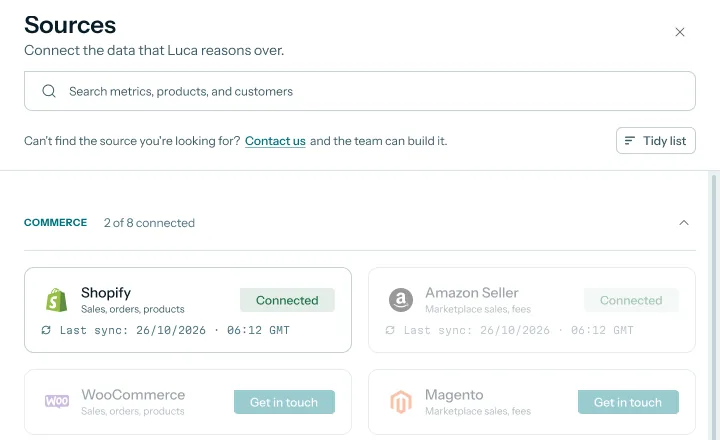
Shopify sits in the Commerce group of the Sources screen, next to Amazon Seller, WooCommerce and Magento. Before you connect, the card shows Connect. Afterwards it reads Connected, with the time of the last sync underneath.
 Illustrative example · demo brand
Once Shopify is connected, its card shows when the last overnight sync ran. The brand and figures are sample data for a demo brand.
What it is not
It is not an app that runs inside your store or edits it. Luca can't change prices or products, create discount codes, edit orders, issue refunds or change store settings. It is also not a replacement for Shopify's admin. You still run the store in Shopify; Luca reads it so you can analyse it.
Why a Shopify analytics tool matters
What it's for
A Shopify analytics tool answers the questions the store alone can't. Which products make money once refunds, fees and costs come off? Do customers from last spring come back? How much stock is left at each location?
How it helps
- Profit, not just sales. Refunds, payment fees and product costs come off revenue, down to each product and variant.
- The whole history. Cohorts and year-on-year comparisons use every order since the store opened, not a short window.
- Store data beside everything else. Ad spend and your ledger sit next to Shopify orders in the same answer.
- Stock you can plan with. Inventory by location turns into stock cover and stock-out risk.
What happens without it
Without one, the founder sees sales figures that look healthy while margin quietly leaks. A bestseller with heavy returns looks like a winner. Customers who never reorder look like growth, because each month's new orders hide them.
Why buyers care
Founders feel this when they outgrow the built-in reports, usually around the first serious hiring or stock decision. Finance leads feel it at month end, when store sales and the books disagree.
The Luca AI approach to Shopify analytics
Picture the founder of a Shopify eyewear brand that sells sunglasses and prescription frames. Sales have doubled in two years, and the built-in reports no longer answer her questions. She wants to know which frames make money after returns, whether last summer's customers came back, and how much stock sits in each warehouse.
The usual workaround is a weekend of exports. Orders come out of Shopify as a spreadsheet, costs come from a supplier sheet and refunds have to be matched by hand. It often takes days, and the answer may be stale by Monday.
What changed is that the questions now cross systems. Profit needs refunds, fees and product costs together. Retention needs years of customers, not one month. Stock needs every location at once, and no single Shopify report holds all three.
Luca AI connects to Shopify read-only and imports the store's full history in one step. It then reads ads, Amazon and the accounting ledger beside the store, refreshes everything overnight and checks its figures against Shopify every day. You ask in plain English, and Luca answers from all of it together.
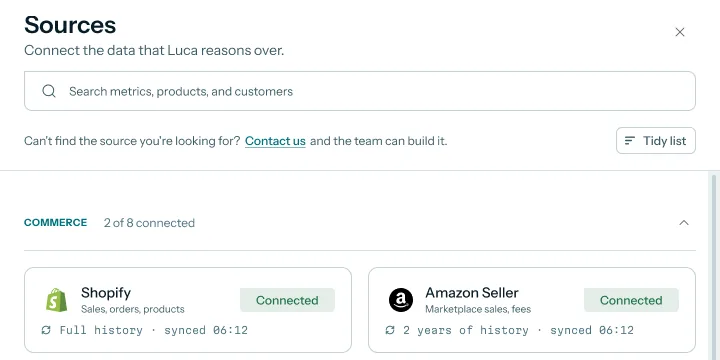
The amount of history is not hidden. After the import, the Shopify card on the Sources screen reads Full history with the last sync time. How that compares with other tools is covered in How Luca AI compares for Shopify analytics, below.
How Shopify data gets into an analytics tool
There are three common ways to get Shopify data somewhere you can analyse it. Each catches some questions and misses others.
Shopify's own reports
Shopify's analytics and reports let you review your store's recent activity and its transactions. They catch anything that lives inside the store, such as sales by product. They miss what lives elsewhere: ad spend, supplier costs, and the ledger your accountant closes each month.
Exports into a spreadsheet
You export orders, products and refunds as files and join them yourself. This catches anything you have time to build. It misses freshness, because each export is a snapshot, and it breaks when a column changes or a refund lands in a later month.
An app reading through Shopify's API
An app asks the store owner to approve a list of permissions it wants to accept, known as scopes. Some scopes only read, such as reading orders. Others write, such as modifying products. This route catches the full history and refreshes on its own, but you should read the permission list before you approve.
What this means for your store
Luca takes the third route with read-only access. It imports your full history, refreshes overnight and adds your other sources. Before the hand-off to Shopify, it shows you what it can read and what it can't do.
What Luca reads from your Shopify store
Luca reads the records you need for sales, profit, customers and stock. Here is what each group is used for.
| What Luca reads | What it's used for |
|---|---|
| Orders and line items | Gross and net sales, units and average order value |
| Refunds and returns | Refund rate, and refunds taken out of revenue and margin by product |
| Products, variants and collections | Gross profit by product and variant, and products bought together |
| Customers | New against returning customers, monthly cohorts and lifetime value |
| Inventory by location and transfers | Stock by location, stock cover and stock-out risk |
| Payments, payouts and fees | Payment fees reconciled to the cash Shopify pays out |
| Discounts, codes and gift cards | Discounts kept separate from gross sales |
Net revenue keeps gross sales, discounts, returns, shipping and tax as separate figures. That way you can see which one moved when revenue changes.
Try asking Luca:
"Which frames had the highest refund rate last quarter, and what did that do to their gross profit?"
What Luca never changes
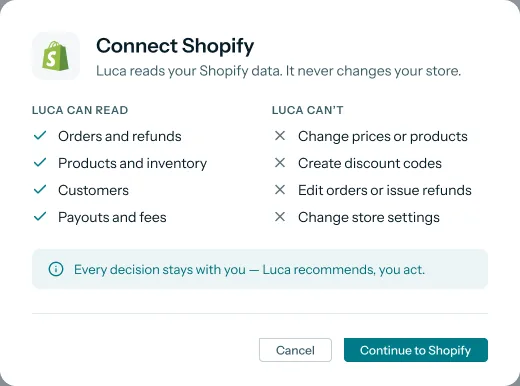
Every connection Luca makes is read-only. Luca never writes to a store, ad account, email platform or ledger. For Shopify, the Connect Shopify dialog spells this out before you approve anything.
 Illustrative example · demo brand
Read this dialog before you approve: it lists what comes in and what Luca can never touch. Shown for a demo brand with sample data.
The Luca can read list covers orders and refunds, products and inventory, customers, and payouts and fees. The Luca can't list covers changing prices or products, creating discount codes, editing orders or issuing refunds, and changing store settings. Every decision stays with you. The full picture across all sources is on the page about how Luca's read-only access works.
How much history comes in
Luca imports your full Shopify history. There is no cut-off at one or two years. That matters for anything that compares periods, such as year-on-year sales, cohorts that run out to three years and a forecast built from past seasons.
 Illustrative example · demo brand
The card tells you how much history arrived: all of it for Shopify, up to two years for Amazon. Sample data for a demo brand.
If you also sell on Amazon, the picture is different. Amazon Seller Central brings in up to two years of history, so comparisons across both channels go back two years at most. The page on connecting Amazon Seller Central covers that source.
After the first import, every source refreshes once a day, overnight. From the next overnight refresh, answers can combine Shopify with everything else you have connected.
What the Shopify data opens up
The store data on its own answers more than the built-in reports. With costs, ads and the ledger added, it answers the questions a founder actually asks.
Profit by product
Luca works out profit by product, variant and SKU. Returns and refunds come off revenue and margin down to product level. Costs, shipping, fees and overheads are applied using your own cost rules. Contribution margin then comes in layers, after product costs, fees and advertising. Profit then sits in the same daily view of the whole business as sales, ads and cash.
Customer cohorts and lifetime value
Customers are grouped by the month of their first order, with retention out to three years. You also get historical lifetime value by acquisition cohort, and repeat-purchase rate by cohort and by first product bought. For an eyewear brand, that shows whether sunglasses buyers return for frames. The customer retention analysis page walks through reading the cohort table.
Stock by location
Inventory comes in for each Shopify location, so you see stock by location rather than one total. Luca turns it into stock cover and stock-out risk, and sets reorder points per product. You choose the quantity and place the order yourself. The demand forecasting page explains how weekly product demand feeds that.
A revenue forecast
Your order history feeds a daily revenue forecast. The more seasons the history covers, the more the forecast has to learn from. The Shopify revenue forecast page covers how it is read and checked.
Ad spend beside store revenue
Ad spend from Meta and Google sits beside Shopify revenue. Luca compares spend and the results each platform reports with what the store actually took. The ROAS analysis page shows how to read spend against break-even ROAS.
"How did revenue from customers who first bought sunglasses last summer compare with those who first bought frames?"
How to check a Shopify import is complete
Before you trust any analysis, check that the store data arrived whole. Two measures matter most for a Shopify connection.
Order count and net sales tie-out
The first measure is order count for a set period, compared with Shopify. The second is net sales for the same period. If both match, the import is complete for that period.
Both have weak spots. A refund can fall in a later month than its order, so a month's net sales can differ depending on which date you use. Test orders and cancelled orders can also inflate a count if one side keeps them and the other doesn't. Compare like with like: the same dates, the same time zone and the same definition of net sales.
Where Luca shows the check
Luca runs daily data-quality checks that compare its data with Shopify to catch gaps and duplicates. These checks look at whether orders and revenue match Shopify before any number is rebuilt. You can still run the tie-out yourself in chat for any month you care about.
"How many orders and how much net sales did we have in March, and does that match Shopify?"
How to work out profit by product on Shopify
Profit by product is the analysis most founders want first, so here is the manual method and then the same job in Luca.
The manual method
- Export orders with line items for the period from Shopify.
- Export refunds for the same period, and match each to its product.
- Subtract discounts and refunds from gross sales to get net sales per product.
- Add each product's cost from your supplier sheet, multiplied by units sold.
- Add payment fees and shipping cost per product, split by order value or units.
- Subtract those variable costs from net sales to get contribution per product.
- Divide contribution by net sales to get contribution margin as a percentage.
The same job in Luca
Connect Shopify and agree your cost rules with Luca's team during onboarding. Luca then takes refunds off revenue by product, reconciles payment fees to payouts and applies your costs. Ask for contribution by product in chat, or read it on the profit dashboard Luca's team sets up with you.
A worked example: two eyewear lines with the same sales
This is an illustrative calculation with sample figures, not a Luca output. It follows the contribution margin formula: net sales minus variable costs, divided by net sales.
| Line (one quarter) | Sunglasses | Prescription frames |
|---|---|---|
| Gross sales | £60,000 | £60,000 |
| Discounts | £6,000 | £2,000 |
| Refunds | £4,000 | £14,000 |
| Net sales | £60,000 − £6,000 − £4,000 = £50,000 | £60,000 − £2,000 − £14,000 = £44,000 |
| Product cost | £15,000 | £15,000 |
| Payment fees | £1,500 | £1,300 |
| Shipping | £3,500 | £3,700 |
| Variable costs | £20,000 | £20,000 |
| Contribution | £50,000 − £20,000 = £30,000 | £44,000 − £20,000 = £24,000 |
| Contribution margin | £30,000 ÷ £50,000 = 60% | £24,000 ÷ £44,000 = 54.5% |
Both lines show the same gross sales in a sales report. Once refunds and costs come off, sunglasses leave six thousand pounds more. The frames' refunds are the gap, so that is where the founder looks first.
Connect your Shopify store
You need admin access to your Shopify store to approve the connection. No developer is needed.
- Sign up or sign in to Luca, and register your organisation.
- Open Sources and find the Commerce group.
- Click Connect on the Shopify card.
- Read the Connect Shopify dialog, then click Continue to Shopify.
- Approve read-only access in Shopify.
- Connect any other sources you use, such as ads and accounting.
The Shopify card then shows Connected with the time of the last sync. Within minutes of signing up, Luca reads your website and gives you a first insight, before your data has synced. During onboarding, Luca's team maps your data with you. The full first-day walkthrough is in setting up Luca.
How the Shopify connection works with the rest of Luca
Amazon Seller Central
If you sell on Amazon too, Amazon Seller Central connects self-serve, per region. Shopify and Amazon then sit in one P&L, with one view of each SKU's sales, fees and profit across both.
Meta and Google Ads
Google Ads connects self-serve, and Meta connects through guided partner access with Luca's team. Spend then sits beside store revenue, so you can read ROAS by channel against what Shopify recorded.
Xero and QuickBooks
Xero and QuickBooks Online both connect self-serve and read-only. Your ledger then sits in the same answer as your store data, which helps when store sales and the books disagree at month end.
Chat and dashboards
You ask questions about Shopify data in plain English, and the answer can draw on every connected source. Dashboards are built for each brand by Luca's team and refreshed every morning. For one set of KPI definitions across chat, dashboards and exports, see ecommerce KPI reporting.
Who uses the Shopify connection, and how
Founders and CEOs
A founder connects Shopify first, because it is the record of what sold. From there she asks which products make money and which customers come back. The morning view of the whole business builds on the same connection.
CFOs and finance leads
A finance lead uses the payouts and fees data to tie store sales to the cash that lands. With Xero or QuickBooks connected, the store and the books meet in one place.
Operations and inventory leads
An operations lead reads stock by Shopify location, stock cover and stock-out risk. Reorder points come from the same data, and the lead decides how much to order. The demand forecasting page covers the weekly view.
How Luca AI compares for Shopify analytics
Luca imports your full Shopify history read-only, then puts stock by location, monthly cohorts and your Xero or QuickBooks ledger beside it. Luca AI is the only platform in this table that does all four.
Shopify analytics features, from each platform's public documentation:
| Platform | Luca AI | Shopify reports | Triple Whale | Lifetimely by AMP | Daasity | Northbeam |
|---|---|---|---|---|---|---|
| Full order history on connect | Yes | Partly (inventory metrics from 1 October 2023) | Yes (historical order import) | Yes (all historical orders on first sync) | Yes (Load Historical Data step) | Yes (backfill historical orders) |
| Xero or QuickBooks beside store data | Yes | Not in docs | Not in docs | Partly (QuickBooks mappings) | Not in docs | Not in docs |
| Stock by Shopify location | Yes | Yes (active locations in inventory reports) | Not in docs | Not in docs | Partly (inventory by location type) | Not in docs |
| Monthly customer cohorts | Yes | Yes (cohort analysis fields) | Yes (Cohort Page by first-purchase period) | Yes (Lifetime Value cohorts) | Yes (tracks cohorts) | Not in docs |
Yes: documented and built in. Partly: documented with a limit, shown in brackets. Not in docs: not found in the vendor's public documentation.
Why Luca AI is the stronger choice for Shopify analytics
- Profit by product goes back as far as your store. Luca imports full history and works out profit by product, variant and SKU. Lifetimely's Products and Orders reports initially cover the previous 30 days through yesterday. See Luca AI and other Lifetimely alternatives.
- History is checked, not assumed. Luca imports full Shopify history and compares it with Shopify every day for gaps and duplicates. Triple Whale notes that when history isn't fully imported, some returning customers may appear as new. See Triple Whale alternatives.
- Stock by location comes straight from Shopify. Luca reads inventory for each Shopify location and turns it into stock cover. Daasity's omnichannel inventory docs say likely dimensions exist to break inventory by location type. See Luca AI and other Daasity alternatives.
Competitor details checked against each vendor's public documentation on 7 November 2026. Features and plans change, so confirm with the vendor before you decide.
Limits of the Shopify connection
- Read-only by design. Luca never changes prices, products, discount codes, orders, refunds or store settings. Any change you decide on, you make in Shopify.
- Overnight, not live. Shopify data refreshes once a day, overnight, so today's orders appear after the next refresh.
- Wholesale needs a custom source. Wholesale orders are not covered by the standard Shopify connection.
- Other store platforms are set up by Luca's team. WooCommerce and Magento stores show Get in touch rather than Connect.
- Spend beside revenue, not attribution. Ad spend and platform-reported results sit next to store revenue. Luca doesn't tie a given order to an ad.
Common questions
What does Luca read from my Shopify store?
Luca reads orders, line items, customers, products and variants, collections, inventory by location, transfers, refunds and returns, fulfilment, discounts and codes, gift cards, payments, payouts and fees. It also reads disputes, abandoned checkouts and selling plans.
Can Luca change anything in my Shopify store?
No. The connection is read-only. Luca can't change prices or products, create discount codes, edit orders, issue refunds or change store settings. The Connect Shopify dialog lists this before you approve.
How much Shopify history does Luca import?
Luca imports your full Shopify history. Once the import is done, the Shopify card on the Sources screen reads Full history with the time of the last sync.
How often does Shopify data refresh in Luca?
Shopify data refreshes once a day, overnight, like every other connected source. New orders from today show up after the next overnight refresh.
What access do I need to connect Shopify?
You need admin access to the Shopify store so that you can approve the connection. You start from Sources, click Connect on the Shopify card and approve read-only access in Shopify.
Do I need a developer to connect Shopify?
No. Shopify connects self-serve from the Sources screen. During onboarding, Luca's team maps your data with you, including the cost rules used for profit.
How soon do I see something useful after connecting?
At sign-up, Luca reads your website and gives you a first insight within minutes, before your Shopify data has synced. Analysis on your store data follows once the import is in.
Does Luca include Shopify payment fees?
Yes. Shopify-processed payment fees are included, and payment fees are reconciled to the payouts Shopify sends. That lets you tie store sales to the cash that actually lands.
Can I see stock for each Shopify location?
Yes. Luca reads inventory by Shopify location, so you see stock by location as well as in total. It turns that into stock cover, stock-out risk and reorder points per product.
How are refunds handled in profit figures?
Returns and refunds are taken out of revenue and margin, down to product level. Net revenue keeps gross sales, discounts, returns, shipping and tax as separate figures, so you can see which one moved.
How do I check that Luca's numbers match Shopify?
Luca runs daily data-quality checks that compare its data with Shopify to catch gaps and duplicates. You can also ask in chat for a month's order count and net sales, then compare them with Shopify for the same dates.
How does ad spend fit with my Shopify sales?
Ad spend from Meta and Google sits beside Shopify revenue. Luca compares spend and the results each ad platform reports with what the store took. It doesn't link a given order to a given ad.
Can I use Luca with Shopify and Amazon together?
Yes. Amazon Seller Central connects self-serve, per region, with up to two years of history. Shopify and Amazon then sit in one P&L, with each SKU's sales, fees and profit across both.
What if my store runs on WooCommerce or Magento?
WooCommerce and Magento stores are set up by Luca's team rather than connected self-serve. Their cards on the Sources screen show Get in touch instead of Connect.
Updated 7 November 2026: first published, with what Luca reads from Shopify, how much history comes in, what it never changes, how to check the import, the manual method for profit by product with a worked example, and fourteen questions.