
E-commerce cash-flow forecasting answers one question for a finance lead: how much cash will the brand have each week, and when is it lowest? A spreadsheet answers it once, and it is out of date the day after you build it. Luca AI reads your Xero or QuickBooks file beside your Shopify store and builds a 13-week and a 12-month cash forecast from them. It checks its forecasts against actuals every night, so the lowest week is visible before it arrives.
At a glance
| What you need to know | The short answer |
|---|---|
| What it forecasts | Your cash, week by week for 13 weeks and then 12 months ahead |
| What it reads | Xero or QuickBooks for bank transactions, invoices and bills, beside Shopify orders, refunds and payouts |
| How fresh it is | Every source refreshes overnight, and forecasts are checked against actuals every night |
| What it needs | A connected Xero or QuickBooks file, and forecasting switched on for your brand by Luca's team |
| What it never does | Post to your ledger, pay a supplier or change your store: Luca reads your books and never writes to them |
| Where you find it | Numbers, on the Cash tab, or by asking in chat |
What the cash flow forecast is
The cash flow forecast is Luca's view of the money your brand will hold in the weeks and months ahead. It covers free cash flow for brands with Xero or QuickBooks, next to the revenue forecast and the product demand forecast. The near term comes week by week for 13 weeks, and the longer view runs 12 months ahead.
It starts from your books rather than from a template. Xero connects by OAuth and brings in your P&L, balance sheet, bank transactions, invoices and bills. QuickBooks Online connects the same way, with full accounting detail. Shopify adds orders, refunds, payouts and fees, so the forecast sees when sales actually turn into cash.
What you see on the Cash tab
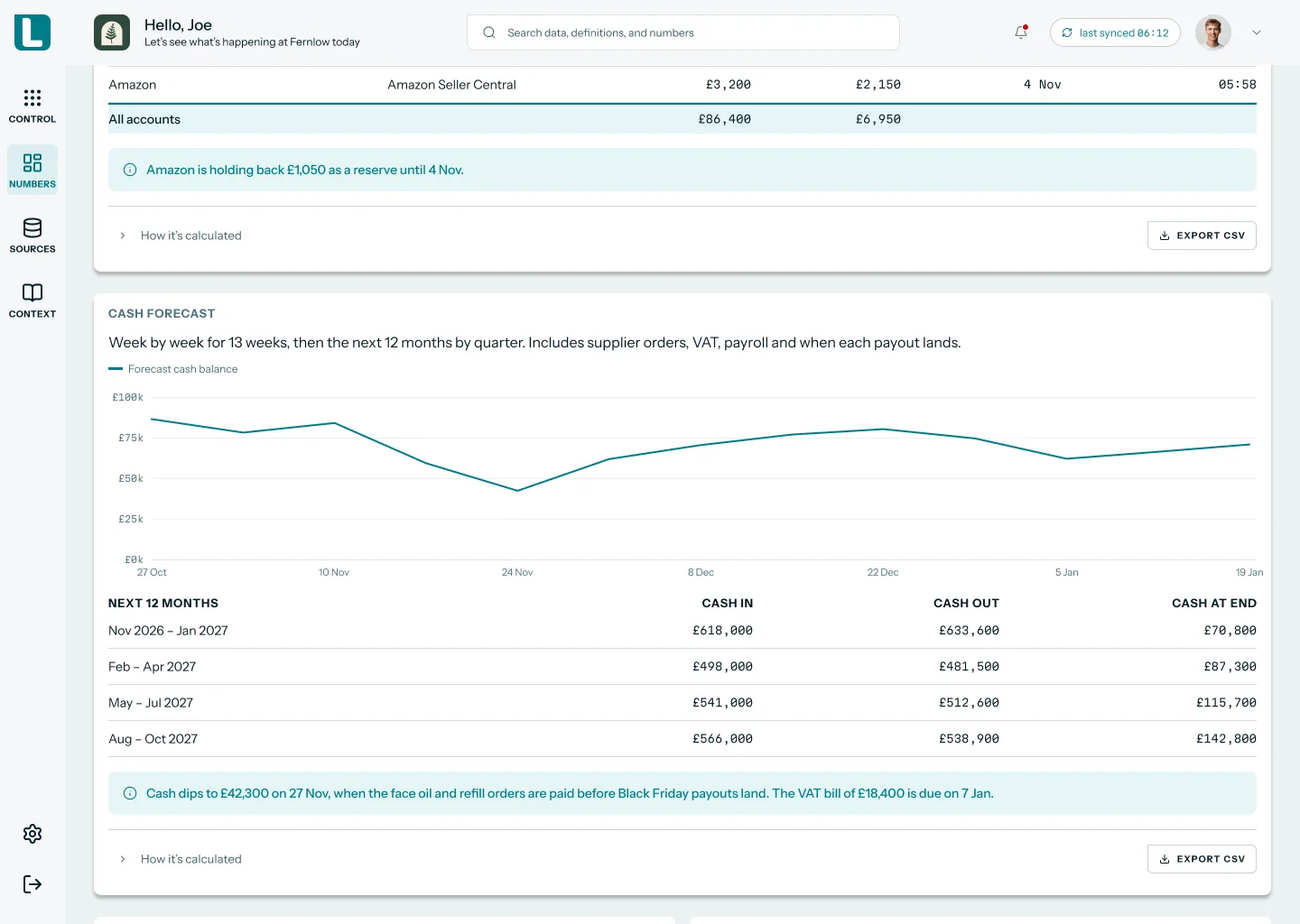
Open Numbers and go to the Cash tab. It shows the cash forecast, a Runway card and a Working capital card. The forecast chart traces your cash balance week by week, and a table below it gives cash in, cash out and cash at the end of each quarter for the next 12 months. Payouts that a marketplace is still holding back show up too, so you can see cash that has been earned but not yet received.
 Illustrative example · demo brand
The 13-week chart shows the lowest week at a glance, and the quarterly table carries the view out to 12 months. All figures are sample data for a demo brand.
What it is not
It is not a budget you type in, and it is not a bookkeeping tool. Luca never posts journals, pays bills or edits invoices in Xero or QuickBooks. It is also not a lender: it shows where a gap falls, and you decide what to do about it.
Why e-commerce cash-flow forecasting matters
What it's for
E-commerce cash-flow forecasting shows how much cash the brand will have in the coming months, built from the accounts and store sales. It tells you, before you commit to a big bill, whether cash stays above the level you need. For an ecommerce brand, cash moves on its own timetable. Payouts lag sales, stock is paid for weeks before it sells, and tax falls due on fixed dates. Most cash forecasting tools miss that timetable.
How it helps
- You see the lowest week, not just the month end. A weekly view catches a dip that a monthly total hides.
- Your forecast starts from the books. Bank transactions, invoices and bills come straight from Xero or QuickBooks.
- It stays current without a rebuild. Sources refresh overnight, and the forecast is checked against what actually happened.
- You can test a decision first. Ask in chat what happens to cash if a supplier bill moves.
What happens without it
A large stock buy and a tax payment can land in the same few weeks without anyone noticing. You find out when the bank balance drops below what payroll needs, and the options left are rushed and expensive.
Why buyers care
It matters most to the finance lead or founder who signs off supplier payments. It matters most in the quarters when a seasonal stock buy, a VAT payment and a slower sales month overlap.
The Luca AI approach to e-commerce cash-flow forecasting
Take the finance lead at a UK coffee brand that sells subscriptions and retail bags through Shopify and keeps its books in Xero. The roaster needs a large green-coffee buy this quarter, and the quarterly VAT payment falls in the same weeks. She has to tell the founder whether cash stays positive, and above the floor the board set, through both.
The usual answer is a spreadsheet. She exports bank transactions and open bills from Xero, pulls payouts from Shopify and builds a week-by-week grid by hand. That typically takes most of a day, and it is stale by the next morning, once new orders, refunds and bills have landed.
What has changed is that every input already sits in systems that can be read automatically. Payouts, bills and bank transactions all have a date, so a forecast can be rebuilt every night instead of every month.
Luca AI reads the Xero file and the Shopify store together and builds the 13-week and 12-month cash forecast for her. It refreshes overnight, checks its forecasts against actuals every night and answers what-if questions in chat from the brand's own data. She reads the lowest week instead of building the grid.
You can check one part of this on the page. Luca builds its cash forecast from Xero or QuickBooks read beside Shopify, and its access to the books is read-only. How that stacks up against other tools is covered in How Luca AI compares for e-commerce cash-flow forecasting, below.
How cash flow forecasts are built
There are a few standard ways to build a cash forecast. Each one catches some risks and misses others, so it helps to know which one you are reading.
The direct method: receipts and payments
The direct method lists the cash you expect in and out, item by item. Shopify's guide describes it as working from known income and expenses, and suited to short-term forecasting. It catches timing well: a supplier bill due in week six shows up in week six. It misses anything you have not written down yet, and it assumes customers and marketplaces pay on time.
The indirect method: from profit and the balance sheet
The indirect method starts from projected profit and adjusts it for changes in stock, debtors and creditors. The same guide says it uses projected balance sheets and projected income statements for longer-range forecasts. It catches the slow drift of a growing stock holding or longer supplier terms. It is weaker on exact dates, so a single large bill can blur into a monthly average.
A rolling 13-week view
A 13-week forecast is one quarter, laid out week by week, and it rolls forward as each week ends. It is built for the question "is there a week where we run short?" It catches a dip between two month ends. It does not show next year's seasonal peak or the stock you will need for it.
A rolling 12-month view
A 12-month view answers the planning question: does the year hold together? Shopify's guide recommends keeping a rolling 12-month cash flow forecast, because longer horizons add work and little insight. It catches seasonal swings and the run-up to a peak. Shown by quarter, it can hide a short dip inside the quarter.
Scheduled bills: tax and annual payments
Some outflows are known months ahead. VAT, annual insurance and software renewals are easy to forget in a weekly grid. Shopify's guide reminds you to put tax bills in your outflows alongside tax refunds in your inflows. Missing one makes every later week look healthier than it is.
What this means for your cash forecast in Luca
Luca gives you both horizons: 13 weeks week by week, and 12 months ahead. It reads the dated items, bank transactions, invoices and bills, from Xero or QuickBooks, and payouts and fees from Shopify. It is VAT and sales-tax aware. It checks its forecasts against actuals every night. Luca also shows the assumptions behind every forecast, so you can see what a figure rests on.
Read your cash forecast
Read the forecast in the same order each time. You are looking for one number first: the lowest balance in the next 13 weeks, and the week it falls in.
- Open Numbers and go to the Cash tab.
- Find the lowest point on the weekly chart and note its date.
- Compare that low point with the minimum cash your business needs.
- Read the 12-month table for the quarter-end balances.
- Check the payouts still held back by a marketplace, because that cash arrives later.
Check the lowest week first
The quarter-end figure is the one people quote, but the lowest week is the one that hurts. A quarter can end comfortably while week nine sits below your floor. If the lowest week is close to your minimum, look at what lands that week before anything else.
Plan a large stock buy
A big supplier bill is the most common reason a cash forecast dips. Before you agree the size and payment date of a stock buy, ask Luca in chat what happens to cash if that bill lands in a given week. Luca answers what-if questions from your brand's data. You choose the quantity, the supplier and the payment terms, and you place the order yourself.
For the coffee brand, that means asking whether cash stays above the floor if the green-coffee bill is paid in week six, then asking again with week ten. The answer that keeps the lowest week above the floor is the one to take to the supplier.
Plan around the VAT payment
Luca is VAT and sales-tax aware, so a VAT bill that is due appears in the forecast. In the demo brand's 12-month table, a note flags a VAT bill due in early January. Read the weeks either side of the VAT date together with any large supplier bill. Two outflows a few weeks apart can do more damage than either one alone.
Set your cash floor as business context
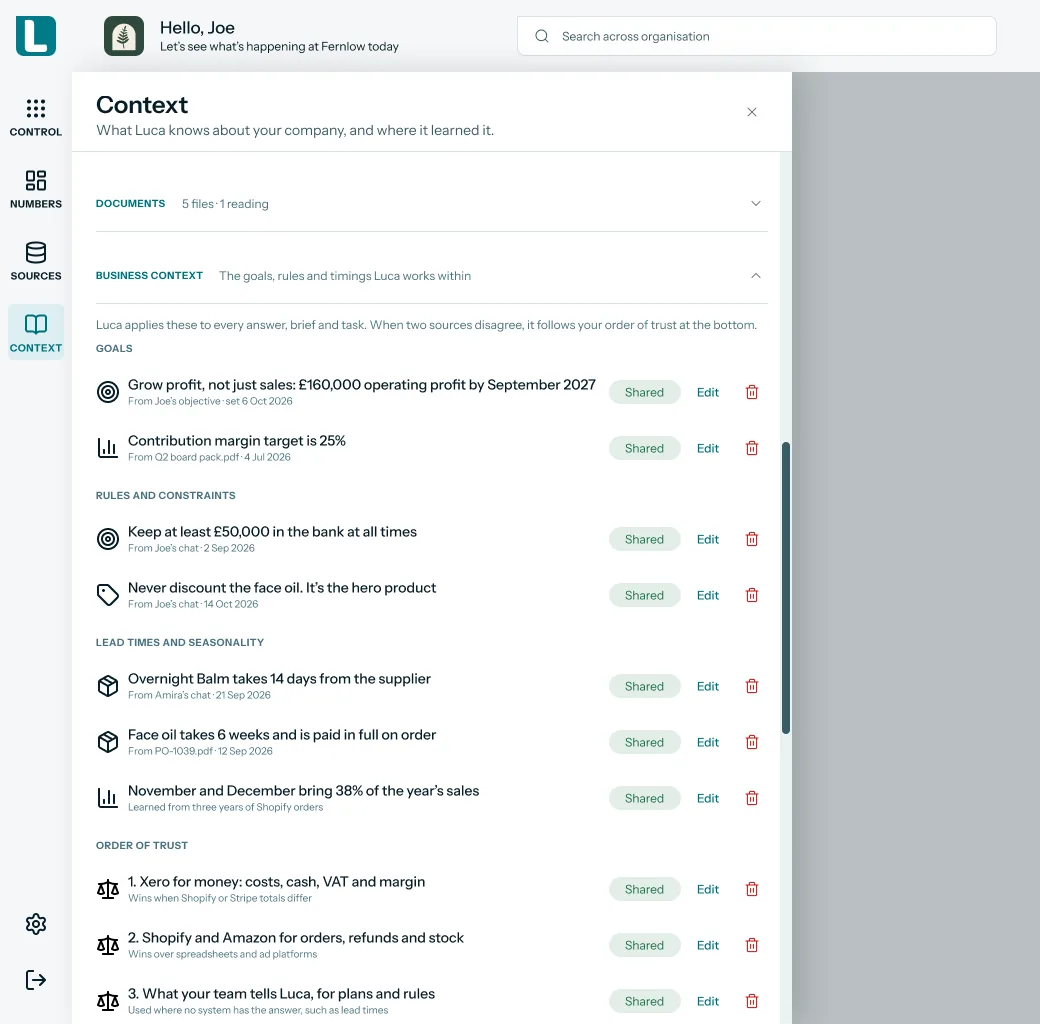
Tell Luca the rules you plan around, such as the minimum cash you keep in the bank. Luca holds goals, constraints, cost rules, lead times and seasonality as business context, following your own order of trust between sources. Supplier lead times are held as context too, which helps when you time a stock buy.
 Illustrative example · demo brand
A cash floor written as business context gives every cash answer the same line to measure against. The rules and figures shown are sample data for a demo brand.
Read runway and working capital beside the forecast
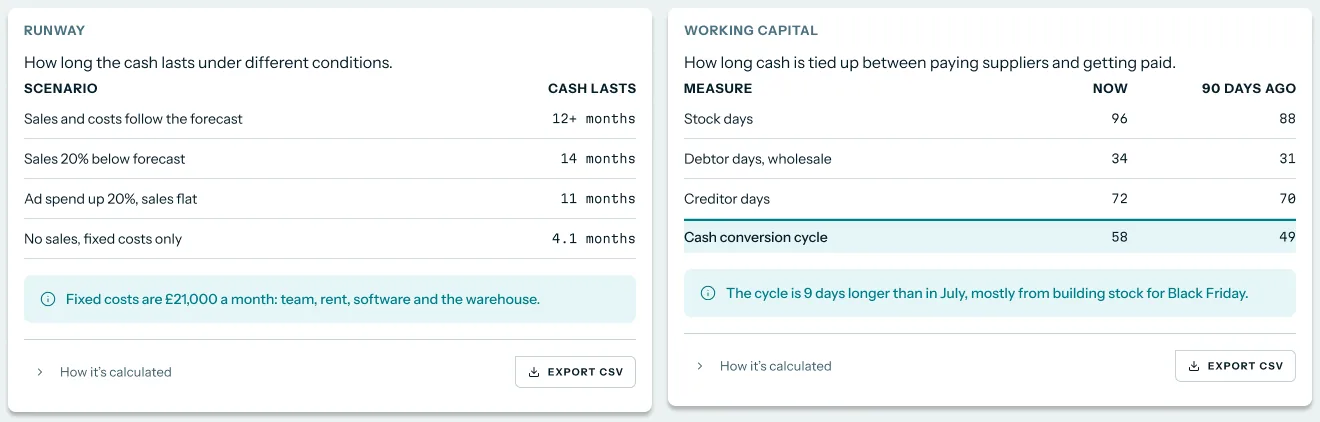
The Runway card shows how long cash lasts, worked out from the cash-flow forecast and your burn. The Working capital card shows debtor, creditor and inventory days, which together give the cash-conversion cycle. A long cycle explains why cash feels tight even in a profitable month: stock and unpaid invoices are holding it.
 Illustrative example · demo brand
Runway and the cash-conversion cycle sit under the forecast, so you can see how long cash lasts and what is tying it up. All figures are sample data for a demo brand.
Luca also warns you before you run out of cash or stock. For the stock side of that question, the ecommerce demand forecasting page covers unit demand and days of stock.
How cash forecast accuracy is measured
A cash forecast is only useful if it is close enough to act on. Two simple measures tell you most of what you need.
Average error on the closing balance
Compare each week's forecast closing balance with the actual balance once the week has passed. The average size of the miss, ignoring whether it was over or under, is the mean absolute error. The forecasting textbook Forecasting: Principles and Practice notes that MAE is popular because it is easy to understand and compute. Its weak spot is scale: a 5,000 pound miss matters far more to a small brand than to a large one, so read it against your cash floor.
Bias: always too high or too low
Bias is the average miss with its sign kept. If the forecast is usually above the actual balance, it is optimistic, and that is the dangerous direction for cash. The same textbook says that when errors have a mean other than zero, the forecasts are biased. A late-paying marketplace or a forgotten annual bill often shows up as steady optimism.
Forecast accuracy in Luca
Luca measures forecast accuracy against actuals every night and corrects its forecasts as new data lands. Because the books and the store refresh overnight, last night's actual balance is already in the comparison when you open the Cash tab. Keep your own weekly record of forecast against actual for the first few months.
How to forecast cash flow for an ecommerce brand
The manual method
- Pick the horizon: 13 weeks for timing decisions, 12 months for the plan.
- Take today's cash balance from your bank or your Xero file.
- List expected cash in by week: store payouts, marketplace payouts and any wholesale invoices due.
- List expected cash out by week: supplier bills, payroll, rent, software, ad spend and tax.
- Add the dated one-offs, such as a large stock buy and the VAT payment.
- Work out each week's closing balance as opening balance plus cash in minus cash out.
- Mark the lowest week and compare it with your minimum cash.
- Each week, replace the oldest week with actuals and add a new week at the end.
Steps three and four are where a manual forecast drifts. Payout timing changes, refunds land, and new bills arrive after the grid is built.
The same job in Luca
In Luca, steps two to four and step eight happen for you. Luca reads bank transactions, invoices and bills from Xero or QuickBooks and payouts from Shopify, and it refreshes every night. You open the Cash tab, find the lowest week and compare it with your floor. For steps five and seven, you ask in chat about the one-off you are planning and read the answer against the floor you set as business context.
A worked example: a green-coffee buy and a VAT payment in one quarter
This is an illustrative calculation with sample figures in pounds sterling, not a Luca output. A coffee brand starts the quarter with 80,000 pounds. In a normal week, 30,000 pounds comes in and 24,000 pounds goes out, a net gain of 6,000 pounds. A 60,000 pound green-coffee bill is due in week six, and a 35,000 pound VAT payment in week nine. The board's floor is 50,000 pounds.
| Week | Arithmetic | Closing cash |
|---|---|---|
| Start | Opening balance | £80,000 |
| Weeks 1 to 5 | £80,000 + (5 × £6,000) | £110,000 |
| Week 6 | £110,000 + £6,000 − £60,000 coffee bill | £56,000 |
| Weeks 7 and 8 | £56,000 + (2 × £6,000) | £68,000 |
| Week 9 | £68,000 + £6,000 − £35,000 VAT | £39,000 |
| Week 10 | £39,000 + £6,000 | £45,000 |
| Weeks 11 to 13 | £45,000 + (3 × £6,000) | £63,000 |
Cash never goes negative, and the quarter ends at 63,000 pounds, above the floor. But weeks nine and ten sit 11,000 and 5,000 pounds below it. A monthly forecast would have shown a healthy quarter. The weekly view shows that the brand needs a smaller first coffee buy, better supplier terms or a later payment date before it commits.
Get forecasting switched on
Forecasting is switched on per client by Luca's team, and the cash forecast needs Xero or QuickBooks. To get it running:
- Connect Shopify if you haven't already, following the steps to set up Luca for your store.
- Open Sources, find Xero or QuickBooks under Finance and click Connect.
- For Xero, read the Connect Xero dialog, click Continue to Xero and approve access on Xero's consent screen.
- Ask your Luca contact to switch on forecasting for your brand.
- After the next overnight refresh, open Numbers and the Cash tab.
The Xero dialog is headed "Luca reads your books. It never writes to them." The read-only access page explains what that means for your ledger.
How the cash flow forecast works with the rest of Luca
Shopify
Shopify connects by one-click OAuth and brings in orders, refunds, payouts and fees, along with its full history. Luca matches orders to Shopify or Stripe payouts and to the ledger, so revenue, cash and the books agree.
Xero and QuickBooks
Your accounting file is where the cash forecast starts. Xero brings in the P&L, balance sheet, bank transactions, invoices and bills, and QuickBooks Online brings full accounting detail. Luca does not connect to bank feeds or Open Banking directly, so your bank transactions arrive through the accounting file. The guide to ecommerce data integration explains why one joined-up data set matters. Connecting Xero beside your store and ad accounts also lets chat answers combine the books with sales.
Amazon and Stripe
If you sell on Amazon or take payments through Stripe, Luca shows cash across banks and payment processors, traced from sale to cash. Payment-processor and marketplace fees are reconciled to payouts. The demo shows an Amazon reserve being held back until a set date, which is cash your forecast should not count on yet.
Recharge
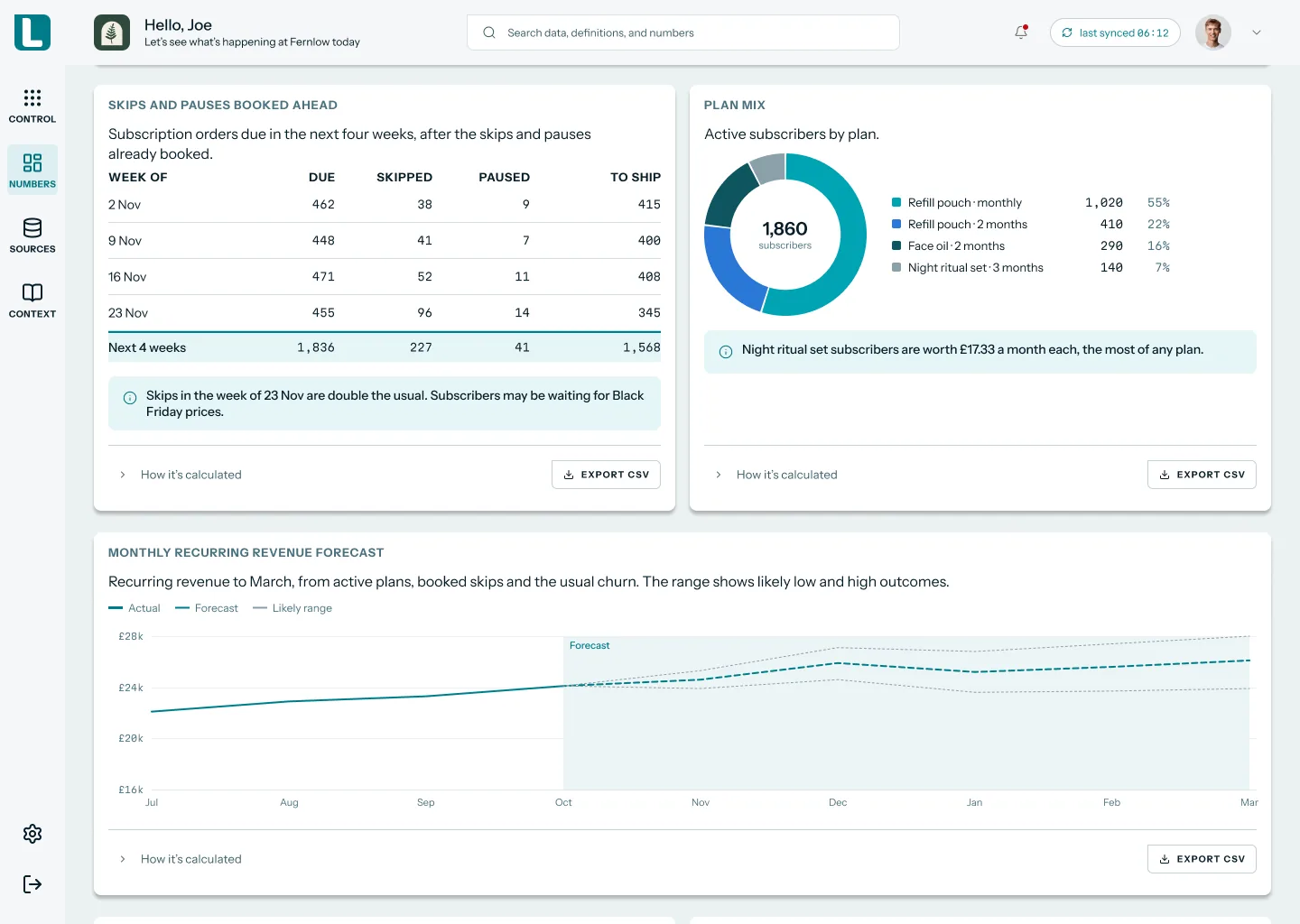
For a subscription brand, Recharge brings in subscriptions, charges, skips, cancellations and renewals, and the Luca team sets it up for you. Luca also builds an MRR and subscription revenue forecast on the Subscriptions tab, which helps you judge renewal income in the weeks ahead. The customer retention analysis page covers which subscribers stay.
 Illustrative example · demo brand
Skips and pauses booked ahead show how many subscription orders will really ship, which matters when renewals are a large part of cash in. All figures are sample data for a demo brand.
Revenue forecast
The Shopify revenue forecast looks at daily revenue up to a year ahead, allowing for seasonality. Read it before a peak season, then check the cash forecast to see whether the stock you need for that peak can be paid for in time.
Chat
You can ask about cash in plain English, such as "what happens to cash if the coffee bill moves to week ten?" Chat answers come from your brand's data, and the AI agent for ecommerce page shows what else you can ask.
Who uses the cash flow forecast, and how
CFOs and finance leads
A finance lead reads the lowest week every Monday and signs off large supplier bills against it. She uses the 12-month table for the board pack, and the KPI reporting page shows how those figures go into a shared report.
Founders and CEOs
A founder wants one answer: can we afford this? She asks in chat before agreeing a stock buy or a new hire, and reads the runway card for the longer view. The whole-business view puts cash beside sales and ads each morning.
Operations and inventory leads
An operations lead times stock buys around the cash forecast. He agrees the quantity with the supplier, then checks that the bill lands in a week where cash stays above the floor.
Subscription DTC brands
A subscription brand watches renewals, skips and pauses beside the cash forecast. When skips double in a given week, the cash in for that week will be lower than the run rate suggests.
How Luca AI compares for e-commerce cash-flow forecasting
Luca builds a 13-week and a 12-month cash forecast from your accounting file read beside your store, and checks it every night. The analytics tools Shopify brands often compare it with focus on revenue, profit and marketing, and their public documentation does not describe a cash forecast.
E-commerce cash-flow forecasting features, from each platform's public documentation:
| Platform | Luca AI | Daasity | Lifetimely | Saras Analytics | Shopify Sidekick | Triple Whale |
|---|---|---|---|---|---|---|
| 13-week and 12-month cash forecast | Yes | Not in docs | Not in docs | Not in docs | Partly (forecasts on request by code) | Not in docs |
| Xero or QuickBooks read beside Shopify | Yes | Not in docs | Partly (QuickBooks for expenses) | Yes (Xero connector) | Not in docs | Not in docs |
| Checked against actuals every night | Yes | Partly (plan vs actual, for revenue) | Not in docs | Not in docs | Not in docs | Not in docs |
| Warns before cash runs short | Yes | Not in docs | Not in docs | Not in docs | Not in docs | Not in docs |
Yes: documented and built in. Partly: documented with a limit, shown in brackets. Not in docs: not found in the vendor's public documentation.
Why Luca AI is the stronger choice for e-commerce cash-flow forecasting
- A cash forecast, not a revenue plan. Luca forecasts cash 13 weeks and 12 months ahead. Daasity documents a comparison of daily performance against your projections, which you enter yourself. See Daasity alternatives.
- The books are the starting point. Luca reads bank transactions, invoices and bills from Xero or QuickBooks. Lifetimely documents QuickBooks Online for syncing expenses into its profit view. See Lifetimely alternatives.
- Tax inside the forecast. Luca is VAT and sales-tax aware, so a VAT bill appears in the weeks it is due. Triple Whale suggests using tax collection data to manage cash flow. See Triple Whale alternatives.
Competitor details checked against each vendor's public documentation on 7 November 2026. Features and plans change, so confirm with the vendor before you decide.
Limits of the cash flow forecast
- It needs Xero or QuickBooks. Without an accounting connection, the free-cash-flow forecast is not available.
- It is switched on per client. Luca's team switches forecasting on for your brand, as part of setting up Luca.
- It is as fresh as last night. Sources refresh once a day, overnight, so a bill entered this morning appears after the next refresh.
- Bank balances come through your books. Luca does not connect to banks or Open Banking directly, so keep your Xero or QuickBooks bank feeds up to date.
- It reads, it doesn't act. Luca never pays a bill, posts to the ledger or places an order. You decide the size and timing of every stock buy.
Common questions
What is cash flow forecasting software?
Cash flow forecasting software estimates how much cash a business will hold in the weeks and months ahead. Luca builds that forecast for ecommerce brands from Xero or QuickBooks read beside Shopify, and refreshes it overnight.
Does Luca need Xero or QuickBooks for the cash forecast?
Yes. The free-cash-flow forecast needs a connected Xero or QuickBooks file. Without one, Luca can still forecast revenue and product demand, but not cash.
How far ahead does the cash forecast look?
It gives a 13-week view week by week, then a 12-month view. The 13 weeks are for timing decisions such as a supplier bill. The 12 months are for the yearly plan.
Why look at 13 weeks as well as 12 months?
A quarterly or monthly total can hide a short dip. The 13-week view shows each week's balance, so you can see a week below your minimum even when the quarter ends well.
Does the cash forecast include VAT?
Luca is VAT and sales-tax aware, so a VAT bill that is due appears in the forecast. Read the weeks around the VAT date together with any large supplier bill.
Can Luca change anything in my Xero file?
No. Luca reads your books and never writes to them. It does not post journals, pay bills or edit invoices in Xero or QuickBooks. The read-only design covers your store and ad accounts too.
How often is the cash forecast updated?
Every connected source refreshes once a day, overnight. Forecasts are then checked against actuals every night, so each morning's view includes yesterday's cash movements.
How is the accuracy of the cash forecast checked?
Luca measures forecast accuracy against actuals every night and corrects its forecasts. Keep your own weekly record of forecast against actual balance to see how close it runs for your brand.
Can I test what happens if a supplier bill moves?
Yes. Ask in chat, for example "what happens to cash if the stock bill is paid two weeks later?" Luca answers what-if questions from your brand's own data.
Does Luca place stock orders or pay suppliers?
No. Luca shows how a stock buy affects cash. You choose the quantity, agree terms with the supplier and place the order yourself.
Does the forecast show marketplace payouts that are held back?
Yes. Luca shows cash across banks and payment processors, traced from sale to cash. A payout that Amazon is holding back as a reserve shows up as cash not yet received.
Is Luca a lender, or can it fund a cash gap?
No. Luca is an analytics tool, not a lender. It shows when and by how much cash falls short, and you decide how to cover it.
How do I get the cash forecast switched on?
Connect Xero or QuickBooks under Sources, then ask your Luca contact to switch on forecasting. Luca's team switches it on per client, and the forecast appears on the Cash tab.
What is the difference between the cash forecast and runway?
The cash forecast shows your balance week by week and month by month. Runway turns that forecast and your burn into one figure: how long the cash lasts.
Updated 7 November 2026: first published with the methods explainer, accuracy guide, manual method and worked example.