
AI data analysis for e-commerce should let you ask a question about your store, ads and books, and get a figure you can check before you act on it. Most Shopify founders still get there by exporting from each tool and rebuilding a spreadsheet. Luca AI is an AI analyst for e-commerce brands: you ask in plain English, and Luca answers from your connected Shopify, Amazon, Meta, Google, GA4 and Xero data. Each figure links to the table it came from, so you check the working yourself, then chart, download or share the answer.
At a glance
| The job | Answer store, ad and finance questions without rebuilding a spreadsheet, with figures you can trace |
|---|---|
| How you ask | In plain English in the chat box, typed or by voice, with follow-ups in the same thread |
| Sources in one answer | Shopify, Amazon Seller Central, Amazon Ads, Meta, Google Ads, GA4, Search Console, Xero, QuickBooks and Stripe |
| What an answer contains | A title, KPI tiles, short What changed bullets, a chart where useful, next steps and a source line |
| How you check it | Each figure links to the table it came from; chat shows its reasoning steps and sources; dashboards show the exact query behind each figure |
| Your definitions | KPIs are calculated by Luca from your own metric definitions and cost rules, so chat and dashboards give the same number |
| Freshness | Every source refreshes once a day, overnight, so answers run to yesterday |
| Charts and exports | Ask for a chart; download the data as CSV or Excel, and the answer as Word, PDF or PowerPoint |
| Question limit | None on any plan, and no AI credits |
| What it changes | Nothing. Luca reads every connected system and writes to none of them |
Where AI data analysis for e-commerce fits
What it's for
AI data analysis for e-commerce is for the questions you ask every week and currently answer by hand. You want to ask them directly, across store, ad and finance data, and trust the figure enough to act on it.
How it helps
- One question, every source: a single answer can combine ad spend, store orders and the accounting ledger.
- Figures you can trace: each figure links to the table behind it, so a doubtful number takes a minute to check.
- Your own definitions: Luca calculates KPIs with your metric definitions and cost rules, not a generic formula.
- No rebuild: sources refresh overnight, so Monday's question runs on Sunday's data without an export.
What happens without it
Every answer waits for someone to pull the data together. Questions that need two or three sources get asked less often, or not at all. Decisions on spend, stock and cash are made on last week's view, and nobody can say quickly where a number came from.
Why buyers care
Founders of Shopify and Amazon brands care most, because they are usually the person rebuilding the sheet. Finance leads care at month end, and growth leads care whenever a platform's figures disagree with the store's. Luca's article on what an AI data analyst for e-commerce can replace covers the wider case.
The Luca AI approach to AI data analysis for e-commerce
Picture the founder of a supplements brand selling on Shopify and Amazon. Every Monday morning she exports last week's Shopify sales, Meta spend and the Xero figures, pastes them into the same spreadsheet and rebuilds her formulas. By the time the sheet balances, the first decision of the week is already late, and a new question means starting the exports again.
The usual workarounds help a little. Some founders keep one master sheet, others paste an export into a general chatbot. Both tend to run on a snapshot that is out of date by Tuesday. When a figure looks wrong, it can be hard to tell whether the data, the formula or the date range is at fault.
The questions themselves rarely change. The data already lives in the store, the ad accounts and the books. What the founder needs is the answer to the question as she would ask it. She also needs a quick way to see how each figure was built.
Luca brings every connected source into one private warehouse for the brand, refreshed overnight. She types her question in plain English, and Luca answers with figures, a chart where useful and next steps. Luca calculates the KPIs itself, using her own cost rules and metric definitions, and keeps the thread for her follow-ups.
Open any answer and each figure links to the data table it came from, while the source line names the systems behind it. How Luca compares on this is covered in How Luca AI compares for AI data analysis for e-commerce, below.
What AI data analytics in Luca looks like
The chat is where you ask. In the images the input reads Ask Luca about your business, and you type or speak the question as you would ask a colleague. Luca can only answer from the sources you have connected, so the first job is connecting them.
What you see in a chat answer
An answer has a title, KPI tiles, short What changed bullets and a source line, such as "Built from Shopify, Amazon, Recharge, Klaviyo and Meta Ads · as at 27 Oct". Each figure links to the table it came from. The way one question pulls from several systems is set out in answering across Shopify, ads and Xero at once.
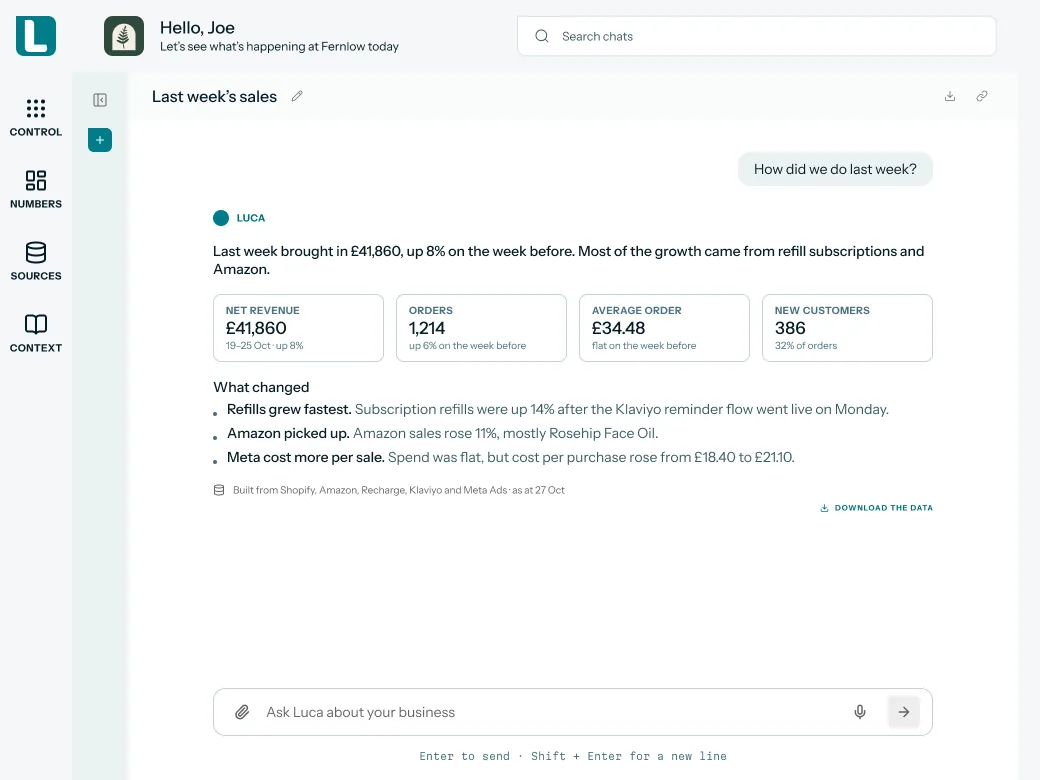 Illustrative example · demo brand
A plain-English question answered with figures and a source line, which is the starting point for checking each number. The figures are sample data for a demo brand.
One warehouse behind every answer
Every source lands in one private warehouse for the brand. There it is modelled into consistent tables, cleaned, matched and checked. Chat and dashboards both draw on that same warehouse, which is why one reply can combine ad spend, store orders and the ledger.
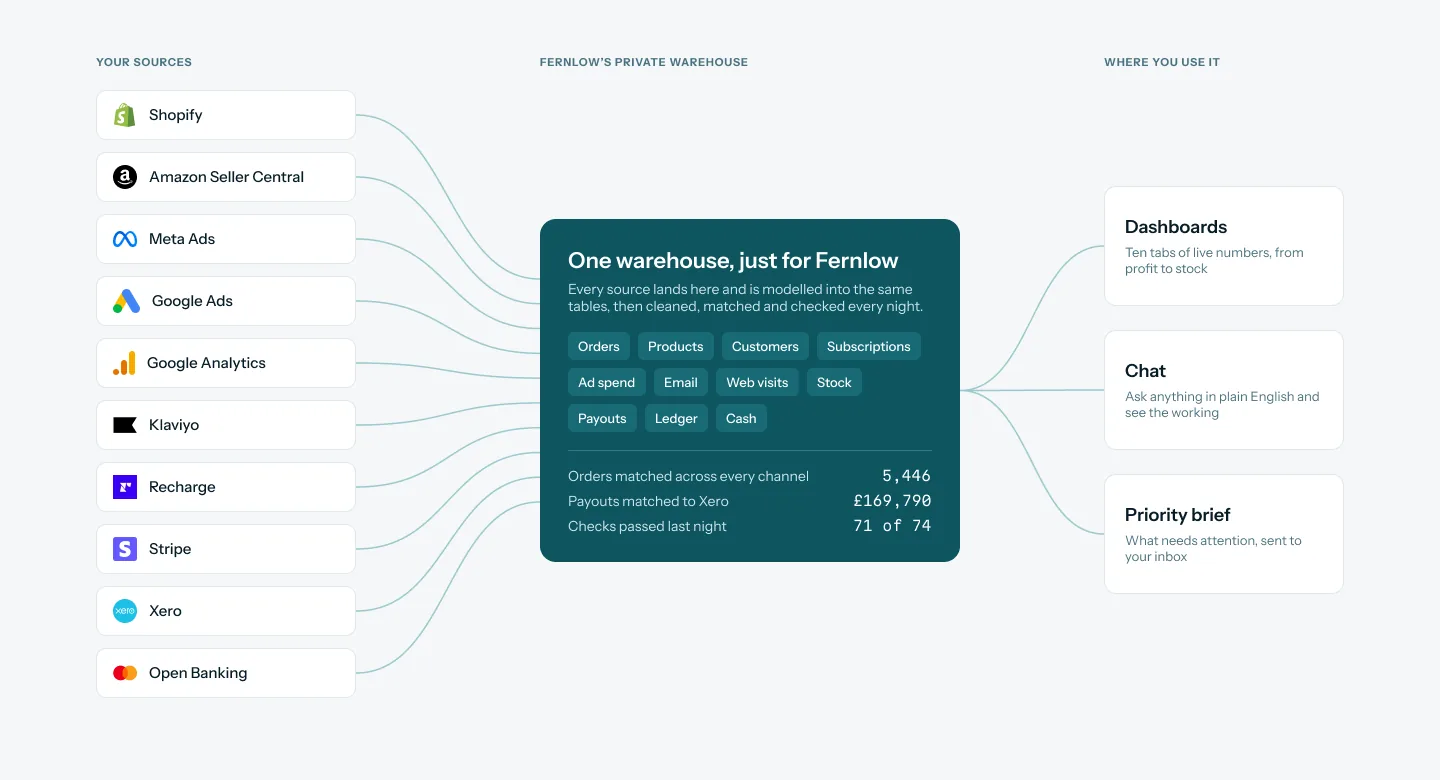 Illustrative example · demo brand
Every source feeds one warehouse per brand, so a single question can reach store, ad and accounting data together. The counts shown are sample data for a demo brand.
How ecommerce data analysis gets done
There are five common ways to answer a question about your store's numbers. Each one catches some problems and misses others, and knowing which helps you judge any answer you get.
Spreadsheet exports
You export from each tool and join the files yourself. You control every formula, which is why so many founders start here. What it misses is consistency: one changed column or date range breaks last week's comparison. Shopify's guide on MER advises using the same revenue and spend definitions each time, which is hard when the sheet is rebuilt by hand.
Each platform's own reports
Shopify, Amazon, Meta and Google each report on their own data, quickly and in detail. What they miss is the overlap. Google Ads, for example, doesn't deduplicate conversions from campaigns on other platforms, so the platforms' sales claims can add up to more than the store recorded.
A general chatbot with a CSV
Pasting an export into a general chatbot gets you plain-English answers on that file. It misses everything outside the file, and the file is a snapshot you rebuild each time. The chatbot also works from its own idea of your metrics, not your cost rules. Luca's article on why general chatbots struggle with store data goes into the detail.
A data warehouse with BI and SQL
A warehouse joins every source, and a BI tool turns it into dashboards. This catches the cross-source questions the other methods miss. It needs someone to model the data, write SQL and build each view, so new questions wait in a queue. Luca's round-up of no-code analytics platforms for ecommerce compares the lighter options.
An AI analyst on connected data
An AI analyst sits on a modelled warehouse and answers questions directly. It catches cross-source questions without a queue. It only works if the data is modelled well and you can see how each figure was built. Without that, a fluent answer is still just a claim. How this differs from a broader agent is covered on what an AI agent does for an ecommerce store.
What Luca is confirmed to do
Luca works the fifth way. It models every source into one warehouse per brand, calculates KPIs itself and governs metric definitions in one place. It answers from connected sources only, asks a clarifying question when a question is ambiguous, and links each figure to its table. It says when it doesn't have the data to answer, rather than guessing.
Ask, follow up, chart and export
This is the everyday workflow, from the first question to the file you send to someone else.
Ask the question
Open the chat and type the question in plain English, for example "How did we do last week?". To speak instead, use voice input: Luca transcribes your question into the chat box, and the audio is not stored. While Luca works, it gets your data and, where the question needs it, searches the web for benchmarks or market news.
Follow up and narrow it
Ask a follow-up and Luca keeps the thread of the conversation. You can narrow by channel, product or date without repeating yourself. If your question is ambiguous, Luca asks you a question back. Answer it rather than rephrasing, so the thread keeps your intent.
Add a file the sources don't hold
Some answers need data that no connected source holds, such as a supplier's new price list. Upload a PDF, spreadsheet, CSV or document straight into the chat, and Luca answers from it alongside your store data.
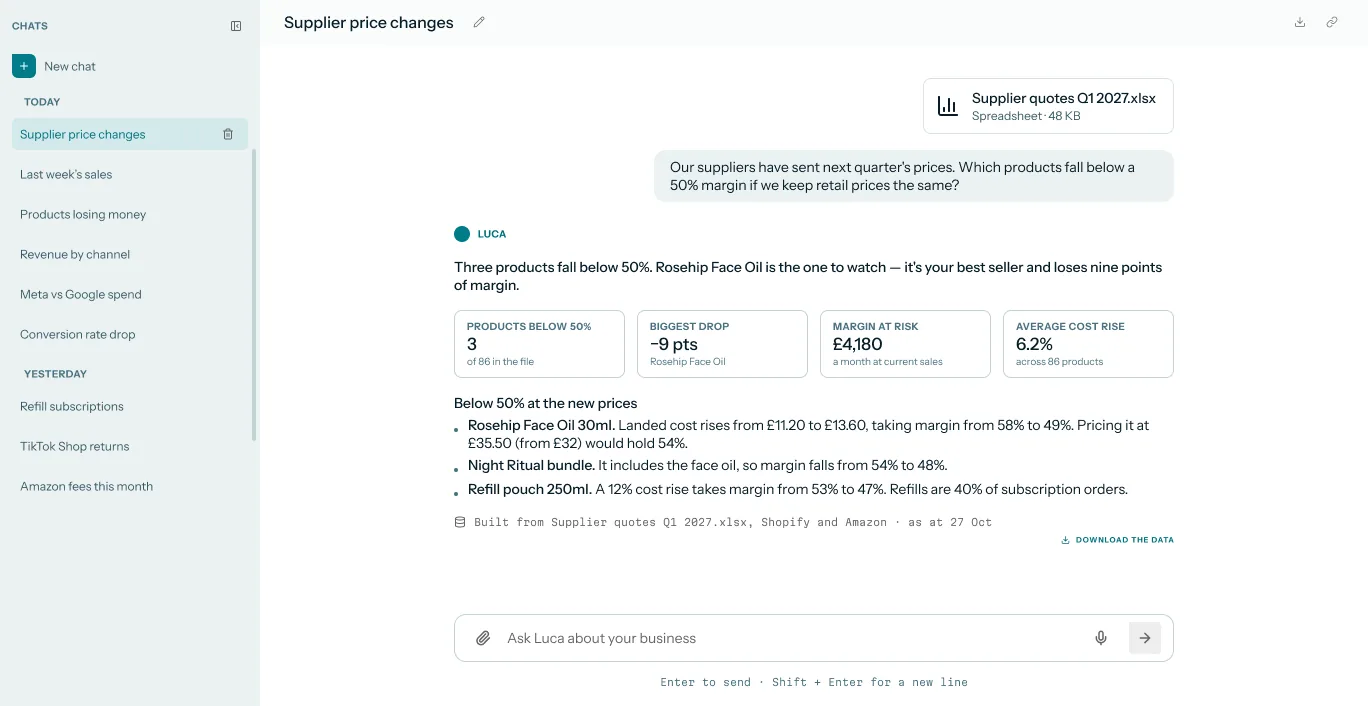 Illustrative example · demo brand
An attached spreadsheet read alongside Shopify and Amazon, so a one-off file joins the same answer as your connected data. The figures are sample data for a demo brand.
Chart and export the answer
Ask for a chart and Luca draws it from your data. Under the answer, click Download the data to take the figures out. Data downloads as CSV or Excel, and answers as Word, PDF or PowerPoint, so the Monday table can still land in your own sheet.
Share it with your team
Click Share, turn on Private link and click Copy link. The recipient sees a frozen copy of the conversation. Share links are private, revocable and not indexed by search engines; you switch a link off under Numbers, then Sharing.
How to check a figure in an AI answer
An AI answer is only as useful as your confidence in its figures, and you are the one who checks them. Two simple measures tell you whether a figure is safe to act on.
Two measures worth tracking
The first is the reconciliation gap: the difference between the answer's figure and the source platform's own total for the same dates. A small, explained gap is normal. A large one means the dates, the filters or the definition differ.
The second is definition match: whether the figure means what you think. Revenue can be gross or net of refunds, and with or without shipping and tax. Shopify's own BFCM figures, for example, are stated net of refunds and inclusive of shipping, duty and VAT. Your ledger may also count income on an accrual basis, which records income when it's earned, not when the payout arrives.
Both measures have weak spots. A Shopify total and a Xero total can differ for good reasons, such as timing and refunds after the date. Ad platforms each report their own conversions, so their totals rarely match the store. A gap is a prompt to look, not proof of an error.
Where Luca shows what to check
Every answer shows its working. Chat shows its reasoning steps and sources, each figure links to its table, and the source line gives the systems and the "as at" date. On a dashboard, each figure shows the exact query behind it.
The Definitions tab on Numbers explains how every number is worked out, and Data health shows sync status, freshness and data-quality checks. Luca's daily data-quality audits catch gaps, duplicates and stale tables. That is about the data, so you still check the figure. The single set of KPI definitions is what keeps chat, dashboards and exports in line.
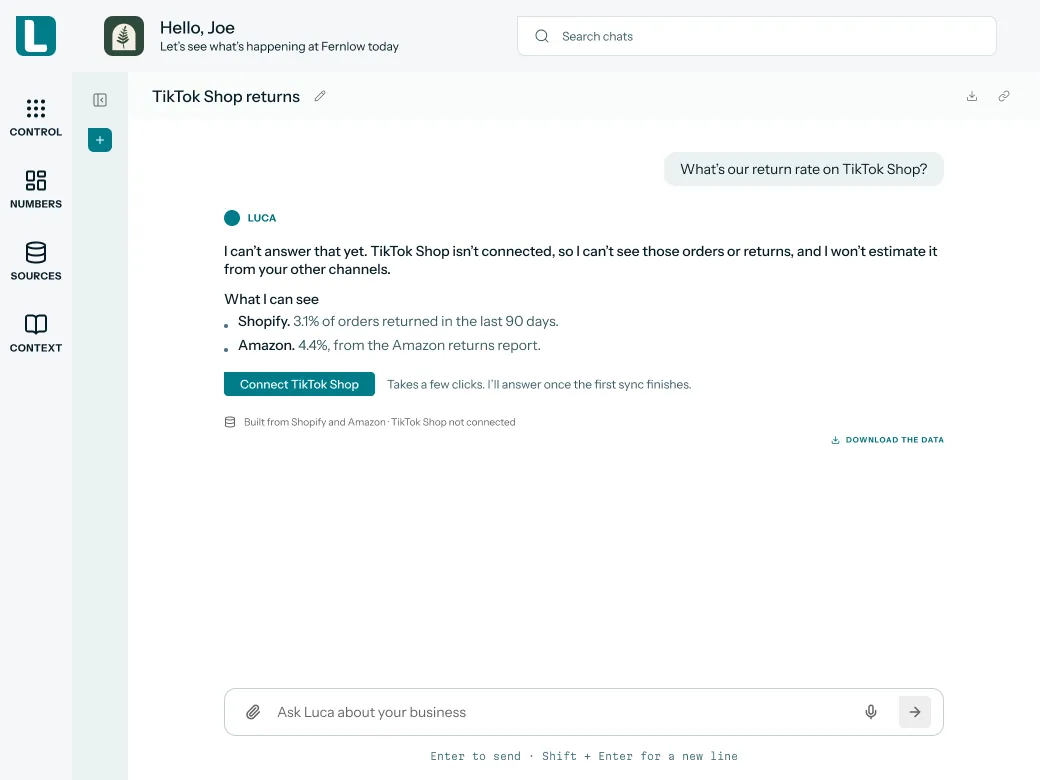 Illustrative example · demo brand
When a source is missing, Luca says so and shows what it can see, so you know the answer's limits before acting. The figures are sample data for a demo brand.
How to answer a weekly trading question
Take the founder's Monday question: what did the business make last week after product costs, fees and ads, with Shopify and Amazon together?
The manual method
- Export last week's sales from Shopify, using the same date range as last Monday.
- Download Amazon orders, and note whether the figure is order value or settlement after fees.
- Export Meta spend, and Amazon Ads spend, for the same dates.
- Pull product costs, shipping and fees from Xero or your cost sheet.
- Paste everything into the sheet and line up dates, currencies and refunds.
- Work out contribution after ads and MER, then check each total against the platform's own report.
- Repeat the whole process next Monday, and for every new question.
The same job in Luca
Ask "What was our contribution after ads last week, Shopify and Amazon together?". Luca answers from the overnight data with your own cost rules. Open the table behind each figure, check which Amazon figure and which costs it used, and then download the data or share the link.
A worked example: Monday contribution after ads
This is an illustrative calculation with sample figures, not a Luca output. It uses Shopify's contribution margin formula: net sales less variable costs, divided by net sales. MER is total revenue divided by total marketing spend.
| Line | Where it comes from | Arithmetic | Amount |
|---|---|---|---|
| Shopify net sales | Shopify export | £28,000 | |
| Amazon sales (order value) | Amazon Seller Central | £12,000 | |
| Net sales | Both stores | £28,000 + £12,000 | £40,000 |
| Product costs | Xero or cost sheet | £12,000 | |
| Shipping and fulfilment | Xero | £4,000 | |
| Payment and marketplace fees | Shopify payouts and Amazon fees | £1,000 + £2,000 | £3,000 |
| Ad spend | Meta and Amazon Ads | £6,000 + £2,000 | £8,000 |
| Contribution after ads | £40,000 less £12,000, £4,000, £3,000 and £8,000 | £13,000 | |
| Contribution margin after ads | £13,000 ÷ £40,000 | 32.5% | |
| MER | £40,000 ÷ £8,000 | 5.0 |
Now suppose the Amazon figure pasted in is the settlement after Amazon's fees, and the fees are then taken off a second time:
| Line | Arithmetic | Amount |
|---|---|---|
| Amazon sales (settlement after fees) | £12,000 less £2,000 | £10,000 |
| Net sales | £28,000 + £10,000 | £38,000 |
| Contribution after ads | £38,000 less £12,000, £4,000, £3,000 and £8,000 | £11,000 |
| Contribution margin after ads | £11,000 ÷ £38,000 | 28.9% |
One definition takes 3.6 points off the margin, and nothing in the sheet flags it. That is what opening the table behind a figure catches: you see which Amazon figure the answer used.
Set up AI data analytics in Luca
You can set up Luca without a developer. Connect the sources your weekly questions use, in this order.
- Connect Shopify. Click Connect and approve read-only access on Shopify's consent screen. You need admin access, and Luca imports your full Shopify history.
- Connect Amazon. Amazon Seller Central connects self-serve per region and brings in up to two years of history. Amazon Ads connects self-serve too.
- Connect Google. Google Ads, GA4 and Search Console connect self-serve.
- Connect Meta. Meta connects through guided partner access with the Luca team.
- Connect your books. Xero or QuickBooks Online connects self-serve, and Stripe too if you take payments through it.
- Ask the team for the rest. WooCommerce, Magento, Recharge and Klaviyo show Get in touch rather than Connect, and the Luca team sets them up for you.
- Ask your first question the next morning. From the next overnight refresh, chat can combine the new source with everything else.
Plans and what each includes are on the Luca AI pricing page.
How it works with the rest of Luca
Shopify and Amazon
Luca reads Shopify orders, line items, customers, products, refunds and returns, payouts and fees. From Amazon Seller Central it reads orders, inventory, listings, fees and settlements. Together they give one view of each SKU's sales, fees and profit across your store and Amazon.
Meta and Google
From Meta, Luca reads spend, reach, clicks, conversions and conversion value. From Google Ads it reads campaign, keyword and search term performance, and GA4 adds traffic and revenue by channel. Luca compares each platform's reported results with what your store recorded.
Xero and QuickBooks
Xero and QuickBooks give the profit and loss, balance sheet and cash flow, plus invoices, bills and payments. Luca matches orders to Stripe or Shopify payouts and to the ledger, so revenue, cash and the books agree. Forecasts draw on the same data, as the daily revenue forecast shows.
Dashboards and Slack
Numbers dashboards draw on the same warehouse and are built for each brand by the Luca team. On the Leadership plan and above, you can ask in Slack, where Luca posts only its own answers.
Who uses AI data analytics, and how
Founders and CEOs
The supplements founder asks her Monday questions directly instead of rebuilding the sheet. She checks the one figure she will act on, then shares a link with her team. The morning picture of sales, ads, profit and cash is set out on seeing the whole business in one place.
CFOs and finance leads
Finance leads ask questions that need the ledger and the store together, such as revenue against payouts. They use the table behind each figure and the Definitions tab to confirm the basis before a number goes to the board.
Growth and marketing leads
Growth leads ask about spend, MER and CAC by channel, and compare platform-reported results with store revenue. Repeat-purchase questions sit on customer retention analysis.
Operations and inventory leads
Operations leads ask about stock cover and products at risk of selling out. The product-level view lives on ecommerce demand forecasting.
How Luca AI compares for AI data analysis for e-commerce
Luca answers plain-English questions with your accounting ledger in the same reply, links each figure to its source table and downloads the answer in the format you need. Other tools cover one or two of these, often with a limit. Luca AI is the only platform in this table that does all four, and Luca's guide to AI-powered analytics tools for ecommerce covers a wider field.
AI data analysis for e-commerce features, from each platform's public documentation:
| Platform | Luca AI | Shopify (Sidekick and reports) | Triple Whale | Daasity | Lifetimely | Northbeam |
|---|---|---|---|---|---|---|
| Plain-English questions | Yes | Yes (answers from your store's own data) | Yes (Moby takes plain-English prompts) | Yes (AI Analyst in plain English) | Yes (Profit Agent answers in plain language) | Partly (through an external AI assistant) |
| Xero or QuickBooks in the same answer | Yes | Not in docs | Not in docs | Not in docs | Partly (QuickBooks cost and expense sync) | Not in docs |
| Each figure linked to its source table | Yes | Not in docs | Not in docs | Partly (fallback answers name the table) | Not in docs | Not in docs |
| Answers download as Excel, PDF or PowerPoint | Yes | Partly (reports export to spreadsheet programs) | Partly (export to a data warehouse) | Partly (PDF, CSV zip or image reports) | Partly (breakdown download) | Partly (CSV only) |
Yes: documented and built in. Partly: documented with a limit, shown in brackets. Not in docs: not found in the vendor's public documentation.
Why Luca AI is the stronger choice for AI data analysis for e-commerce
- The answer, not the query to write. Triple Whale's Moby suggests tables, filters and metrics from a plain-English prompt. Luca answers the question itself, with Xero or QuickBooks in the same reply. Compare Triple Whale alternatives.
- Every figure traceable. Daasity's fallback answers name the table they came from. In Luca, each figure in an answer links to its table, and chat shows its reasoning steps and sources. Compare Daasity alternatives.
- No credits to ration. Lifetimely's Profit Agent pauses once the monthly credits are used. Luca has no question limit on any plan and no AI credits. Compare Lifetimely alternatives.
Competitor details checked against each vendor's public documentation on 7 November 2026. Features and plans change, so confirm with the vendor before you decide.
Limits and things to know
- Read-only by design. Luca never changes your store, ads or books. It can only recommend, and you make the change. How access works is set out on Luca's read-only access.
- Connected sources only. Luca answers only from the sources you have connected, and says so when a question needs one you haven't.
- Daily, not real time. Data refreshes once a day, overnight. A figure may differ from what a platform shows today until the next refresh.
- No attribution model. Luca sets ad spend and platform-reported results beside store revenue. It does not say which ad, creative or campaign drove a given order.
- You check the figures. Luca shows the tables, steps and sources behind each answer, and the check is yours to make.
- Some sources need the team. Meta, Recharge, Klaviyo and custom connectors are set up with the Luca team.
Common questions
What is AI data analytics for ecommerce?
It is asking questions about your store, ad and finance data in plain English and getting figures back, instead of exporting and joining files yourself. In Luca, the answer comes from your connected sources, and each figure links to the table it came from.
Can I just paste my Shopify export into a general chatbot?
You can, but the file is a snapshot you rebuild each time, and the chatbot only sees that file. Luca refreshes every source overnight, calculates your KPIs with your own definitions and links each figure to its table. Luca's piece on general chatbots and store data explains the gap.
Who checks the figures in an answer?
You do. Each figure in a Luca answer links to the table it came from, chat shows its reasoning steps and sources, and dashboards show the exact query behind each figure. Compare the figure with the platform's own total for the same dates and definition.
Which sources can one answer combine?
One answer can combine Shopify, Amazon Seller Central, Amazon Ads, Meta, Google Ads, GA4, Search Console, Xero, QuickBooks and Stripe. Recharge and Klaviyo join once the Luca team sets them up, and the team builds a connector for an unlisted source at no extra fee.
How up to date are the answers?
Every source refreshes automatically once a day, overnight, so answers run to the end of yesterday. The source line on each answer gives its "as at" date. Data is not real time, so today's sales appear after tonight's refresh.
What happens if I ask about a source I haven't connected?
Luca says it cannot answer because the source is not connected, and it will not estimate the figure from other channels. It shows what it can see and offers to connect the missing source, after which the next overnight refresh brings it in.
Does Luca change anything in Shopify, Meta or Xero?
No. Every connector is read-only, so Luca reads from each connected system and writes to none of them. It never changes a store, an ad account, an email platform or a set of books. It can recommend a change, and you decide.
Can I chart and export an answer?
Yes. Ask for a chart and Luca draws it from your data. Click Download the data under the answer to get CSV or Excel, and download the answer itself as Word, PDF or PowerPoint for a board pack or a team update.
Do I need SQL or to build dashboards?
No. You ask in plain English, with no dashboards to build and no SQL to write. Numbers dashboards exist for each brand and are built by the Luca team, so you can use both without designing either yourself.
Is there a limit on how many questions I can ask?
No. There is no question limit on any Luca plan and no AI credits to track. You can ask follow-ups, rephrase and test a figure as often as you need to before you act on it.
Is my data used to train AI models?
No. Your data is never used to train AI models, with zero data retention at Luca's AI providers. Only the fields a query needs are sent to the model, each customer's data sits in its own dataset, and data is stored in the UK or EU.
Does Luca have an attribution model?
No. Luca has no attribution model. It compares ad spend and each platform's reported results with the revenue your store recorded. For channel and campaign return on spend, see ROAS analysis for ecommerce.
Can I ask Luca questions in Slack?
Yes, on the Leadership plan and above. Someone with permission to add apps to your Slack workspace installs Luca, and the only thing Luca posts there is its own answers. Plans are listed on the pricing page.
Can my team share one conversation?
Yes. Click Share, turn on Private link and copy it. The recipient sees a frozen copy of the conversation, and you can switch the link off later under Numbers, then Sharing. Search engines don't index these links.
Updated 7 November 2026: first published, with the ways ecommerce data analysis gets done, how to check a figure in an AI answer, the manual method with a worked example, and further reading.