
Is it safe to connect AI to your Shopify store? For AI agent safety in e-commerce, the question that matters is what a tool can change, not only what it can see. Luca reads Shopify, Amazon, Meta, Google, TikTok Ads, Xero, QuickBooks, Stripe and your bank balances, and writes to none of them. Everything it sends out is its own work: answers, briefs and reports, in the app, by email and in your Slack. This page sets out what Luca can read, what it never touches, how your data is kept, and how to check access before you connect.
At a glance
| What Luca reads | Store orders, products, inventory and payouts; ad spend and results; site analytics; payments; and the accounting ledger |
|---|---|
| What Luca changes | Nothing. It never writes to a store, ad account, email platform or ledger |
| What Luca sends out | Its own answers, briefs and reports: in the app, by email, in your Slack and through outbound webhooks |
| How you grant access | Approve read-only access on each platform's own consent screen, or the Luca team sets the source up with you |
| Who has to approve | Someone with admin or owner access to the platform being connected |
| Where the data goes | One private warehouse for your brand, in its own BigQuery dataset, stored in the UK/EU |
| How it is protected | Encrypted at rest and in transit, never used to train AI models, and covered by GDPR and a DPA |
| Who sees what | Role-based access per source and per action, including finance data |
| Who decides | You. Luca recommends next steps, and you make every change yourself |
What read-only access is
Read access lets a tool fetch your data. Write access lets it change that data: edit an order, pause a campaign, post a journal. Every Luca connector is read-only, so Luca can pull your figures in and can't push anything back out.
That holds for every source, including the ones the Luca team sets up for you. The table shows what each main connector reads and what it writes.
| Source | What Luca reads | What Luca writes |
|---|---|---|
| Shopify | Orders, line items, customers, products and variants, inventory, refunds, discounts, payouts and fees | None |
| Amazon Seller Central and Amazon Ads | Orders, fees and settlements, inventory, listings, Sponsored Ads performance | None |
| Meta | Spend, reach, clicks and conversions at account, campaign, ad and creative level, plus Facebook Page and Instagram data | None |
| TikTok Ads | Spend and reach | None |
| Google Ads, GA4 and Search Console | Campaign and keyword performance, site traffic and revenue by channel, search queries | None |
| Xero and QuickBooks Online | Profit and loss, balance sheet, cash flow, invoices, bills, payments, journals | None |
| Stripe | Charges, fees, refunds, disputes, payouts and subscriptions | None |
| Klaviyo and Recharge | Campaigns, flows and segments; subscriptions, renewals and cancellations | None |
| Open Banking, via Mastercard | Bank balances | None |
| Slack | Nothing from your workspace | Luca's own answers, briefs and alerts |
Luca's overview of how the product works shows where this read-only layer sits.
What you see on Sources
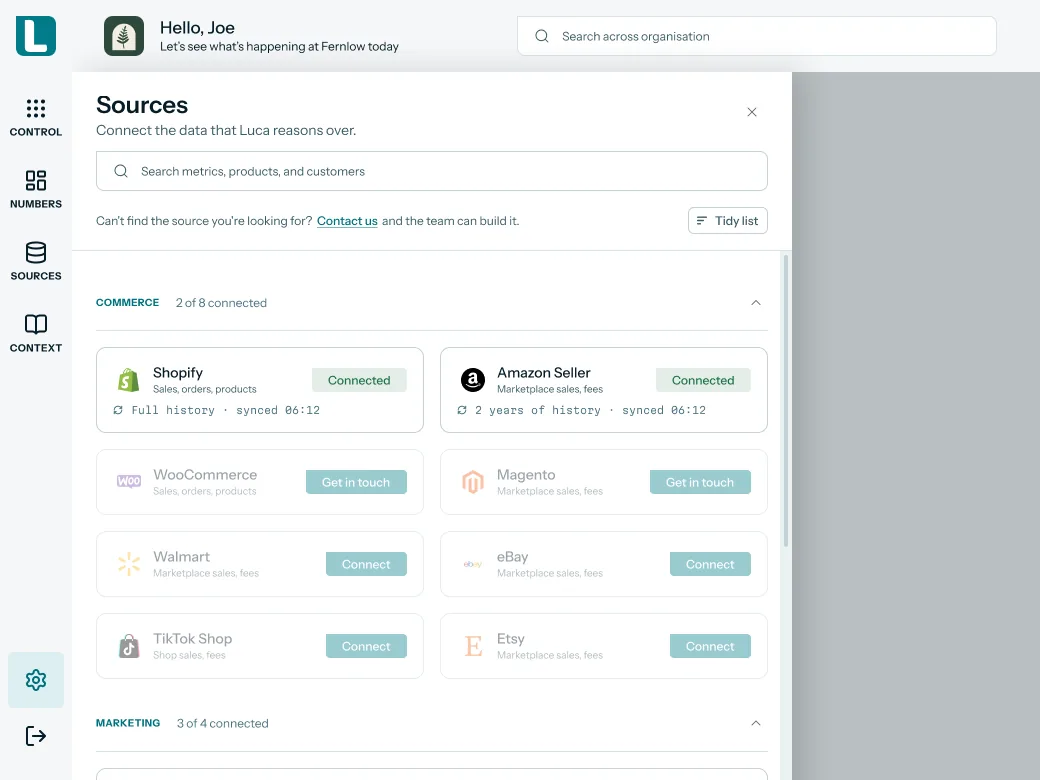
Your connected sources sit on the Sources screen, grouped by type. A connected card shows when it last synced. The commerce cards also show how much history Luca has read: your full Shopify history, and up to two years from Amazon Seller Central. Reading that history is all a connection does.
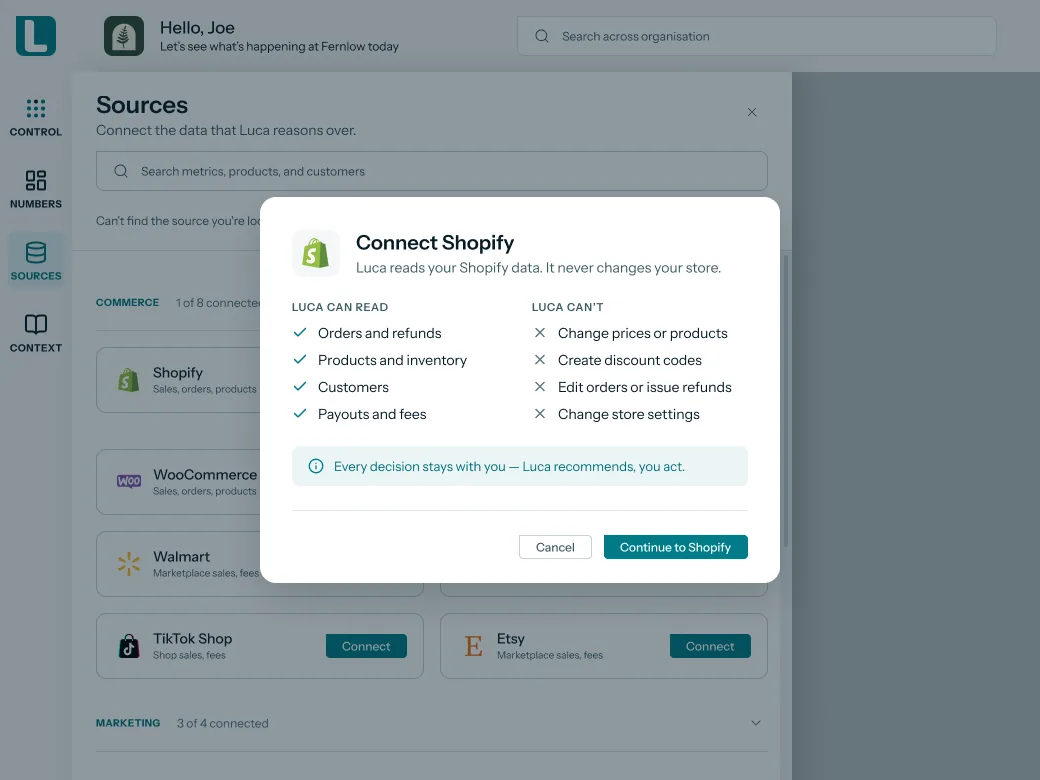
Luca lists its read-only scopes for each connector before you approve anything. When you click Connect on Shopify, a Connect Shopify dialog says that Luca reads your Shopify data and never changes your store. Under Luca can read it lists orders and refunds, products and inventory, customers, and payouts and fees. Under Luca can't it lists changing prices or products, creating discount codes, editing orders or issuing refunds, and changing store settings.
 Illustrative example · demo brand
The Connect Shopify dialog for Fernlow, a demo brand. It shows what Luca can and can't do before you reach Shopify's own consent screen, so you judge the scope first.
 Illustrative example · demo brand
The Shopify and Amazon cards for Fernlow, a demo brand, with sample sync times. Each card describes what Luca has read, which is the whole of what a read-only connection does.
Why read-only access matters
What it's for
AI agent safety for e-commerce starts with knowing what a tool can touch. Read-only access lets you get answers from your store, ad accounts and books without giving anything the power to change them.
How it helps
- No surprise edits. Prices, products, campaigns and journals stay exactly as your team left them.
- A short security review. You check what a tool reads, not every action it might take.
- Nothing to undo. Because nothing is written, there are no changes to trace or roll back.
- Clear ownership. Every change in your store still has a person's name behind it.
What happens without it
A tool with write access can act on a misread number. One wrong change can reach live prices, a running campaign or a closed month in the ledger. Even when nothing goes wrong, someone has to watch what it does.
Why buyers care
Founders feel this first, because the store and the ad accounts are the business. Finance leads feel it at month end, when the books must stay closed. It matters most at the moment of connecting, before anyone has seen the tool at work.
The Luca AI approach to read-only access
The founder of a Shopify homeware brand wants an AI analyst on her numbers. Her store, two ad accounts and her Xero file hold years of work. Before she connects anything, one question stops her: what could this tool change?
A common answer is to keep AI tools away from live accounts altogether. Another is to grant broad access and hope nothing goes wrong. The first leaves her doing the analysis by hand. The second can leave her checking every price and campaign after each session.
AI tools have moved from reading data to acting on it. Some now edit orders, change campaigns or build email lists once a user approves. So the safe question is no longer only what a tool can see. It is what the tool can write.
Luca gives her a plain answer: nothing. Luca reads her Shopify store, her Meta and Google accounts and her Xero ledger, and writes to none of them. When she asks it to change a price, Luca explains that it is read-only and can only recommend. She makes the change herself, in Shopify.
The source table above shows "None" in the writes column for every connector except Slack, where Luca posts its own answers. How that compares with other analytics tools is covered in How Luca AI compares for AI agent safety for e-commerce, below.
How AI tools get access to your store data
Every app or AI tool that connects to your store, ad accounts or books is granted a set of permissions. Knowing how that works lets you judge any tool, Luca included, in a few minutes.
Permissions, also called scopes
When an app asks to connect to a Shopify store, it sends a list of permissions, called scopes. Shopify's developer guide describes scopes as a list of permissions that you're asking the store owner to accept, and its own example requests the right to read orders and to change products. Read scopes let a tool see data. Write scopes let it change data, and that one difference decides what a tool could do to your store.
Approval without sharing your password
Most platforms use a standard called OAuth for this. You approve the tool on the platform's own screen, and the platform gives the tool an access token for the permissions you approved. Shopify's guide warns that this token is like a password into this shop, so it has to be kept safe. The consent screen is the moment you decide what a tool can do.
Asking for no more than it needs
Platforms expect tools to ask for as little as possible. Shopify's API terms tell developers to only request the merchant data you need to provide your service, nothing more. Security teams call this least privilege, and it is a fair test of any tool. If a tool only needs to read, it should not ask to write.
Analysts that read, agents that act
AI tools now come in two kinds. An analyst reads your data and recommends what to do. An agent goes further: Shopify's guide to retail AI agents describes systems that decide what to do next, and act, including pausing ads based on buying signals and inventory. Acting needs write access, and write access is where the risk sits.
What this means for your stack
Before you connect anything, sort each tool into reader or actor, and check its permissions against that. Luca is a reader by design. Every Luca connector is read-only, Luca lists what it can read before you connect, and you approve each self-serve source on the platform's own consent screen. Everything Luca sends out is its own work: answers, briefs and reports.
AI in e-commerce businesses in 2026
Connecting AI to business systems is now routine. The Office for National Statistics found that 30% of UK businesses used at least one AI technology in September 2026, up from 9% when it first asked in September 2023. The figure was 29% for businesses with fewer than 10 employees and 51% for those with 250 or more. The ONS also reports that a lack of expertise is one of the most cited barriers to adopting AI. A plain answer to "what can this tool change?" removes one of the hardest questions from that review.
Peak season raises the stakes. Black Friday falls on Friday 27 November 2026, and at the 2025 peak Shopify merchants sold 5.1 million US dollars a minute, a figure Shopify describes as approximate and unaudited. A wrong price or a paused campaign costs most in those hours. Our revenue forecast guide shows how the peak builds in your own numbers.
Check access before you connect
You can confirm what Luca will read before any data moves. The steps are the same whether you connect one source or ten.
- Open Sources. Sources are grouped as Commerce, Marketing, Email & subscriptions, Finance, Payments and Banking.
- Check who needs to approve. You need admin or owner access to each platform you connect, and admin access to your Shopify store.
- Click Connect on a self-serve source. Shopify, Amazon Seller Central, Amazon Ads, Google Ads, GA4, Search Console, Xero, QuickBooks Online and Stripe connect this way. Shopify connects with one-click OAuth.
- Read Luca's list, then the platform's consent screen. Luca's own dialog lists what it can read and what it can't. Then approve read-only access on the platform's screen. For OAuth sources such as Stripe, Google Ads and Xero, a successful approval returns you to Luca.
- Ask the team about the rest. Meta connects by OAuth for some accounts and through guided partner access with the Luca team for others. Cards showing Get in touch, such as Klaviyo and Recharge, are set up by the team, still read-only.
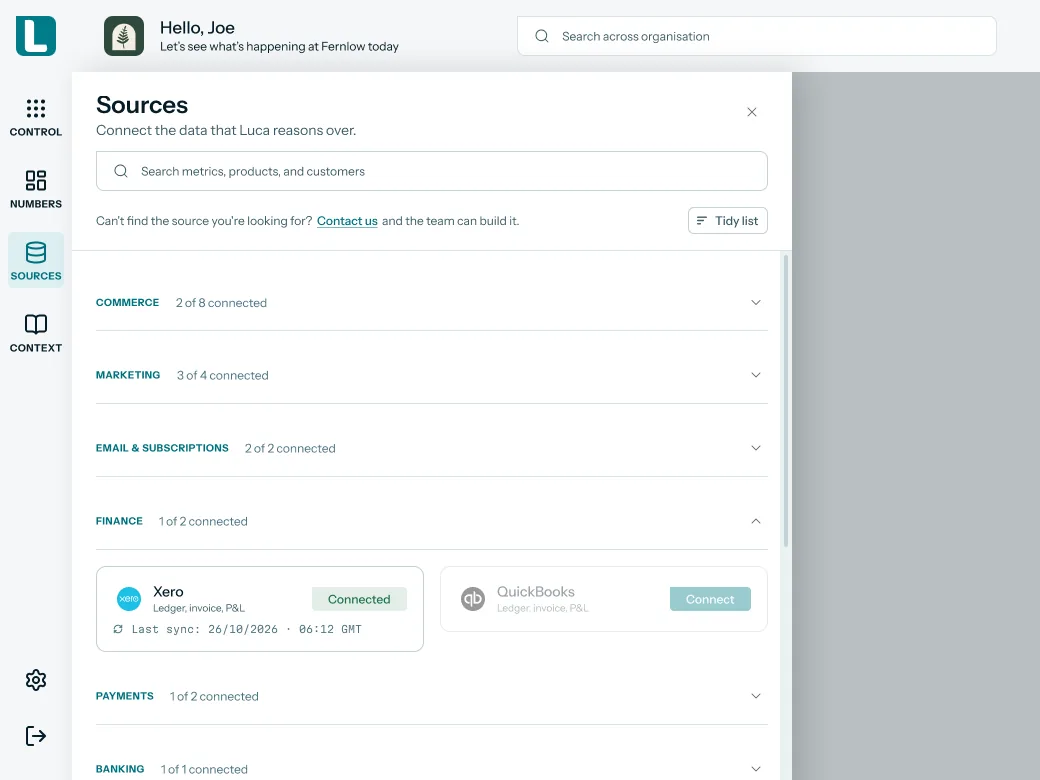
- Confirm the sync. Each connected card shows the time of its last sync. From the next overnight refresh, Luca can answer from that source.
 Illustrative example · demo brand
A connected Xero card for Fernlow, a demo brand, with a sample sync time. The card confirms that Luca is reading the ledger; nothing in Xero changes when it syncs.
Once a source is in, Luca keeps watch on it. It knows which sources are connected, flags any that fail or go stale, and alerts you when a connection breaks.
Try asking Luca:
"Which of our sources are connected right now, and has any of them failed or gone stale this week?"
Questions to ask any AI tool before you connect it
These questions work for Luca and for any other tool you assess. Luca's own answers sit in the right-hand column.
| Question | Luca's answer |
|---|---|
| Can it change prices, products, discount codes or orders? | No. Luca never writes to your store |
| Can it pause, edit or create ad campaigns? | No. Ad accounts are read-only |
| Can it post journals, invoices or payments to the books? | No. Xero and QuickBooks are read-only |
| Can it email your customers or change flows and segments? | No. Klaviyo is set up read-only |
| Where does it send anything at all? | Only its own answers, briefs and reports: in the app, by email, in Slack or through webhooks |
| Where does my data sit? | In one private warehouse for your brand, in its own dataset, stored in the UK/EU |
| Is my data used to train AI models? | No. Luca has zero data retention with its AI providers |
| What happens to my data when I leave? | It is deleted, under Luca's published retention and deletion policy |
For the wider picture of agents that act rather than advise, Luca's explainer on agentic AI for e-commerce founders and its comparison of AI agents for e-commerce are useful reading.
What happens when you ask for a change
You can still ask Luca what to do. It answers with figures, a chart where useful, and next steps. If you ask it to make the change itself, for example to lower a price or pause a campaign, Luca tells you it is read-only and can only recommend.
The decision and the action stay with you, in the platform where the change belongs. That keeps one clear record of who changed what, inside the tool your team already uses. The guide to AI tools for Shopify owners compares how other tools approach this.
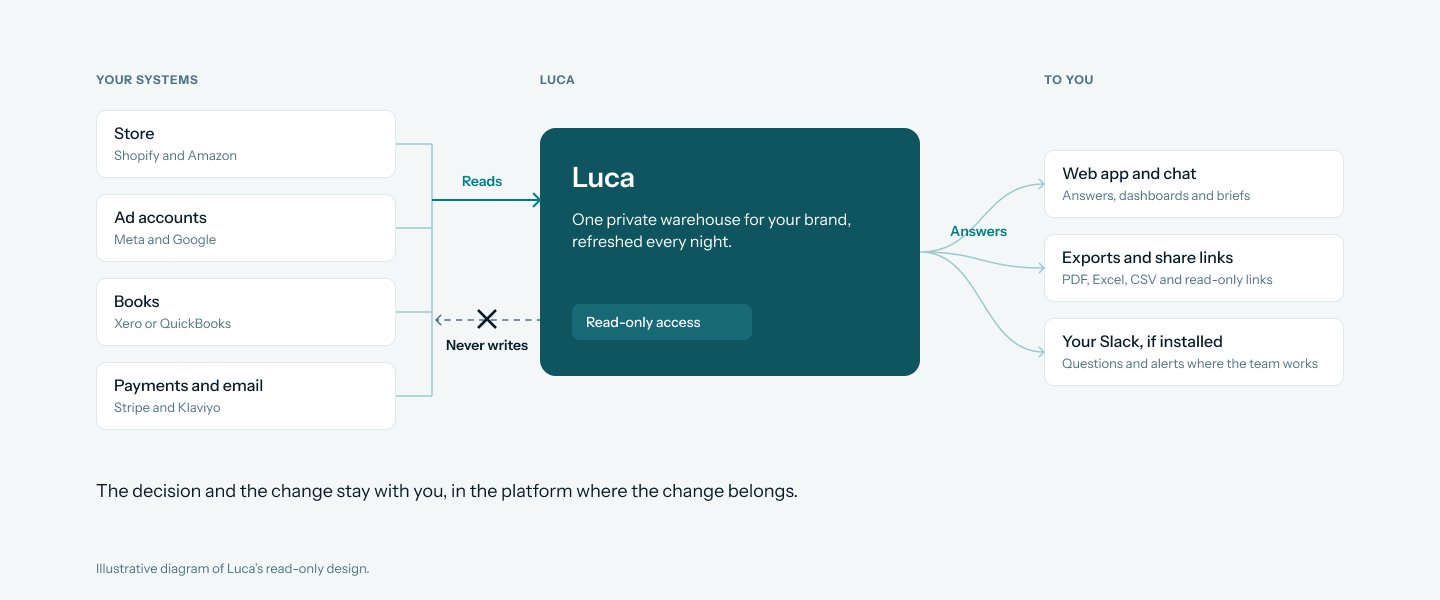
An illustrative diagram of Luca's read-only design: data flows one way into your brand's warehouse, and only answers flow out to you.
"Should I pause our weakest Meta campaign this week? Show me the spend and sales behind your answer."
How your data is kept
Every source you connect lands in one private warehouse for your brand. Each customer's data lives in its own BigQuery dataset, and every AI query is checked to stay inside it. That keeps your figures apart from every other brand's.
The same care runs through how your data is stored and used:
- Where it is stored. Your data is stored in the UK/EU, in Google Cloud's London region.
- Encryption. Your data is encrypted at rest and in transit.
- No training. Your data is never used to train AI models. Luca has zero data retention with its AI providers.
- Only what a question needs. Only the fields a query needs are sent to the model.
- GDPR and a DPA. Luca is GDPR compliant and offers a data processing agreement (DPA).
- Published sub-processors. Luca publishes its sub-processor list: OpenAI, Google Cloud, Clerk, Stripe, SendGrid, Langfuse and DataForSEO.
- Your documents. You can view, download and delete the documents in your knowledge base at any time.
- When you leave. Luca's published data retention and deletion policy means your data is deleted after you leave. Before then, you can export any conversation as CSV, Excel or PDF.
Answers you share go out through private, revocable share links that search engines don't index. Voice questions are transcribed into the chat box, and the audio is not stored. Luca's about page introduces the team behind the product, and you can reach them through the contact page with security questions before you connect.
 Illustrative example · demo brand
Shared links for Fernlow, a demo brand, with sample view counts. Switching a link off stops it working, so sharing an answer never hands over access to your accounts.
Who on your team sees what
Read-only access protects your systems from Luca. Role-based access protects your data inside your own team. Luca gives role-based access per source and per action, and per team, so each person sees the parts of the business that belong to their job.
Finance data has its own control. Role-based access to finance data means margin, cash and the ledger can stay with the people who need them. Luca also uses role lenses for growth, finance and operations, so briefs go to the right seat.
How to measure what a tool can change
Security reviewers judge write access on three things. Score each write permission a tool asks for against all three.
- Reach. How many products, campaigns or ledger entries a single action can touch.
- Reversibility. Whether the change can be undone cleanly, or whether customers and the books have already acted on it.
- Time to notice. How long a wrong change could run before someone on your team sees it.
A write that can touch every price, can't be undone and might run overnight is the highest risk in your stack. A read permission scores zero on all three, because it changes nothing.
What Luca's design gives you
Luca's write column is empty for your store, ad accounts, email platform and books. It reads from every connected system and writes to none of them, so there is no action to reach, reverse or notice. Its only outputs are its own answers, briefs and reports, which you read and act on yourself.
How to vet an AI tool before you connect it
You can run this check on any tool in under an hour. It works best before the first connection, when nothing has moved yet.
The manual method
- List every system the tool wants. Store, marketplaces, ad accounts, email, payments and accounting.
- Read each consent screen. Write down every permission, and split them into read and write.
- Question each write permission. Ask the vendor why it is needed and what triggers its use.
- Check the controls. Find out whether changes need approval, can be capped and are logged.
- Check whose login it uses. Confirm who on your team can approve a connection, and whether the tool uses its own credentials.
- Ask about your data. Where it is stored, who can see it, whether it trains AI models, and what happens when you leave.
- Start small. Connect the lowest-risk source first and review the first week.
The same check for Luca
For Luca, steps two to four have a short answer. Every connector is read-only, so there are no write permissions to justify, approve or log. You approve each self-serve source on the platform's own consent screen, with admin or owner access. Luca lists its read-only scopes before you connect, and its AI agent uses its own read-only credentials. Your data lands in one private warehouse for your brand, in its own dataset, stored in the UK/EU and never used to train AI models. Luca is GDPR compliant with a DPA, and your data is deleted after you leave. The same figures then feed your KPI reports and board packs, without anything flowing back.
"Which products would I need to reprice to protect gross margin, based on last month's sales?"
A worked example: what one unwanted change could cost
This illustrative calculation uses sample figures for a demo homeware brand, in pounds sterling. It is not a Luca output. It prices four changes a tool with write access could make by mistake on an ordinary day.
| Unwanted change | Arithmetic | Cost (GBP) |
|---|---|---|
| A 20% price cut on a best-selling lamp | 300 orders × 60 price × 20% | 3,600 of lost revenue |
| A sale campaign paused overnight | 12 hours × 400 of sales an hour | 4,800 of missed sales |
| A 25% code applied sitewide for six hours | 6 hours × 2,000 of sales an hour × 25% | 3,000 of extra discount |
| A journal posted into a closed month | 4 hours of accountant time × 50 | 200, plus reopening the month |
| Total for one bad day | 3,600 + 4,800 + 3,000 + 200 | 11,600 |
On Black Friday, if hourly sales run at three times normal, the sitewide code alone costs 6 × 6,000 × 25%, or 9,000. A read-only tool scores zero in every row, because it cannot make the change. Your team can still make mistakes, but the tool is no longer one of the ways they happen.
Works with
- Shopify. Read-only access to orders, products, inventory, customers, refunds, payouts and fees. You need admin access to your store to approve it.
- Amazon Seller Central and Amazon Ads. Self-serve and read-only, connected per region for Seller Central.
- Meta and Google Ads. Read-only spend and performance data, plus Facebook Page and Instagram data from Meta. Meta connects by OAuth for some accounts and through guided partner access with the Luca team for others.
- TikTok Ads. Read-only spend and reach, in the Marketing group next to Meta and Google.
- Google Analytics 4 and Search Console. Read-only traffic, revenue by channel and search queries, on the same Google card as Google Ads.
- Xero and QuickBooks Online. Read-only ledger, profit and loss, balance sheet and cash flow.
- Stripe. Read-only charges, fees, refunds, payouts and subscriptions.
- Open Banking, via Mastercard. Read-only bank balances, in the Banking group, so cash sits next to sales and the books.
- Klaviyo and Recharge. Set up by the Luca team, read-only. Luca's guide to connecting Shopify, ads, Stripe, Klaviyo and Xero explains how these sources fit together.
- Slack. Luca posts its own answers, briefs and alerts here, and reads nothing from your workspace. Available on the Leadership plan and above (plans and pricing).
- Email and webhooks. Luca sends briefs, insights and business health reports by email, and supports outbound webhooks. Both carry Luca's own output and change nothing in your systems.
Who uses it
A finance lead protecting closed months
A finance lead wants profit and cash answers without risking the ledger. Xero or QuickBooks connects read-only, so no journal, invoice or payment can be posted. The guide to cash flow, revenue and profit covers the questions she then asks.
A head of growth with live campaigns
A head of growth runs Meta and Google campaigns daily and can't risk a stray budget change. Luca reads spend and results and leaves every campaign as it is. Luca's article on AI marketing analytics for e-commerce shows what he can ask.
A subscription brand guarding its email flows
A subscription brand relies on Klaviyo flows and Recharge renewals. The Luca team connects both read-only, so no flow, segment or subscription changes. The guide to customer churn analysis covers what to look for next.
An operations lead checking stock
An operations lead asks about stock cover and run-out risk across Shopify locations and Amazon FBA. Luca reads inventory and never adjusts it. The guide to e-commerce inventory management covers the decisions that follow.
How Luca AI compares for AI agent safety for e-commerce
Luca reads your store, ad accounts and books and writes to none of your systems. Everything it sends out is its own work: answers, briefs and reports. Luca AI is the only platform in this table that does all three.
AI agent safety features for e-commerce, from each platform's public documentation:
| Platform | Luca AI | Shopify Sidekick | Triple Whale | Northbeam | Lifetimely | Saras Analytics |
|---|---|---|---|---|---|---|
| Store and ad accounts read-only | Yes | Partly (edits orders once you approve) | Partly (logs changes initiated through Moby) | Partly (Meta connection needs ads_management) | Not in docs | Yes (READ permissions to data sources) |
| Books read-only (Xero, QuickBooks) | Yes | Not in docs | Not in docs | Not in docs | Reads QuickBooks (cost and expense sync) | Yes (Xero integration into Daton) |
| Writes to none of your systems | Yes | Partly (fills in fields in your admin) | Not in docs | Partly (assistant can be allowed all actions) | Partly (creates Klaviyo audiences you approve) | Partly (writes tables in your destination) |
Yes: documented and built in. Partly: documented with a limit, shown in brackets. Not in docs: not found in the vendor's public documentation.
Why Luca AI is the stronger choice for AI agent safety for e-commerce
- Your store stays as you left it. Luca reads Shopify and never writes to it, so there's nothing to review or undo. Shopify's help centre says Sidekick can edit existing orders for you after you review the changes. See what Shopify's AI assistant misses.
- No campaign changes to trace. Luca reads Meta and Google Ads and changes nothing in them. Triple Whale's activities table tracks which changes were initiated through Moby or automation. See Triple Whale alternatives compared.
- Your email lists stay yours. Luca reads Klaviyo through a read-only connection set up by its team. Lifetimely's Profit Agent creates the audience once you approve, with a matching Klaviyo list. See Lifetimely alternatives compared.
Competitor details checked against each vendor's public documentation on 29 October 2026. Features and plans change, so confirm with the vendor before you decide.
Limits and things to know
- Luca recommends; you act. Luca won't change a price, pause a campaign, send an email or post to the ledger for you. Every change is made by your team in the platform itself.
- No approval queue. Because Luca takes no actions, there are no approval steps, spending caps or reversals to configure.
- Luca sends only its own work. Answers, briefs, reports and alerts go to the app, email, Slack or a webhook you set up. None of them changes your store, ads or books.
- Admin access to connect. Approving a connection needs admin or owner access to that platform.
- Some sources go through the team. Meta uses guided partner access, and Klaviyo, Recharge, WooCommerce and Magento are set up by the Luca team.
- Daily, not live. Data refreshes once a day, overnight, so answers reflect the last refresh.
Common questions
Is it safe to connect AI to my Shopify store?
With Luca, the store connection is read-only. Luca reads orders, products, inventory and payouts, and never writes to your store. You approve the connection yourself with admin access.
Can Luca change my prices, discount codes or ads?
No. Luca never writes to a store, ad account, email platform or ledger. It can suggest a price change, and you make it in Shopify. Meta, Google Ads, TikTok Ads and Amazon Ads connect read-only, so every campaign stays as you set it.
Can Luca post anything to Xero or QuickBooks?
No. Luca reads the ledger, profit and loss, balance sheet and cash flow, and posts no journals, invoices or payments.
Does Luca email my customers or change Klaviyo flows?
No. The Luca team sets Klaviyo up read-only. Luca reads campaigns, flows and segments and changes none of them. The only emails Luca sends are its own briefs and reports, to your team.
Where does Luca post anything at all?
Luca sends only its own answers, briefs and reports: in the app, by email, in your Slack and through outbound webhooks. Slack is available on the Leadership plan and above.
What happens if I ask Luca to make a change?
Luca tells you it is read-only and can only recommend. It gives you the next steps, and you carry them out yourself.
Does Luca's AI use my admin login?
No. Luca's AI agent uses its own read-only credentials, separate from admin credentials. Someone with admin or owner access still approves each connection; for Shopify, that means admin access to your store.
Where is my data stored, and is it kept apart?
Your data is stored in the UK/EU, in Google Cloud's London region, in its own BigQuery dataset. Every AI query is checked to stay inside it. Luca Labs (UK) Inc. is registered with the ICO under number ZA839159.
Is my data used to train AI, and is Luca GDPR compliant?
Your data is never used to train AI models, and Luca has zero data retention with its AI providers. Luca is GDPR compliant, offers a DPA, encrypts data at rest and in transit, and publishes its sub-processor list.
What happens to my data if I leave Luca?
Luca's published data retention and deletion policy means your data is deleted after you leave. You can export any conversation as CSV, Excel or PDF first.
Can I limit which teammates see finance data?
Yes. Luca gives role-based access per source and per action, including role-based access to finance data.
Can I share an answer without sharing my accounts?
Yes. Share a conversation through a private, revocable link that search engines don't index. The person sees the answer, not your connected accounts.
What is the difference between read access and write access?
Read access lets a tool fetch your data, such as orders or ad spend. Write access lets it change that data, such as a price, a campaign or a journal. Every Luca connector is read-only.
What should I ask an AI vendor before connecting my store?
Ask which permissions it needs and which of them can write, what triggers each change, whether changes need approval, whose credentials it uses, and where your data is stored. For Luca, the write list is empty.
Updated 29 October 2026: added how AI tools get access to store data, how to measure what a tool can change, a vetting checklist with a worked example, 2026 AI adoption and peak-season context, images and further reading. Later the same day: added the Connect Shopify read-only list, TikTok Ads and Open Banking, data residency, encryption, GDPR and the DPA, no training on your data, sub-processors, deletion when you leave and role-based access.