
Inventory replenishment breaks down when one reorder rule has to cover products with very different supplier lead times. Luca AI sets a reorder point for every product you sell, from your Shopify and Amazon sales and stock and the supplier lead times you give it. It shows which products have reached that point and when each one needs ordering. You choose the quantity and order with your supplier yourself.
At a glance
| What it is | A reorder point for each product you sell, set by Luca |
|---|---|
| What it's built from | Your Shopify and Amazon sales and stock, plus the supplier lead times you give Luca |
| What it answers | Which products have reached their reorder point, and the date each one needs ordering by |
| Where you see it | On Numbers › Stock, with stock cover, run-out dates and order-by dates, or in chat |
| Stock it counts | Shopify inventory by location and Amazon FBA stock |
| How fresh it is | Every source refreshes once a day, overnight |
| Who decides the order | You. You pick the quantity and place each order with your supplier |
| What it never does | Change your store. Luca only reads your data |
What a reorder point per product is
A reorder point is the stock level at which you order more of one product. It sits high enough that the new delivery lands before the last unit sells. When a product's stock falls to that level, it has reached its reorder point and needs ordering.
Luca sets that level separately for every product. A light from a supplier nine weeks away gets a much higher point than a box from a printer two weeks away. Luca then compares each product's stock cover with its supplier lead time and gives the expected run-out date per product. You read the result as a short list of products that need an order now, and the date each order has to be placed by.
What you see on the Stock tab
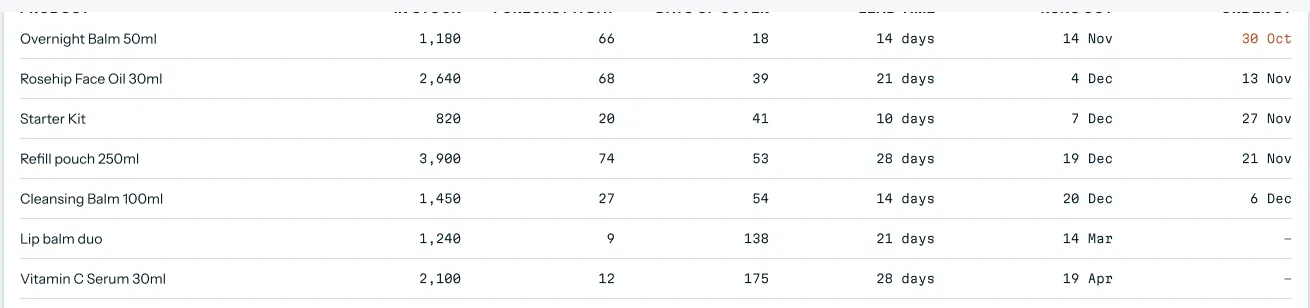
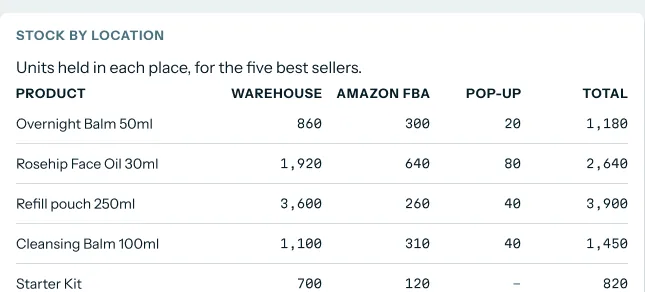
Open Numbers › Stock to see stock cover, run-out dates and order-by dates for each product. Stock cover shows in weeks and days, with and without incoming stock, so a delivery already on its way is counted. Stock by location splits units across your Shopify locations and Amazon FBA.
 Illustrative example · demo brand
The columns run, left to right: product, units in stock, forecast sales per day, days of cover, lead time, run-out date and order-by date. Each order-by date sits beside that product's own lead time, so you can see which products have reached their reorder point. The figures are sample data for a demo brand.
What it is not
A reorder point answers "when". It is built on how fast each product sells, which the SKU demand forecast covers in its own right. How much stock to hold overall, and how much cash that ties up, sits on inventory planning for ecommerce.
Why inventory replenishment needs a reorder point per product
What it's for
Inventory replenishment comes down to two questions for each product: when to order, and how much. A reorder point answers the first one. It gives every product its own trigger, set from its own sales speed and its own supplier's lead time.
How it helps
- No guessing at the trigger. Each product has a stock level that tells you it is time to order.
- Long and short lead times both work. A nine-week supplier and a two-week supplier each get the point they need.
- One list to work from. You see which products have reached their point instead of scanning every row.
- Faster sellers are caught. When sales pick up, the order-by date moves earlier.
What happens without it
Without a reorder point per product, the long-lead products run out first. By the time anyone notices, the next delivery is still weeks away, and those weeks are lost sales. Short-lead products go the other way, ordered too early, with cash and shelf space tied up in stock that could have waited.
Why buyers care
Operations and inventory leads care most, usually on the day they sit down to decide what to order this week. Founders care when a best seller sells out before a busy season. Finance leads care when the stock bill lands earlier, or bigger, than the cash plan expected.
The Luca AI approach to inventory replenishment
Picture the operations lead at a Shopify cycling-accessories brand. Bike lights and bottle cages come from a supplier in Taiwan on a nine-week lead time. The printed boxes come from a local printer in two weeks. Every Monday she decides what to reorder, and one rule cannot fit both suppliers.
The usual fix is a spreadsheet with a single trigger, such as "reorder when 30 days of stock is left". It tends to run on stock counts exported by hand, so it can be out of date within days. The rule may suit the boxes well enough while the lights quietly sell out for weeks at a time.
What changed is simply that the right trigger differs by product. A nine-week lead time needs far more stock on hand when you order than a two-week one. Sales speed shifts too, so a number set in spring can be wrong by autumn.
Luca AI sets a reorder point for each product from your Shopify and Amazon sales and stock and the supplier lead times you give it. It shows stock cover, run-out dates and order-by dates on the Stock tab, so she can see which products have reached their point. She still chooses the quantity and places each order with the supplier.
One fact you can check on this page: every connector Luca uses is read-only. It reads your store and writes to none of your systems. That, and how other tools handle reorder timing, is covered in How Luca AI compares for inventory replenishment, below.
How reorder points are set
There are a handful of common ways to set a reorder point. Shopify's guide gives the standard reorder point formula: daily sales velocity times lead time, plus safety stock. Lead time is how long your supplier takes to get the stock to you once you order. Each way below catches some problems and misses others.
A fixed number per product
You pick a level for each product from experience, such as "order lights at 1,000". It is quick and easy to explain. It misses any change in sales speed or lead time, so it drifts out of date without anyone noticing.
Sales velocity times lead time
You multiply how many units sell per day by the lead time in days. The result is the stock you will sell while you wait for the delivery. Shopify notes that a lean business willing to risk stockouts may run with no safety stock at all. This catches the difference between long and short lead times, but any delay or sales spike means a stockout.
Adding safety stock
Safety stock is extra stock held in case of a supply problem or a jump in demand. The basic safety stock formula takes maximum daily usage times maximum lead time, minus average daily usage times average lead time. It catches ordinary bad weeks. Shopify warns that it works for average scenarios but not for seasonal changes in demand.
Safety stock for an unreliable supplier
Some formulas set safety stock from how much the supplier's lead time varies. Heizer and Render's version suits a supplier whose lead time moves around, but it doesn't allow for changes in customer demand. Greasley's version uses both the lead time and the swings in demand. The more uncertainty you have, the higher the reorder point should be.
Forecast-led reorder points
Here the sales rate comes from a demand forecast rather than last month's average. In Shopify's guide to inventory forecasting, replenishment uses the forecast, current stock and your inventory policies to decide when and how much to reorder. This catches a coming peak before it shows in past sales. It is only as good as the forecast behind it.
What this means for your reorder points
Luca sets a reorder point per product, compares stock cover with each supplier's lead time and gives each product's run-out date. It builds a demand and stock forecast by SKU, and it builds seasonality into stock planning. How the forecast itself is made is explained on ecommerce demand forecasting.
Read your reorder points and order-by dates
Start with the products whose order-by date is today or already past. Those have reached their reorder point. Next, look at the ones due in the coming week, so you can line up cash and supplier slots. The rest can wait.
Check each product against its supplier
Read the lead time beside each order-by date before you act. A light from Taiwan with an order-by date of Friday needs ordering this week, because nine weeks is a long wait. A box from the printer with the same stock cover may not need ordering for weeks. Stock cover with and without incoming stock tells you whether an order already on its way changes the answer.
When Luca flags a product to reorder
Luca can bring a product to you before you open the Stock tab. Priority briefs (Beta) set out the finding, what is at stake and what to check before you act. Every priority brief (Beta) ends with an appendix showing which data Luca used and how each figure was calculated.
The quantity is still your call. Check it against your supplier's minimum order, the space you have and your cash before you order.
Ask about reorders in chat
You can ask in plain English, for example "What's going to run out before Black Friday?" or "Which products from the Taiwan supplier need ordering this month?" Luca answers with figures, a chart where useful and next steps, with each figure linked to the table it came from. Asking across your sources works the same way for stock as for sales.
Long lead times and seasonal peaks
A long lead time pulls every seasonal decision earlier. With a nine-week supplier, stock for a December rush has to be ordered by the end of September. Luca builds seasonality into stock planning, and its forecasts allow for holidays such as Black Friday. Shopify's guide also warns that in a slow or seasonal spell you may need to hold off on reordering.
How to tell if your reorder points are working
Two measures tell you whether your reorder points are set well. Watch both, because fixing one by itself usually makes the other worse.
Stockouts on long-lead products
Count the days each product spends out of stock, and the sales you missed in that time. If the lead time is already long, a product that sells out can stay out of stock for months. The weak spot is that a stockout hides demand: you can't see the orders that never happened, so lost sales are always an estimate.
Overstock on short-lead products
Look at the stock left when each delivery arrives. If it is far above your safety stock, the product was ordered too early. Too much safety stock brings a risk of dead stock and high storage costs, as Shopify's safety stock guide puts it. The weak spot here is timing: a big leftover can also mean sales were slower than expected, not that the point was wrong.
Where Luca shows them
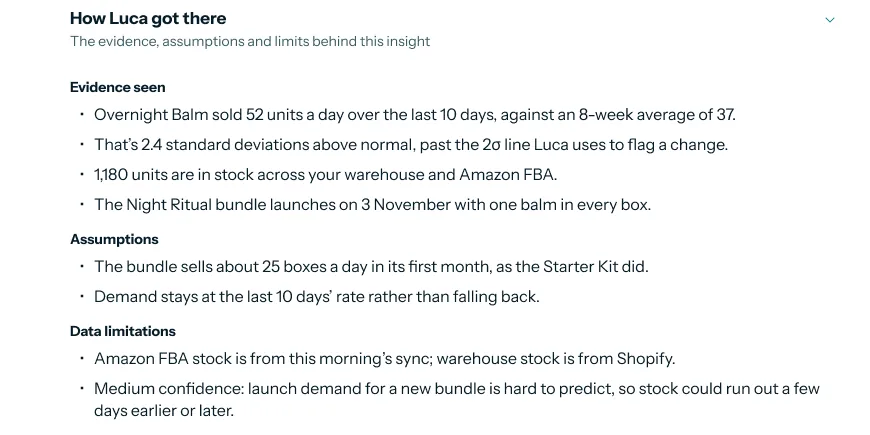
Luca tracks stock-out risk per product, from current stock and recent demand, along with days in stock and the share of your catalogue in stock. It shows overstock and slow movers, plus slow-moving and aged stock and the cash tied up in it. Before you rely on an order-by date, open the working behind it.
 Illustrative example · demo brand
Check the working before you trust an order-by date: the sales rate, stock on hand and assumptions are all listed. The figures are sample data for a demo brand.
How to set reorder points for inventory replenishment
The manual method
- Export units sold per product for the last few months from Shopify and Amazon.
- Work out average and peak daily sales for each product.
- Write down each supplier's average lead time and the longest delivery you have had.
- Multiply average daily sales by average lead time to get the stock you sell while waiting.
- Add safety stock, using the basic formula or one that allows for an unreliable supplier.
- Set that total as the product's reorder point, and check stock against it every week.
- Recalculate whenever sales speed or a lead time changes.
The weak step is the last one. Shopify's guide advises setting new reorder points whenever sales velocity or lead time changes, and few teams find time to redo a spreadsheet that often.
The same job in Luca
Give Luca's team your supplier lead times once. Luca reads sales and stock from Shopify and Amazon every night, sets a reorder point per product, and shows stock cover, run-out dates and order-by dates on the Stock tab. When a sales rate or lead time moves, the order-by date moves with it. You decide the quantity and place each order with your supplier.
A worked example: one rule against two lead times
This is an illustrative calculation with sample figures, not a Luca output. The brand sells a rear light and a bottle cage from a supplier on a 63-day (nine-week) lead time, which has run as long as 70 days. Boxes come from a printer in 14 days, 16 at worst. It compares the basic safety stock formula with a single rule of "reorder when 30 days of stock is left".
| Product | Average and peak daily sales | Average and longest lead time | Stock sold while waiting | Safety stock | Reorder point | 30-day rule | What the 30-day rule costs |
|---|---|---|---|---|---|---|---|
| Rear light | 20 and 30 | 63 and 70 days | 20 × 63 = 1,260 | (30 × 70) − 1,260 = 840 | 1,260 + 840 = 2,100 | 20 × 30 = 600 | 63 − 30 = 33 days out; 33 × 20 = 660 units × £25 = £16,500 of missed sales |
| Bottle cage | 10 and 15 | 63 and 70 days | 10 × 63 = 630 | (15 × 70) − 630 = 420 | 630 + 420 = 1,050 | 10 × 30 = 300 | 33 days out; 33 × 10 = 330 units × £12 = £3,960 of missed sales |
| Printed box | 40 and 50 | 14 and 16 days | 40 × 14 = 560 | (50 × 16) − 560 = 240 | 560 + 240 = 800 | 40 × 30 = 1,200 | 1,200 − 560 = 640 left at delivery; 640 − 240 = 400 extra boxes × £0.50 = £200 tied up |
Under the 30-day rule, the rear light reorders at 600 units. That stock lasts 30 days, but the delivery takes 63, so the light is out of stock for 33 days. At 20 a day, that is 660 units of missed sales, and the bottle cage misses 330.
The boxes go the other way. At 1,200 they are ordered early, so about 640 are left when the delivery lands, against a safety stock of 240. That is 400 extra boxes sitting in the stockroom. One rule starves the long-lead products and overstocks the short-lead one, which is why each product needs its own point.
Get reorder points set up
- Connect Shopify. It connects self-serve and read-only, as covered in setting up Luca.
- Connect Amazon Seller Central if you sell there, so FBA stock is counted. It connects self-serve, per region.
- Send Luca's team your supplier lead times and minimum order quantities, product by product or supplier by supplier. Luca holds them as business context.
- If your lead times live in a supplier sheet, add it to Luca's knowledge base, which holds PDF, Word, PowerPoint and spreadsheet files.
- Choose where stock-out alerts go: Slack, email or the app.
- Open Numbers › Stock the next morning, once your sources have refreshed overnight.
How reorder points work with the rest of Luca
Shopify
Shopify supplies products and variants, inventory by location, transfers, refunds and returns, with full history refreshed daily. Each Shopify location shows as its own column in stock by location.
Amazon Seller Central
Amazon Seller Central adds marketplace sales, fees and FBA stock, with up to two years of history. FBA units count towards each product's stock cover, so a product isn't flagged while Amazon still holds weeks of it.
 Illustrative example · demo brand
A reorder point counts stock wherever it sits, so units already at Amazon FBA keep a product from being flagged too early. The figures are sample data for a demo brand.
Demand forecast
The SKU demand forecast gives forecast units per product and days of stock remaining. Forecasts run daily and are checked against actual sales every night.
Your own inventory system
If your stock lots and costs live in an ERP or inventory system, Luca's team builds a custom source on request, with no fee. It can bring in catalogue, stock lots and costs, stocktakes and store sales.
Chat
Anything on the Stock tab can be asked in chat. Answers can be downloaded as CSV or Excel, which helps when you build your supplier order sheet.
Who uses reorder points, and how
Operations and inventory leads
The operations lead at a brand with two kinds of supplier opens the Stock tab each Monday. She orders what has reached its reorder point, checks the lead time on each, and leaves the rest. Her wider stock plan sits on inventory planning.
Founders and CEOs
A founder wants to know that the best seller won't sell out before a busy month. A question in chat answers it in seconds, and the order-by date shows how much time is left. The daily view of the whole business puts stock beside sales and cash.
CFOs and finance leads
A finance lead wants the stock bill to land when the cash plan expects it. Luca treats inventory as working capital, showing the cash tied up in stock. Order-by dates show when the next large supplier bills are likely, and the KPI report carries stock figures to the board.
How Luca AI compares for inventory replenishment
Luca sets a reorder point for every product and turns it into an order-by date against that product's own supplier lead time. It counts Shopify and Amazon FBA stock together. Luca AI is the only platform in this table that does all four.
Inventory replenishment features, from each platform's public documentation:
| Platform | Luca AI | Shopify | Lifetimely by AMP | Triple Whale | Daasity |
|---|---|---|---|---|---|
| Reorder point per product | Yes | Partly (reorder points you adjust) | Partly (reorder when days left reach lead time) | Not in docs | Not in docs |
| Order-by date against supplier lead time | Yes | Partly (days of inventory remaining) | Partly (days of stock from sales velocity) | Partly (Days of Stock and Out of Stock Date) | Partly (weeks of supply against lead time) |
| Supplier lead times held per product | Yes | Partly (lead-time changes as annotations) | Partly (lead times in your planning sheet) | Not in docs | Partly (lead times in Amazon Vendor Central data) |
| Amazon FBA stock beside Shopify stock | Yes | Not in docs | Not in docs | Not in docs | Yes (FBA inventory reports) |
Yes: documented and built in. Partly: documented with a limit, shown in brackets. Not in docs: not found in the vendor's public documentation.
Why Luca AI is the stronger choice for inventory replenishment
- A reorder point set for you. Luca sets one per product from your sales, stock and lead times. Lifetimely shows days of stock from sales velocity, which you then hold against lead times yourself. Lifetimely alternatives
- An order-by date, not only a run-out date. Luca gives the date each product needs ordering by. Triple Whale shows Days of Stock and an Out of Stock Date on its Summary page. Triple Whale alternatives
- Lead times built into the answer. Luca holds your supplier lead times as business context. Daasity's inventory explore leaves you to compare weeks of supply with lead time yourself. Daasity alternatives
Competitor details checked against each vendor's public documentation on 7 November 2026. Features and plans change, so confirm with the vendor before you decide.
Limits of reorder points in Luca
- Luca does not draft or place purchase orders. It sets the reorder point and shows when each product needs ordering. You choose the quantity and place every order with your supplier.
- It reads, it never writes. Luca never changes stock levels, products or settings in Shopify, Amazon or your books, as explained in read-only access.
- Lead times come from you. Luca uses the lead times you and Luca's team hold as business context. 3PL connections are not offered.
- Daily, not live. Every source refreshes once a day, overnight, so the order-by date reflects yesterday's sales and stock.
Common questions
What is a reorder point?
A reorder point is the stock level at which you order more of a product. It is set so the new delivery arrives before the last unit sells. Each product needs its own, because sales speed and supplier lead times differ.
How do I calculate a reorder point?
Multiply average daily sales by the supplier's lead time in days, then add safety stock. For example, 20 units a day on a 63-day lead time is 1,260 units, plus whatever safety stock you choose to hold.
What is the difference between a reorder point and safety stock?
Safety stock is the extra stock you hold in case of a late delivery or a sales spike. The reorder point includes it: it is the stock you sell while waiting for a delivery, plus that safety stock.
Can one reorder rule cover products with different lead times?
Rarely. A rule such as "reorder at 30 days of stock" leaves a nine-week product out of stock for about a month. It also makes a two-week product arrive with far too much stock left over.
How does Luca set a reorder point for each product?
Luca sets a reorder point per product from your Shopify and Amazon sales and stock and the supplier lead times you give it. It then compares each product's stock cover with its lead time and gives a run-out date.
Where do I see which products have reached their reorder point?
Open Numbers › Stock in Luca. It shows stock cover, run-out dates and order-by dates for each product. You can also ask in chat, for example "What's going to run out before Black Friday?"
How do I give Luca my supplier lead times?
Send them to Luca's team when you set up Luca. The team holds them with you as business context alongside minimum order quantities. If they sit in a supplier spreadsheet, you can add that file to Luca's knowledge base.
Does Luca tell me how much to order?
Luca shows when each product needs ordering and the figures behind it. The quantity is your decision. Check it against the supplier's minimum order, your storage space and your cash before you place the order.
Does Luca change anything in my Shopify store?
No. Every connector Luca uses is read-only by design. Luca reads your store, ads and books and writes to none of them, so stock levels and product settings in Shopify stay exactly as you set them.
How often are reorder points and order-by dates updated?
Every source refreshes automatically once a day, overnight, and forecasts run daily. Each morning's order-by dates reflect the sales and stock up to the end of the previous day.
Does Luca count Amazon FBA stock?
Yes. Amazon Seller Central brings in FBA stock alongside marketplace sales and fees. FBA units sit beside your Shopify locations in stock by location, so the whole stock of a product is counted.
What happens when a supplier's lead time changes?
Tell Luca's team the new lead time so the business context is updated. A longer lead time raises the reorder point and brings the order-by date forward, so update it as soon as the supplier tells you.
How do reorder points handle Black Friday and seasonal peaks?
Luca builds seasonality into stock planning, and its forecasts allow for holidays such as Black Friday. On a long lead time, check order-by dates well before the peak, as stock may need ordering months ahead.
Can I get an alert when stock runs low?
Yes. Luca sends stock-out alerts and lets you choose where they go: Slack, email or the app. Amazon-specific alerts cover stock and the Buy Box.
Updated 7 November 2026: first published, with how reorder points are set, how to tell if they are working, the manual method with a worked example, and fourteen common questions.