
Board reporting for e-commerce comes down to one recurring job: the monthly investor update, with revenue, margin, cash, runway and what comes next, in figures that agree with your books. This page gives you an investor update template you can copy today. Luca AI, an AI analyst for e-commerce brands, drafts that update, and board or investor packs as PDF in your format, from live Shopify, ad and Xero or QuickBooks data. You check the draft, change what you want and send it yourself.
At a glance
| What it is | A drafted investor update, plus board and investor packs as PDF, written from your live data |
|---|---|
| What goes in it | Revenue, margin, marketing, customers, cash, runway and what comes next, in the template below |
| Where the figures come from | Shopify orders, refunds and payouts, Meta and Google ad spend, and your Xero or QuickBooks ledger |
| Format | Your own board format, previewed as a PDF with Edit in chat and Download PDF |
| Other downloads | Answers as Word, PDF or PowerPoint, and data as CSV or Excel |
| Sharing | Private, revocable links that search engines don't index |
| Freshness | Every source refreshes once a day, overnight |
| Runway | From the cash-flow forecast and burn, for brands on Xero or QuickBooks |
| Who sends it | You. Luca drafts the update; you decide what goes to investors and when |
| What it never does | Change your store, ad accounts or books, or give fundraising, valuation or investment advice |
What board and investor reporting in Luca is
Board and investor reporting in Luca turns the figures you already hold into the documents your investors read. Luca writes your board or investor update, builds board and investor packs as PDF, and prepares quarterly reviews from your data. The board pack follows your format, so its pages look like the ones your investors already know.
Everything starts from the same connected data. Luca reads your Shopify orders, refunds and payouts, your ad spend from Meta and Google, and your ledger in Xero or QuickBooks. It matches orders to Stripe or Shopify payouts and to the ledger, so revenue, cash and the books agree before a figure reaches a page.
Because the draft comes from live data, next month's update starts from fresh numbers, not from last month's spreadsheet. Every source refreshes once a day, overnight, so a draft written this morning uses the figures as they stood last night.
What you see in a board pack
A board pack opens as a PDF preview with two controls: Edit in chat and Download PDF. The first page of the demo pack is a one-page board update. It shows tiles for net revenue, contribution profit, operating profit and cash with runway, then a chart of net revenue by month. The demo pack runs to six pages, written in the brand's own board template.
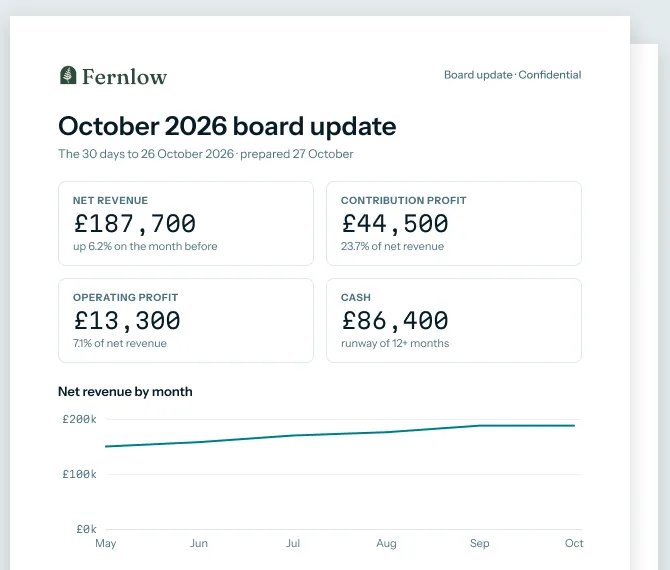 Illustrative example · demo brand
The board update page of a pack written in the brand's own board template, the page most investors read first. The figures are sample data for a demo brand.
What it is not
It is not a mail-out. Luca drafts the update and the pack; you read them, change what you want and send them yourself. It is not advice either: Luca reports what happened and what the forecast says, and it gives no fundraising, valuation or investment advice. It also never changes your store, ad accounts or ledger, because every connector is read-only.
Why board and investor reporting matters
What it's for
Board reporting for e-commerce keeps your investors' picture of the business in step with yours. A short, regular update on revenue, margin, cash and runway lets them help early. It also lets you ask for that help with the facts already in front of them.
How it helps
- Evenings back. The figures arrive drafted, so you edit instead of copying.
- One set of numbers. Revenue, cash and the books agree before the update goes out.
- The same shape every month. Investors compare this month with last month without hunting.
- Runway you can defend. Cash and runway come from the books and the forecast, not a guess.
What happens without it
Without a regular update, investors hear about a problem late, often in the same call where you ask for help with it. An update that skips a month, or changes shape each time, makes the good months look picked. The slowest sections to write by hand, cash and runway, are also the easiest to drop when time runs short.
Why buyers care
It matters most to founders after a seed or Series A round. By then a lead investor and a group of angels each expect the same update. It matters again in the months before a raise, when new investors ask for two years of history at once.
The Luca AI approach to board and investor reporting
Picture the founder of a seed-funded plant-based snacks brand. Oat bars and roasted chickpea packs sell through Shopify, ads run on Meta and Google, and the books sit in QuickBooks. Every month she writes an update to her lead investor and a group of angels.
The usual workaround is last month's document, filled in again by hand. Revenue comes from a Shopify export, spend from two ad dashboards and cash from QuickBooks. That copying can easily cost her two evenings a month, and one mistyped cell puts the wrong runway in front of every investor at once.
What changed is simple. All of those figures already sit in systems that can be read together. Once one tool reads them side by side, the copying disappears. Her time then goes on the part only she can write: what the numbers mean and what comes next.
Luca AI reads her Shopify orders, her Meta and Google spend and her QuickBooks ledger, read-only, and drafts the update from that live data. It builds the board or investor pack as a PDF in her own format, with revenue, margin, cash and runway already filled in. She edits the draft, downloads the PDF and sends it herself.
You can check the format against the demo board pack above. Its first page carries net revenue, contribution profit, operating profit and cash with runway, in the brand's own board template. How that compares with other tools is covered in How Luca AI compares for board reporting for e-commerce, below.
How investor updates get put together
Founders produce the same monthly update in about five ways. Each one catches some problems and misses others, and knowing which is which tells you where to check.
Copy and paste from each tool
You open Shopify, each ad account and QuickBooks, then type the figures into last month's document. It costs nothing and needs no set-up. It catches nothing, though. A wrong date range, a missed refund or a figure in the wrong currency goes straight to investors, and nothing checks that store revenue agrees with the books.
A spreadsheet fed by exports
A workbook holds formulas for margin, burn and runway, and you paste in CSV exports each month. Fixed formulas catch arithmetic slips. They miss changes upstream: when an export's columns move or a cost category is renamed in the ledger, the formulas quietly read the wrong cells.
A scheduled dashboard PDF
Some analytics tools email a PDF of a dashboard to a list of people on a schedule. Investors get the same charts on time every month. What they miss is the story. A dashboard shows that cash fell, not why it fell or what you plan to do, so you still write that part.
Management reports from the accounting system
QuickBooks or Xero gives you a P&L, a balance sheet and a cash summary. These agree with the books by definition. They miss the store and the ads, because order counts, refunds, ad spend by platform and customer cohorts live elsewhere. They also arrive only once the month is closed.
A draft written from connected data
A tool reads the store, the ads and the ledger together, then writes the update for you to edit. It catches mismatches between sources, because it reconciles them first, and it removes the copying. It still needs you: the judgement about what comes next, and the decision to send, stay with the founder.
What this means for your update
Luca works the last way. It reads Shopify, Meta, Google Ads and Xero or QuickBooks, and matches orders to payouts and the ledger so revenue, cash and the books agree. Then it writes the update and the PDF pack. The judgement calls stay with you, and so does the decision to send.
The investor update template
Use these seven sections in this order every month. A fixed order is what lets an investor compare one month with the next at a glance.
| Section | What goes in it | Where the figure comes from |
|---|---|---|
| Headline | Two or three sentences: the month in one line, the biggest change and any ask | Your judgement, written last |
| Revenue | Net revenue after refunds and discounts, with the change on last month and on the same month last year | Shopify orders and refunds |
| Margin | Contribution margin after product costs, fees and ad spend, then operating profit or loss | Shopify, the ad accounts and Xero or QuickBooks |
| Marketing | Ad spend by platform, and ad spend as a share of net revenue | Meta and Google Ads, beside Shopify revenue |
| Customers | New and returning customers, and how recent cohorts are holding up | Shopify orders |
| Cash and runway | Cash at month end, net burn and months of runway | The bank and ledger in Xero or QuickBooks |
| What comes next | Next month's priorities, the main risk and what you are doing about it, and specific asks | Your judgement |
Copy this into your email or document and fill in the brackets:
Subject: [Brand] investor update, [Month Year]

Headline
[The month in one line. The biggest change. Any ask.]

Revenue
Net revenue: [figure] ([change] on last month, [change] on [Month] last year)
Orders: [figure]. Average order value: [figure].

Margin
Contribution margin: [%] after product costs, fees and ad spend
Operating profit or loss: [figure]

Marketing
Ad spend: [figure] (Meta [figure], Google [figure])
Ad spend as a share of net revenue: [%]

Customers
New customers: [figure]. Returning customers: [figure].
[One line on the latest cohort.]

Cash and runway
Cash at [date]: [figure]
Net burn, three-month average: [figure]
Runway: [months] at that burn

What comes next
1. [Priority for next month]
2. [Main risk, and what you are doing about it]
3. [Ask: an introduction, a hire or a decision]
Fill in each section without the usual mistakes
- Say which revenue you mean. Use net revenue after refunds and discounts, and keep that choice every month.
- Take cash from the ledger. Use the bank balance on the last day of the month, not a payout report.
- Average the burn. Work out net burn over three months, not one, and say so in the line.
- Keep ad results as reported. Put spend and each platform's own reported results next to store revenue, as in ROAS and MER. Don't claim a campaign caused a sale.
- Write the headline last. It should sum up the sections, not lead you into them.
Write the monthly update with Luca
The three steps below replace the copying. You stay in charge of what the update says and who receives it.
Draft it from live data
Ask Luca in plain English, for example: "Draft October's investor update in our usual format." Luca writes your board or investor update from the connected data, using the same figures you could ask about in one question. To keep your voice, upload past updates or your board deck to the knowledge base as PDF, Word or PowerPoint files. Answers are then grounded in your own documents, and Luca says which document it used.
Check it and edit it in chat
Read the PDF preview against your own sense of the month first. If a tile surprises you, ask where it came from: chat shows its reasoning steps and sources. Then use Edit in chat to change wording, cut a section or add a note for the board. Write the headline and the "what comes next" section in your own words.
Download it and send it yourself
Choose Download PDF, or download the answer as Word or PowerPoint if your investors prefer slides. You can also share a frozen copy through a private, revocable link that search engines don't index. Either way, you pick the recipients and you send it. Luca sends nothing to your investors.
Board packs, quarterly reviews and investor packs
The monthly update is the short version. Board meetings, quarterly reviews and a raise each need a longer document, built from the same data.
The board pack in your format
A board meeting needs more than the update: the P&L, cash, the plan for next quarter and the decisions you want from the board. Luca builds board packs as PDF in your format. Bring the template your board already uses to onboarding, so the pack follows the layout your board already reads.
Quarterly reviews
Luca also builds quarterly business reviews from your data. Alongside them sits the business health snapshot, a monthly written review that Luca's analysts prepare from your data, naming the decisions with money attached. A snapshot opens with Download PDF and Share controls, so it can sit in a board pack as an appendix.
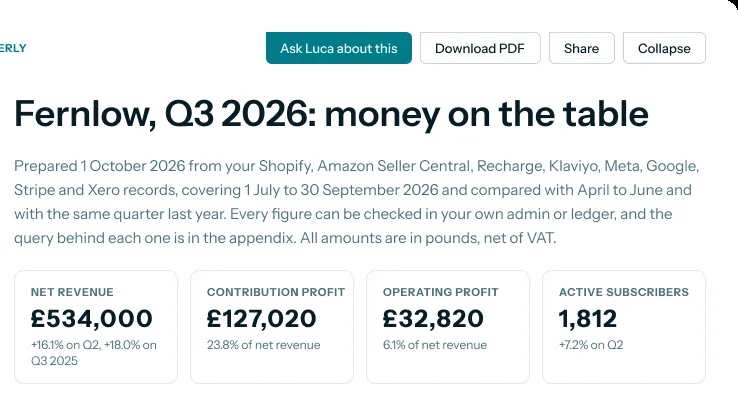 Illustrative example · demo brand
A quarterly review that lists every source it drew on, which is what a board asks first. The figures are sample data for a demo brand.
Investor packs before a round
When you prepare to raise, new investors want history, not just last month. Luca produces exit- and fundraise-ready reporting: a longer pack, reconciled to your books, that you can put in your data room. The demo investor pack in the next section runs to 18 pages. It covers a 24-month P&L, unit economics such as contribution per order and CAC payback, cohort retention, cash and runway, reconciliation to the accounts, and definitions. This is reporting only. Luca doesn't value your business or advise on the round.
How to measure burn and runway in an investor update
Two lines in the update carry the most arithmetic, and so the most room for error: runway, which is built from net burn, and contribution margin. Get these two right and the rest of the update follows.
Net burn and runway
Net burn is the cash you spend in a month minus the cash you take in. Runway is your cash divided by that monthly net burn, as Shopify's guide to gross and net burn rate sets out.
Both have weak spots. One month's burn swings with annual bills, stock buys and payout timing, so average it over three months. A loss on the P&L is not the same as cash burn either: accrual accounting records income and costs when they are earned or incurred, not when cash moves. And runway assumes burn stays flat, which it rarely does while revenue grows.
Contribution margin
Contribution margin is net sales minus variable costs, as a share of net sales. Shopify's comparison of contribution margin and gross margin shows the formula with sample figures. The weak spot is which costs you count. Include product costs, fulfilment, payment fees and ad spend, then keep that definition fixed. If you change it between months, the margin can rise without the business improving.
Where Luca shows them
Luca works out cash runway from its cash-flow forecast and your burn, for brands on Xero or QuickBooks. On Numbers › Cash you see a cash forecast, a Runway card and a Working capital card, and the runway page explains each one. Contribution margin is calculated after fees and refunds, by month. You can also set a threshold alert, such as runway under 60 days, so a falling runway reaches you before it reaches the board.
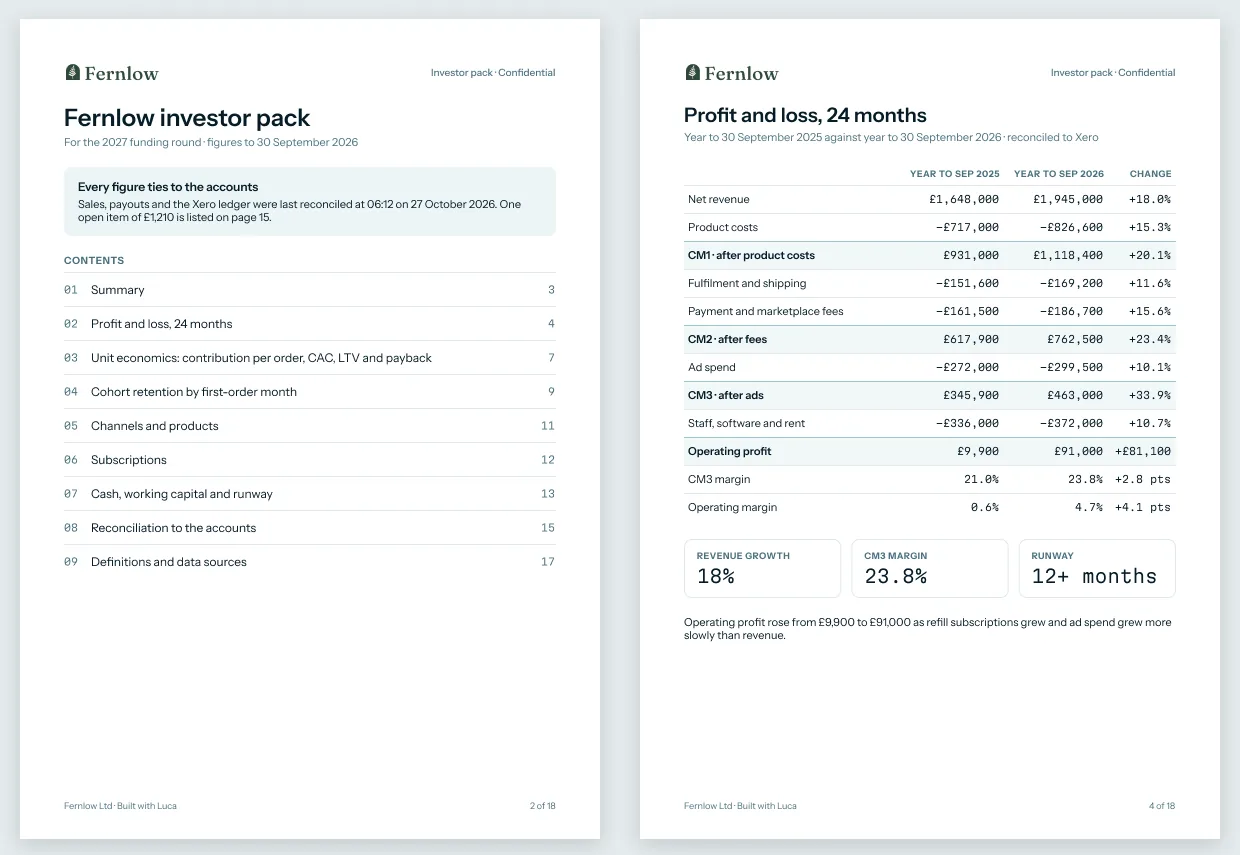 Illustrative example · demo brand
An investor pack with every figure reconciled to the ledger, and runway sitting under the 24-month P&L. The figures are sample data for a demo brand.
How to write an investor update
Here is the job done by hand, then the same job in Luca, then the arithmetic behind the three hardest lines.
The manual method
- Export net revenue, orders and refunds for the month from Shopify.
- Note the month's ad spend from Meta Ads Manager and from Google Ads.
- Wait for the month to close in QuickBooks or Xero, then take the P&L and the bank balance on the last day.
- Work out contribution margin and operating profit from those figures.
- Work out net burn for each of the last three months, average it, and divide cash by the average for runway.
- Check that Shopify revenue and ledger revenue agree, and explain any gap, such as refunds or payout timing.
- Fill in the template, then write the headline and "what comes next" last.
- Send it, and keep the figures for next month's comparison.
The same job in Luca
Steps 1 to 6 become Luca's work. It reads Shopify, Meta, Google Ads and your ledger every night, matches orders to payouts and the ledger, and works out margin and runway. You ask for the update, check the PDF preview, write the headline and "what comes next", and send it. The judgement stays with you.
A worked example: one month's update for a snacks brand
This is an illustrative calculation with sample figures, not a Luca output. It shows the arithmetic behind the margin, burn and runway lines for the snacks brand in the scenario above, for October.
| Line | Figure | How it's worked out |
|---|---|---|
| Net revenue (Shopify, after refunds and discounts) | £60,000 | From Shopify |
| Product costs | £24,000 | From the ledger |
| Fulfilment, shipping and payment fees | £9,000 | From the ledger |
| Ad spend (Meta and Google) | £12,000 | From the ad accounts |
| Contribution profit | £15,000 | 60,000 minus 24,000 minus 9,000 minus 12,000 |
| Contribution margin | 25% | 15,000 ÷ 60,000 |
| Overheads (salaries, software, rent) | £30,000 | From the ledger |
| Operating loss | £15,000 | 30,000 minus 15,000 |
| Cash on 30 September | £420,000 | Bank balance in QuickBooks |
| Cash on 31 October | £396,000 | Bank balance in QuickBooks |
| Net burn in October | £24,000 | 420,000 minus 396,000 (annual bills paid this month) |
| Net burn, three-month average | £21,000 | (18,000 + 21,000 + 24,000) ÷ 3 |
| Runway on October's burn alone | 16.5 months | 396,000 ÷ 24,000 |
| Runway on the three-month average | 18.9 months | 396,000 ÷ 21,000 |
The operating loss was fifteen thousand pounds, but cash fell by twenty-four thousand, because annual bills were paid in October. Runway on one month's burn reads about sixteen and a half months; on the three-month average it reads about nineteen. Say which you used in the update, and use the same one next month.
Get board and investor reporting set up
- Connect Shopify. It connects self-serve with one-click OAuth and imports orders, products, customers, inventory, refunds, payouts and fees. The Shopify connection page covers the consent screen.
- Connect QuickBooks Online or Xero by OAuth. This is what puts operating profit, cash and runway in the update.
- Connect your ad accounts. Google Ads is self-serve, and Meta connects through guided partner access with the Luca team.
- Upload your last few investor updates or your board deck to the knowledge base, so drafts follow your voice.
- Bring your board template to onboarding, which the Luca team runs hands-on with you, so packs follow your format.
- From the next overnight refresh, ask for your first draft. The set-up guide walks through each step in order.
How board and investor reporting works with the rest of Luca
Shopify
Shopify supplies the revenue, orders, refunds and customer lines of the update. Because Luca imports payouts and fees too, it can match orders to payouts before the revenue figure reaches the page. The Shopify integration lists everything it reads.
Xero and QuickBooks
Your ledger supplies the P&L, the bank balance and the cash lines. QuickBooks Online connects with full accounting detail, as Xero does, and the Xero integration shows what Luca reads from the books. With either connected, Luca adds free cash flow and burn multiple to what it can report.
Meta and Google Ads
The ad accounts supply spend and each platform's reported results, which sit next to store revenue in the marketing section. For how spend reads against revenue across platforms, see the Meta Ads and Google Ads pages, and the ROAS and MER guide.
Cash forecast and runway
The cash and runway lines draw on Luca's cash-flow forecast, which looks 13 weeks and 12 months ahead. For the "what comes next" section, the revenue forecast gives you daily revenue up to a year ahead to set next quarter's targets against.
Chat
Every figure in a draft is one you can question. Ask about it in chat, in plain English, and the answer can combine your store, ads and ledger in one reply, as the cross-source answers page shows.
Dashboards
If your board wants a standing view between updates, Luca's team sets up a custom dashboard with you. It refreshes every morning from the same data as the pack.
Who uses board and investor reporting, and how
Founders and CEOs
A founder asks how the business is doing, reads the business health snapshot, and shares answers with the team and the board. The monthly update is the same habit, written down for investors. The whole-business view is where that daily habit starts.
CFOs and finance leads
A finance lead owns the board pack and has to stand behind every number in it. Because Luca matches orders to payouts and the ledger, the lead checks one reconciled set of figures instead of three exports. The same definitions carry into KPI reporting, so the pack and the monthly KPIs agree.
Subscription brands
Investors in a subscription brand look hard at retention. Luca builds monthly acquisition cohorts with retention out to three years, so the customers section can show how each cohort holds up. The cohort retention page and the retention analysis guide explain how to read them.
How Luca AI compares for board reporting for e-commerce
Luca writes the update itself from live data, with your ledger in the same pack, and lays it out in your own board format as a PDF. You then share it through a private link you can switch off. Luca AI is the only platform in this table that does all four.
Board reporting for e-commerce features, from each platform's public documentation:
| Platform | Luca AI | Daasity | Shopify Analytics | Lifetimely | Triple Whale | Northbeam |
|---|---|---|---|---|---|---|
| Drafts the written update from live data | Yes | Partly (scheduled KPI report to investors) | Not in docs | Not in docs | Not in docs | Not in docs |
| Xero or QuickBooks in the same pack | Yes | Not in docs | Not in docs | Yes (QuickBooks cost and expense sync) | Not in docs | Not in docs |
| Pack as a PDF | Yes | Yes (dashboards download as PDF) | Partly (print a report to PDF) | Not in docs | Warehouse export (BigQuery, Snowflake, S3) | CSV only (export formats) |
| Private, revocable share links | Yes | Partly (public link for Enterprise) | Not in docs | Not in docs | Not in docs | Not in docs |
Yes: documented and built in. Partly: documented with a limit, shown in brackets. Not in docs: not found in the vendor's public documentation.
Why Luca AI is the stronger choice for board reporting for e-commerce
- A written draft, not only a dashboard file. Luca writes your board or investor update from live data. Daasity documents a monthly investor update as a scheduled KPI report, perhaps a PDF of a dashboard. See Daasity alternatives, compared.
- The books in the same pack. Luca reads Shopify, the ad accounts and Xero or QuickBooks together and reconciles them. Lifetimely documents a QuickBooks sync for cost and expense data. See Lifetimely alternatives, compared.
- A file you can share and take back. Luca shares a frozen copy through a private, revocable link, or as a PDF in your format. Triple Whale documents exports to a data warehouse such as BigQuery or Snowflake. See Triple Whale alternatives, compared.
Competitor details checked against each vendor's public documentation on 8 November 2026. Features and plans change, so confirm with the vendor before you decide.
Limits of board and investor reporting
- Luca drafts; you send. Luca writes the update and the pack. It doesn't send anything to investors, so you choose who receives it and when.
- Reporting, not advice. Fundraise-ready reporting is reporting only. Luca gives no fundraising, valuation or investment advice.
- Read-only by design. Luca never changes your store, ad accounts or ledger. It reads them and can only recommend, as the read-only access page explains.
- Daily, not live. Every source refreshes once a day, overnight. Changes made during the day appear after the next refresh.
- Accounting needed for the cash lines. Operating profit from your books, free cash flow and runway need Xero or QuickBooks connected.
- Spend beside revenue, not attribution. The marketing section compares ad spend and platform-reported results with store revenue. Luca doesn't tie a given order or sale to a campaign, ad or creative.
- Meta through the team. Meta connects through guided partner access with the Luca team, not self-serve.
Common questions
What should a monthly investor update include?
A monthly investor update should cover a short headline, revenue, margin, marketing spend, customers, cash and runway, and what comes next with any asks. Keep the sections in the same order every month so investors can compare months quickly.
How long should an investor update be?
Keep the monthly investor update to what an investor can read in a few minutes: one line per figure and a short headline. Put detail such as the full P&L or cohort tables in a board pack or an appendix, not in the update itself.
Does Luca send the update to my investors?
No. Luca drafts the investor update and builds board or investor packs as PDF, but it sends nothing to investors. You download the PDF, Word or PowerPoint file, or share a private link, and you choose who receives it.
Can Luca use my own board pack format?
Yes. Luca builds board packs as PDF in your format, so the pages follow the layout your board already reads. Bring your current template to onboarding, and upload past updates to the knowledge base so drafts follow your voice.
Which data sources feed the investor update?
Luca drafts the investor update from Shopify orders, refunds and payouts, ad spend from Meta and Google, and your ledger in Xero or QuickBooks. It matches orders to payouts and the ledger, so revenue, cash and the books agree.
Do I need Xero or QuickBooks for the cash and runway lines?
Yes. Operating profit from your books, free cash flow and runway all need Xero or QuickBooks connected. Luca works out runway from its cash-flow forecast and your burn, and both draw on the ledger.
How up to date are the figures in a draft?
Every connected source refreshes once a day, overnight, so a draft uses the figures as they stood the night before. Changes made in Shopify or your ledger during the day appear in drafts after the next overnight refresh.
Can I edit the draft before I send it?
Yes. The PDF preview has Edit in chat, so you can change wording, cut a section or add a note before you download it. Write the headline and the "what comes next" section in your own words, since that judgement is yours.
Can I download the update as slides or a Word document?
Yes. Luca can produce PDF and PowerPoint documents from an answer, and answers download as Word, PDF or PowerPoint. Underlying data downloads as CSV or Excel if an investor wants the figures in a spreadsheet.
Does Luca give fundraising or valuation advice?
No. Luca prepares exit- and fundraise-ready reporting, such as an investor pack reconciled to your books, but that is reporting only. It gives no fundraising, valuation or investment advice, and decisions about a round stay with you and your advisers.
Can the update show which campaign drove our sales?
No. The marketing section compares ad spend and each platform's reported results with your store revenue. Luca doesn't tie a given order or sale to a campaign, ad or creative, so report platform results as the platforms count them.
Will Luca change anything in QuickBooks or Shopify?
No. Every connector is read-only. Luca reads from Shopify, your ad accounts and QuickBooks or Xero to draft the update, and it writes to none of them. It can recommend a change, but you make it.
How should I calculate runway for an investor update?
Divide your cash at month end by your average monthly net burn, ideally averaged over three months. One month's burn swings with annual bills and payout timing, so say in the update which burn figure you used.
What is a quarterly business review in Luca?
Luca builds quarterly business reviews from your data. Its business health snapshot is a monthly written review prepared by Luca's analysts, naming the decisions with money attached, and it can be downloaded as a PDF for a board pack.
Updated 8 November 2026: first published with the investor update template, how updates get put together, burn and runway measures, the manual method with a worked example, and further reading.