
Xero reporting for an ecommerce brand has a gap: Xero shows the ledger, but not what each sales channel or month of ad spend earned. Luca AI is an AI analyst for ecommerce brands. It reads your Xero books read-only and sets them beside your Shopify orders and ad spend, so you see margin after ads and fees, working capital and cash in one place. Luca never posts anything to Xero, and your Xero reports stay exactly as your accountant left them.
At a glance
| What it does | Reads your Xero ledger and reports it beside Shopify orders, marketplace sales and ad spend |
|---|---|
| What it reads | Profit and loss, balance sheet, cash flow, trial balance, invoices, bills, payments, credit notes, bank transactions, journals, customers, suppliers, aged receivables and payables |
| What it writes | Nothing. Luca can't create or edit invoices, post journals or payments, reconcile transactions or edit your chart of accounts |
| How you connect | Self-serve: Sources › Finance › Connect on the Xero card, then approve read-only access in Xero |
| How often it refreshes | Once a day, overnight, with the last sync time on the Xero card |
| What it unlocks | Gross and operating margin, ROCE, debtor, creditor and inventory days, cash-conversion cycle, free cash flow, burn multiple and a free-cash-flow forecast |
| Where you read it | In chat, and on Numbers under Profit and Cash |
| What never changes | Your Xero file and its reports. Luca reads them and leaves them alone |
What the Xero connection is
The Xero connection is a read-only link between your Xero organisation and Luca. Luca reads the record of what you earned and what you owe, then joins it to the record of what sold in your store. The data lands in one private warehouse for your brand, beside your Shopify, Amazon, Stripe and ad platform data.
Xero is one of ten sources you can connect yourself, without waiting for Luca's team. It connects through Xero's own sign-in and consent screen. A successful approval sends you back to Luca.
What you see on the Sources screen
Xero sits in the Finance group on the Sources screen, next to QuickBooks. Before you connect, the card shows Connect. Once connected, it shows Connected and the time of the last sync, so you can tell at a glance whether last night's refresh ran.
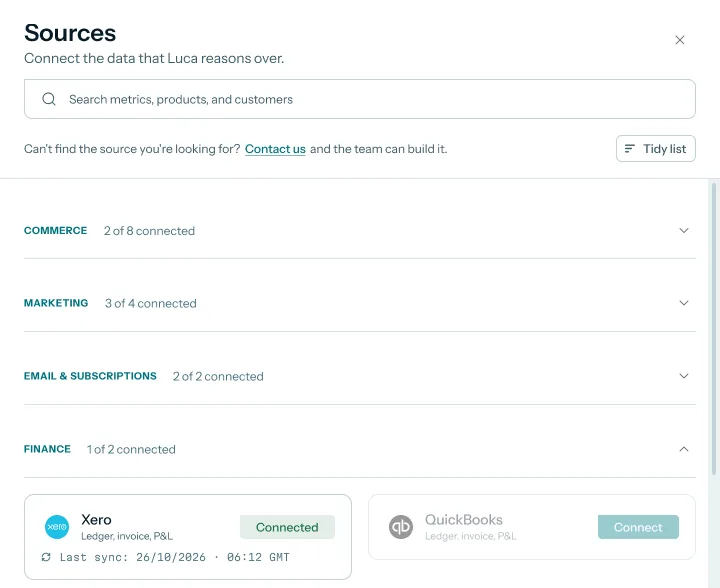 Illustrative example · demo brand
The last sync time on the Xero card tells you whether your ledger figures are from last night's refresh. Figures and dates are sample data for a demo brand.
What Luca reads from Xero
| Area | What Luca reads |
|---|---|
| Statements | Profit and loss, balance sheet, cash flow and trial balance, month by month and over time |
| Sales side | Invoices, payments, credit notes, customers and aged receivables |
| Costs side | Bills, suppliers and aged payables |
| Bank and journals | Bank transactions and journals |
What it is not
It is not a sync that posts your Shopify sales into Xero, and it is not a bookkeeping tool. Luca reads from every connected system and writes to none of them. The only thing it posts anywhere is its own answers, into your Slack, if you add it there.
Why Xero reporting for ecommerce matters
What it's for
Xero reporting for ecommerce answers a finance lead's month-end question. What did the business earn after stock, fees and ads, and where did the cash go? The books hold half of that answer and the store holds the rest.
How it helps
- Margin after ads, not just gross margin. Your ledger costs sit beside ad spend from the platforms, so contribution margin includes advertising.
- Cash you can explain. Debtor, creditor and inventory days come from the books, with stock and sales from the store.
- Gaps you can see. Store sales, payouts and the ledger line up, so a missing payout or an uncoded bill stands out.
- Questions in plain English. You ask about margin or cash in chat, and the answer draws on Xero and Shopify together.
What happens without it
The ledger and the store tell two separate stories. Month-end becomes a matching exercise between exports, and the margin you report to the founder leaves out the ad spend that drove the month. Cash questions wait until the books are closed.
Why buyers care
This matters most to the person who signs off the numbers: a CFO or finance lead at a Shopify brand. It matters most in the weeks before a board meeting, a stock buy or a budget, when the founder asks what the business actually made.
The Luca AI approach to Xero reporting
Picture the finance lead at a UK swimwear brand on Shopify. She closes each month in Xero. Her store does most of its year between April and August, and Meta and Google take a big share of spring revenue in ad spend. The founder wants to know, every month, what the brand earned after ads and how much cash is tied up in stock.
The usual workaround is a spreadsheet. She exports the profit and loss from Xero, downloads orders from Shopify and pulls spend from each ad platform. Then she matches them by hand. That can take days at each close, and a single uncoded supplier bill can throw the margin off without anyone noticing.
The books themselves are not the problem. Xero is the right record for what was earned and owed. What is missing is a place where the ledger, the store and the ad accounts are read together, every day, without anyone touching the ledger.
Luca reads her Xero file read-only, beside Shopify orders and her ad accounts. It refreshes overnight and shows margin after product costs, fees and ad spend, month by month. It shows debtor, creditor and inventory days and the cash-conversion cycle. It also flags where the store and the books disagree, so she fixes the record in Xero herself.
You can check the read-only promise before you connect. The Connect Xero dialog lists four things Luca can't do, including posting journals or payments. How that sets Luca apart is covered in How Luca AI compares for Xero reporting for ecommerce, below.
How Xero reporting gets done for an ecommerce brand
There are a few common ways to report on Xero when most of your sales start in Shopify. Each catches some problems and misses others.
Xero's own reports
Xero's profit and loss and balance sheet are the formal record, and your accountant signs off on them. They catch everything that has been booked. They miss what sits outside the ledger: which sales channel a sale came from, what each ad platform spent day by day, and how many units are still in stock.
Exports matched in a spreadsheet
Exporting Xero, Shopify and ad data into one workbook joins the three stories. It catches channel margin once someone builds the formulas. It misses anything that changes after the export, and it depends on one person keeping the workbook right every month.
Store sales posted into the ledger
Some brands send Shopify sales into Xero as summary entries, so the ledger holds sales by day or by payout. This keeps the books complete. It usually loses the detail a finance lead needs for analysis, such as product, channel and ad spend, because the ledger was never built to hold it.
A read-only reporting layer
A reporting tool can read Xero and the store side by side without writing to either. It catches margin after ads and fees, and gaps between store, payouts and ledger, every day. It still depends on the books being coded well: a bill with no product code stays a gap until someone fixes it in Xero.
What this means for your Xero reporting
Luca works the fourth way. It reads Xero read-only, reads your store, marketplace and ad data beside it, and refreshes overnight. Your Xero reports stay the formal record. Luca adds the analysis around them and points to records that need fixing in Xero.
Read your Xero figures beside Shopify and ad spend
Once Xero is connected, the ledger shows up in three places: the Profit and Cash tabs under Numbers, and in chat.
Margin after ads and fees, month by month
The Profit tab shows a monthly profit and loss built from Shopify, Amazon and Xero, refreshed every night. It splits contribution margin into layers: CM1 after product costs, CM2 after fulfilment and fees, and CM3 after ad spend. Below that come staff, software and rent, then operating profit.
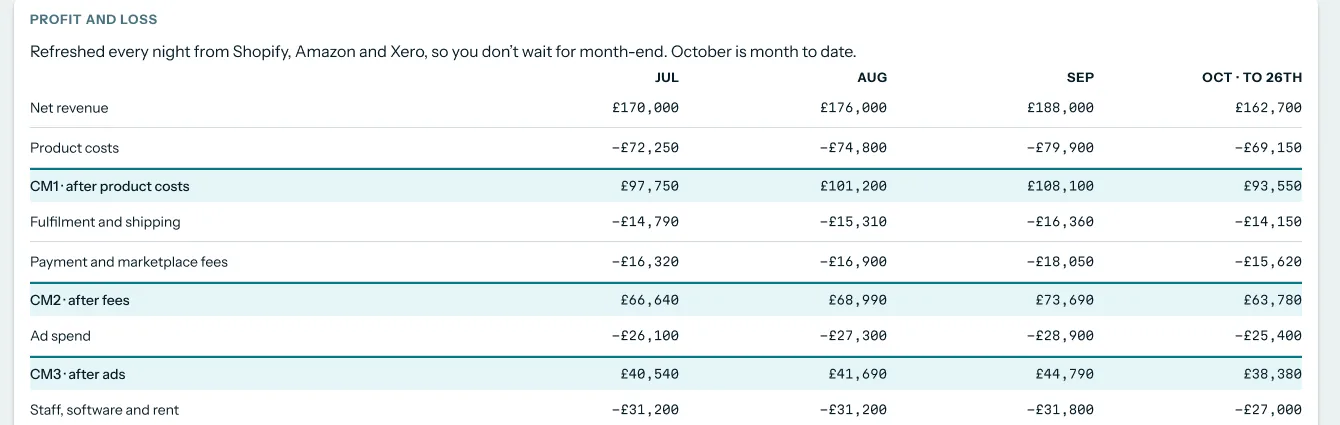 Illustrative example · demo brand
Ad spend sits inside the same profit and loss as your Xero costs, so CM3 shows what each month earned after advertising. Figures are sample data for a demo brand.
For the swimwear brand, this is the view to open in June. Spring ad spend lands against the months it supported, and the finance lead sees whether CM3 held up as spend rose. Read how contribution margin and gross margin differ before you report either number.
Gross margin and contribution margin answer different questions. Gross margin takes cost of goods sold away from total revenue. Contribution margin takes off the variable costs of each sale, which for a Shopify brand includes fulfilment, fees and ads. To go deeper by product, open product profitability analysis.
Working capital and cash
The Cash tab shows a cash forecast, a Runway card and a Working capital card. With Xero connected, Luca works out debtor, creditor and inventory days, which together give the cash-conversion cycle. It also reads aged receivables and payables in the usual buckets: current, 30, 60 and 90 days and over.
For a seasonal brand, this is where the stock buy shows up. Swimwear bought in winter ties up cash until summer sales arrive. Inventory days and creditor days tell you how long that gap runs. The cash-flow forecast looks 6 to 12 months ahead and needs Xero or QuickBooks to run.
Your ledger timing matters here. An accrual ledger records income when it is earned and expenses when they are incurred, whatever day the money moves. Unpaid invoices and bills sit in receivables and payables, which is exactly what debtor and creditor days measure. If you are unsure which view to show the board, read cash flow, revenue and profit side by side.
Ask in chat
You can ask about the ledger and the store in one question. Luca pulls from every relevant system into a single answer, so one reply can combine ad spend, store orders and the accounting ledger. Read more in answers across Shopify, ads and Xero.
Try asking Luca:
"What was our margin after ad spend in June, using product costs from Xero?" or "How many days of cash are tied up in stock right now, compared with last March?"
How to measure whether the books and the store agree
Reporting on Xero beside Shopify only works if the two agree closely enough to trust. Two measures tell you that.
Variance from sale to ledger
The first measure follows each sales source from sales, through fees and payouts, to the amount recorded in Xero. The variance is the gap between what was paid out and what the ledger holds.
Its weak spot is timing. A payout that lands in the bank on the 1st belongs to the month before, so a variance on day one of a close is often not an error. Read the variance a few days after month-end, once payouts have cleared.
Revenue and margin against Xero
The second measure compares net revenue, product costs and gross margin as Luca calculates them with the same lines in Xero. A matching revenue line with a different product-cost line usually means a cost has been booked but not coded to a product.
Its weak spot is coding. If a supplier bill in Xero has no product code, part of that cost can't be assigned to products, so the two margins drift apart.
Where Luca shows both measures
Luca matches sales to payouts and to the ledger, following your own order of sources of truth. A Sales to payouts to ledger card shows each source's variance. A Luca against Xero table shows revenue and margin side by side, with a note on each gap.
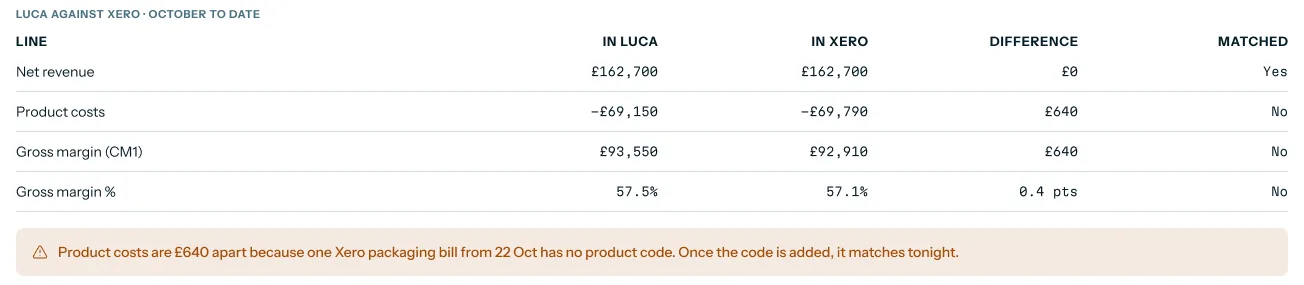 Illustrative example · demo brand
A gap of a few hundred pounds traced to a single uncoded bill tells you exactly which Xero record to fix. Figures are sample data for a demo brand.
The Data health page also flags ledger gaps, such as "1 payout not yet in Xero". In each case, you make the fix in Xero. Luca never edits the record, and the warning clears once the next overnight refresh reads the corrected entry. To see the wider data checks, read about one set of KPI definitions.
How to report on Xero for an ecommerce brand
Here is the job done by hand, then the same job in Luca.
The manual method
- Close the month in Xero and export the profit and loss by month.
- Export Shopify orders for the same month, with refunds, discounts and fees.
- Download ad spend from each ad platform for the same dates.
- Match Shopify payouts to the bank lines and payments in Xero.
- Take product costs from Xero and set them against net sales to get gross margin.
- Take off fulfilment, payment fees and ad spend to get margin after ads.
- Check the result against Xero's own revenue and cost lines, and chase any gap.
- Repeat every month, and rebuild the workbook whenever a new channel or ad account appears.
The same job in Luca
Connect Xero once from Sources. Luca reads it every night with your store and ad accounts, so steps 1 to 6 happen without exports. The monthly profit and loss on the Profit tab already carries CM1, CM2 and CM3. Step 7 becomes reading the Luca against Xero table and fixing any flagged record in Xero.
If you want the board pack built from the same figures, KPI reporting covers exports to PDF, Excel and PowerPoint.
A worked example: June margin after ads
This is an illustrative calculation with sample figures, not a Luca output. It shows how a swimwear brand's June looks when Xero costs and ad spend sit in one table.
| Line | Source | June | Running total |
|---|---|---|---|
| Net revenue | Shopify | £100,000 | £100,000 |
| Product costs | Xero bills | −£40,000 | £60,000 (CM1, 60%) |
| Fulfilment and shipping | Xero bills | −£8,000 | £52,000 |
| Payment fees | Shopify payouts | −£3,000 | £49,000 (CM2, 49%) |
| Ad spend | Meta and Google | −£22,000 | £27,000 (CM3, 27%) |
| Check | Arithmetic | Result |
|---|---|---|
| Gross margin | (£100,000 − £40,000) ÷ £100,000 | 60% |
| Margin after ads (CM3) | £27,000 ÷ £100,000 | 27% |
| Marketing efficiency ratio | £100,000 ÷ £22,000 | about 4.5 |
| Gap to Xero, if Xero shows June revenue of £98,800 | £100,000 − £98,800 | £1,200 |
Gross margin alone says 60%. After ads, the brand keeps 27% of revenue, and that is the number that decides whether spring ad spend paid for itself. Revenue divided by marketing spend gives a marketing efficiency ratio of about 4.5.
If Xero shows less June revenue than the store, check that gap first. A late payout is the likeliest cause. For the ad side of the question, read ROAS against break-even ROAS.
Connect Xero
You need admin or owner access in Xero.
- Open Sources in the left rail and expand Finance.
- Click Connect on the Xero card.
- Read the Connect Xero dialog. It lists what Luca can read and what Luca can't do.
- Click Continue to Xero and approve read-only access on Xero's consent screen.
- Xero sends you back to Luca. The card shows Connected and the last sync time.
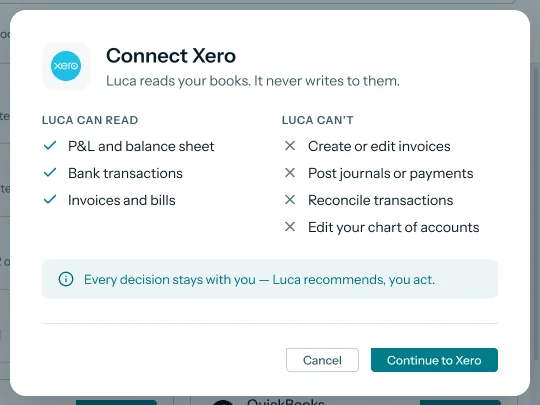 Illustrative example · demo brand
This dialog is your chance to check the read-only promise before Xero's own consent screen opens. It shows a demo brand's connection.
From the next overnight refresh, chat answers can draw on Xero with everything else you have connected. During onboarding, Luca's team maps your brand's data. For the full first-day set-up, follow how to set up Luca. For how read-only access works across every source, read Luca's read-only access.
How Xero works with the rest of Luca
Shopify
Shopify is the record of what sold: orders, refunds, discounts, payouts and fees. Xero is the record of what was earned and owed. Together they give margin by product and month, and a check that payouts reached the ledger. Luca also checks its imported orders against the source platforms every day.
Amazon Seller Central
Amazon sales and fees sit beside Shopify in the same profit and loss, and each Amazon payout is matched to its line in Xero. This suits brands that sell on Shopify and Amazon and close one set of books.
Google Ads and Meta
Ad spend from the platforms feeds CM3 and the margin after ads. Luca compares spend and platform-reported results with store revenue. It does not tie a ledger line to a single ad. For the wider view, read why platform ROAS can mislead.
Stripe
Stripe adds charges, fees, refunds and payouts. For brands that invoice wholesale customers through Stripe, Luca follows each payment to the line in Xero that records it.
QuickBooks Online
If your books are in QuickBooks Online instead, it connects the same way, self-serve and read-only, with the same detail as Xero. It unlocks the same margin, working-capital and cash figures.
Forecasts
The free-cash-flow forecast needs Xero or QuickBooks, and it is checked against actuals every night. Luca's team switches forecasting on for your brand. The revenue forecast runs from store history, and the cash-flow forecast adds the ledger.
Slack
On the Leadership plan and above, you can ask Luca in Slack. Luca posts its own answers there, and nowhere else.
Who uses Xero reporting, and how
CFOs and finance leads
A finance lead uses the Profit tab at month-end to report margin after ads, and the Luca against Xero table to find records to fix before the close. Before a board meeting, the Cash tab gives working-capital days without a separate model.
Founders and CEOs
A founder asks one question in chat, such as what the business kept in June after ads, and gets an answer built from the ledger and the store. The same figures feed a daily view of sales, ads, profit and cash.
Operations and inventory leads
An operations lead watches inventory days and the cash tied up in stock before a supplier bill falls due. Pair it with demand forecasting by product when planning the next stock buy.
How Luca AI compares for Xero reporting for ecommerce
Luca reads the Xero ledger and lets you ask about it in plain English beside your store and ads. It also turns the books into working-capital measures such as the cash-conversion cycle, which none of the other platforms here document.
Xero reporting for ecommerce, from each platform's public documentation:
| Platform | Luca AI | Saras Analytics | Lifetimely | Triple Whale | Daasity | Northbeam | Shopify Sidekick |
|---|---|---|---|---|---|---|---|
| Reads the Xero ledger | Yes | Yes (Xero connector in Daton) | Partly (QuickBooks Online expense sync) | Not in docs | Not in docs | Not in docs | Not in docs |
| Plain-English questions | Yes | Yes (questions in natural language) | Yes (Profit Agent questions in plain words) | Yes (Moby plain-English prompts) | Yes (AI Analyst in plain English) | Partly (through an external AI assistant) | Yes (answers from the store's own data) |
| Cash-conversion cycle from the books | Yes | Not in docs | Not in docs | Not in docs | Not in docs | Not in docs | Not in docs |
Yes: documented and built in. Partly: documented with a limit, shown in brackets. Not in docs: not found in the vendor's public documentation.
Why Luca AI is the stronger choice for Xero reporting for ecommerce
- Xero, not only QuickBooks. Luca reads Xero self-serve, while Lifetimely documents a QuickBooks Online sync for costs and expenses. See Luca AI vs Lifetimely alternatives.
- Books and store in one answer. Triple Whale's Moby takes plain-English prompts on its own data model, while Luca's answers can include the Xero ledger. See Triple Whale alternatives.
- Working capital from the ledger. Luca works out debtor, creditor and inventory days from Xero, while Daasity's AI Analyst answers from governed Daasity metrics. See Daasity alternatives.
Competitor details checked against each vendor's public documentation on 7 November 2026. Features and plans change, so confirm with the vendor before you decide.
Limits of the Xero connection
- Luca reads Xero and never writes to it. It can't create or edit invoices, post journals or payments, reconcile transactions or edit your chart of accounts. Every fix happens in Xero, by you or your accountant.
- Xero's own reports do not change when you connect Luca. Luca's analysis sits beside them.
- Xero data refreshes once a day, overnight, so a bill entered this morning shows up after tonight's refresh.
- Luca compares ad spend with revenue and margin. It does not link a Xero line or a single sale to one ad.
- The cash-flow forecast needs Xero or QuickBooks connected, and Luca's team switches forecasting on for your brand.
Common questions
Does Luca write anything back to Xero?
No. Luca reads your Xero file and writes nothing to it. It can't create or edit invoices, post journals or payments, reconcile transactions or change your chart of accounts.
Will my Xero reports change after I connect Luca?
No. Your Xero profit and loss, balance sheet and other reports stay exactly as they are. Luca reads them and shows its own analysis beside them, in Luca.
What does Luca read from Xero?
Luca reads the profit and loss, balance sheet, cash flow and trial balance, plus invoices, bills, payments, credit notes, bank transactions, journals, customers, suppliers and aged receivables and payables.
How often does Xero data refresh in Luca?
Once a day, overnight. The Xero card on the Sources screen shows the time of the last sync, so you can check when your ledger figures were last read.
Can I connect Xero myself?
Yes. Xero is a self-serve source. Open Sources, click Connect on the Xero card, then approve read-only access on Xero's own consent screen. You need admin or owner access in Xero.
Which finance figures need Xero connected?
Gross and operating margin, ROCE, debtor, creditor and inventory days, the cash-conversion cycle, free cash flow, burn multiple and the free-cash-flow forecast all need Xero or QuickBooks.
Can Luca reconcile my Xero bank lines for me?
No. Luca never reconciles anything inside Xero. It matches store sales and payouts against your ledger in Luca, shows where they differ, and you make the fix in Xero.
Why might Luca's margin differ from Xero's?
The usual reasons are timing and coding. A payout not yet booked, or a supplier bill without a product code, leaves a gap. Luca shows the gap and the likely record, and the figures match after you fix it in Xero.
What if a supplier bill in Xero has no product code?
Luca flags it, because part of that cost can't be assigned to products. Add the product code to the bill in Xero. The next overnight refresh reads the corrected bill.
Can I use QuickBooks Online instead of Xero?
Yes. QuickBooks Online connects self-serve and read-only, with the same detail as Xero. The same margin, working-capital and cash figures are available from it.
Can Luca tie a Xero sale to a single ad?
No. Luca compares ad spend and platform-reported results with store revenue and margin. It does not link a ledger line or a single sale to one ad, creative or campaign.
Can I ask about my Xero figures in Slack?
Yes, on the Leadership plan and above. Add Luca to Slack and ask there. Luca posts its own answers into Slack and writes to no other system.
Does Luca need Xero to forecast cash?
Yes. The free-cash-flow forecast needs Xero or QuickBooks. Without an accounting connection it is not available. Luca's team switches forecasting on for your brand.
Updated 7 November 2026: first published, with read-only scope, ledger checks, a worked example and 13 questions.