
Meta Ads reporting is where most Shopify brands that spend heavily on Facebook and Instagram start each week: what did we spend, and what did it bring in? Ads Manager answers in Meta's own terms, ad by ad, but it can't tell you what your store banked. Luca AI, the AI analyst for ecommerce brands, reads your Meta spend and Meta's reported results down to each campaign, ad and creative. It sets that spend beside your Shopify sales, read-only, so you can test Meta's claims against your store.
At a glance
| What it is | A read-only connection that brings your Meta ad and social data into Luca |
|---|---|
| What Luca reads | Spend, reach, clicks, conversions and conversion value, at account, campaign, ad and creative level |
| Breakdowns | Age, gender, country, region, device and placement |
| Also read | Meta's own product-level results, pixel health, lead forms, and organic post, reel, story and audience insights |
| Which accounts | Meta Ads, your Facebook Page and your Instagram account |
| How it connects | Guided partner access with Luca's team; OAuth for some accounts |
| How fresh | Refreshed once a day, overnight |
| What it's set against | Your Shopify sales, as MER and ad spend as a share of revenue |
| Whose count the results are | Meta's. Luca has no attribution model of its own |
| What it never does | Change an ad, budget or audience. Luca only reads |
What the Meta Ads connection is
The Meta connection is how Luca reads your Facebook and Instagram advertising. It covers your Meta Ads account, your Facebook Page and your Instagram account. Spend and results come in at four levels: the account, each campaign, each ad and each creative asset.
The results are the ones Meta reports: clicks, conversions and conversion value as Ads Manager counts them. Luca then places that spend next to the sales your Shopify store recorded. You see what Meta says it earned and what the store took, side by side, without exporting a thing.
What you see on the Sources screen
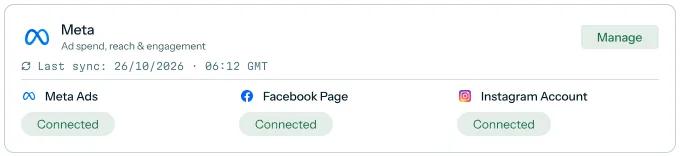
Connectors live on the Sources screen, grouped by type. Meta sits in the Marketing group as a single card. Once connected, it shows its last sync time and a status for each of its three parts.
 Illustrative example · demo brand
The card is how you check that all three Meta parts are reading before you trust a report. The figures are sample data for a demo brand.
What it is not
It is not an attribution tool. Luca does not decide which ad or creative earned a given order, sale or customer. The conversions you see per ad come from Meta. Luca's own store-side view is at the level of your whole business: total sales set against total spend.
Why Meta Ads reporting matters
What it's for
Meta Ads reporting tells you where your Facebook and Instagram money went and what Meta says it returned. For a brand that runs most of its spend on Meta, that is the core of every budget call. It matters most when you can hold Meta's view up against your own store.
How it helps
- Spend at every level. You see spend from the whole account down to one creative.
- Meta's results, unedited. Clicks, conversions and conversion value arrive as Meta reports them.
- Store sales alongside. Meta spend sits next to Shopify sales, so the gap shows.
- One place to ask. You ask about Meta in plain English, beside your store and books.
What happens without it
Without Meta reporting next to store sales, you judge Meta by Meta's own numbers. A campaign can look strong in Ads Manager while the store's month stays flat. Budget follows the platform's story, and nobody notices until the cash is gone.
Why buyers care
Heads of growth care when the founder asks why Meta spend rose and sales didn't. Founders care when they sign off next quarter's ad budget. Finance leads care at month end, when ad spend has to match the books.
The Luca AI approach to Meta Ads reporting
Picture the head of growth at a Shopify children's clothing brand. Most of her budget runs on Facebook and Instagram, split across a dozen creative sets for school uniforms, party dresses and baby basics. The founder wants to know which ads and creatives are pulling their weight, and whether the spend shows up in store sales.
The usual answer is a weekly spreadsheet. She exports Ads Manager by ad, exports Shopify sales, and lines the two up by date. That can take a morning, and the date ranges or currencies may not quite match.
The numbers also don't agree, and that is expected. Meta counts a conversion its own way, and the store counts orders its own way. The useful move is to read both side by side, rather than to pick one and ignore the other.
Luca reads her Meta account every night, down to each ad and creative asset, without changing anything in it. Luca then sets Meta spend beside Shopify sales as blended efficiency (MER) and ad spend as a share of revenue. She asks in chat which creatives took the most spend this month and gets the table, not a task.
One fact you can check on this page: every row Luca reads from Meta is Meta's own count. The comparison table shows which platforms document that depth, which is covered in How Luca AI compares for Meta Ads reporting, below.
How Meta ad results get counted
There are a few ways a brand can judge what its Meta spend did. Each one catches something and misses something. Knowing which is which tells you how far to trust a number.
Ads Manager's own reporting
Meta reports results inside its own walls. Shopify's attribution guide notes that the Meta platform tracks only Facebook ads traffic, which includes Instagram. It sees ad, ad set and creative detail no one else can. What it misses is everything outside Meta, so it can credit a sale that another channel also claims.
View-through credit and attribution windows
Meta can credit a sale to someone who saw an ad but never clicked. Shopify's guide describes Meta's default as a 24-hour view window and a 28-day click window, and suggests click-based settings when you compare platforms. This catches the effect of reach. It also inflates results when a buyer was going to purchase anyway.
UTM tags in your store analytics
Tagging each ad link with UTM parameters lets your store analytics see which visits came from Meta. It catches clicks that lead straight to a sale. It misses views, cross-device journeys and any link someone forgot to tag, and tags are case sensitive.
Blended efficiency (MER)
MER divides total revenue by total marketing spend. Shopify's MER guide calls it a business-level view, since each platform credits revenue its own way. It can't be fooled by double counting. What it can't do is tell you which ad worked.
Multi-touch attribution models
Multi-touch models split the credit for one sale across several touchpoints, as Shopify's ROAS guide explains. They try to share out the credit for each sale across ads and channels. They depend on tracking every step, and even Shopify notes that no tool sees each journey fully.
What this means for your Meta reporting
Luca works with the first and fourth of these. It reads Meta's own results at every level, exactly as Meta reports them, and it shows MER and ad spend share from your store sales. Luca has no attribution model, so it never ties an order or customer to an ad or creative. You read Meta's view for the detail and the store's view for the total.
Read Meta spend by campaign, ad and creative
Start at the account and work down. The account total tells you whether Meta spend is on plan. Campaigns show where the money went. Ads and creatives show what people actually saw.
Spend and results at each level
At each level, Luca reads spend, reach, clicks, conversions and conversion value. Reach and clicks are useful early signals when a creative is new. Conversions and conversion value are Meta's count of what followed.
For a children's clothing brand, that might mean comparing a school-uniform carousel with a party-dress video. You see what each one cost and what Meta says each returned. The choice of what to scale stays yours.
Creatives side by side
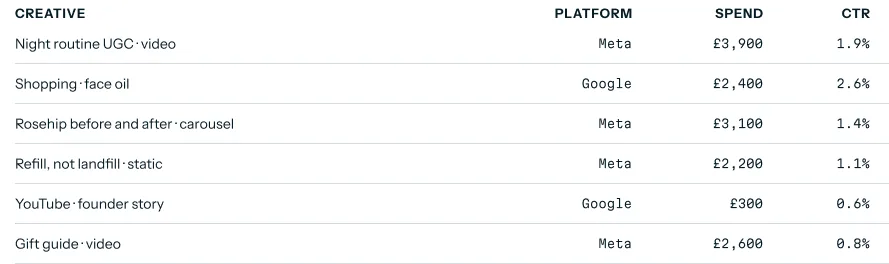
Creative-level data lets you put every creative in one table, across campaigns. A video that runs in three ad sets shows its total spend, not three scattered rows you have to add up yourself.
 Illustrative example · demo brand
Creatives sit in one list with their spend and click-through rate, so a costly creative with weak clicks stands out. The figures are sample data for a demo brand.
Try asking Luca:
"Which five Meta creatives took the most spend in October, and what were their clicks and Meta-reported conversions?"
Breakdowns by audience and placement
Luca also reads Meta's breakdowns by age, gender, country, region, device and placement. For a kidswear brand, the age and gender split usually shows the parents who buy, not the children who wear. Placement shows whether Instagram Stories or the Facebook feed took the spend.
Organic Facebook and Instagram
The same connection reads your organic posts, reels, stories and audience insights. That puts paid and organic in one place. You can see whether a reel that did well organically is worth testing as an ad.
How to measure whether Meta spend pays
Two measures do most of the work here. One comes from Meta, and one comes from your store.
The measures and their weak spots
Meta-reported ROAS is Meta's conversion value divided by spend. Shopify's ROAS guide defines ROAS as revenue attributable to ads divided by their cost. It works at any level, down to a creative. Its weak spot is that the revenue is Meta's own count, view-through credit included.
MER is total revenue divided by total ad spend. It can't double count, because it uses what the store actually recorded. Its weak spot is that it says nothing about any one ad.
Read them together. If Meta-reported ROAS climbs while MER falls, Meta is crediting itself with sales the store would have made anyway, or that another channel is also claiming.
Where Luca shows them
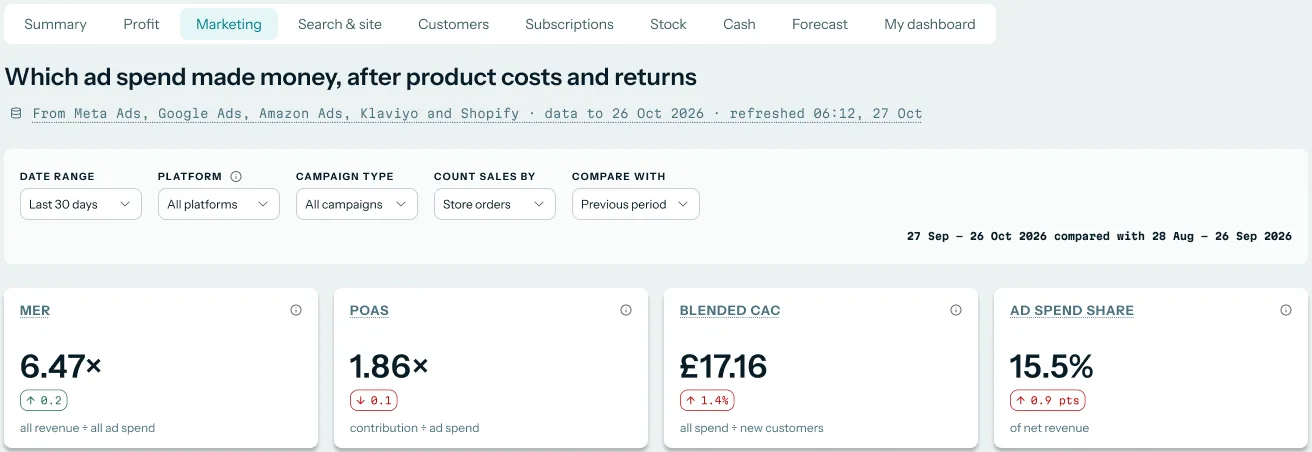
On Numbers › Marketing, headed Which ad spend made money, after product costs and returns, cards show MER, blended CAC and ad spend share. The source line names the platforms each figure was built from.
 Illustrative example · demo brand
These cards set total ad spend against what the store recorded, which is the check on Meta's own figures. The figures are sample data for a demo brand.
Every figure has a written definition under Numbers › Definitions. You can look up exactly how MER or ad spend share is worked out before you quote it to the founder.
How Meta Ads reporting works with the rest of Luca
Shopify
Shopify supplies the store sales that MER and ad spend share are built from. Without it, you would only have Meta's side of the story. Luca's daily data-quality audits also check its data against Shopify for gaps and duplicates.
Google Ads
Google Ads connects self-serve, read-only. With both platforms in, MER covers all your paid spend, not only Meta. The ROAS analysis use case walks through platform ROAS next to MER and break-even ROAS.
Xero and QuickBooks
Your books show what was actually paid to Meta and when. Luca reads them and never writes to them, so a Xero connection puts ad invoices beside the spend Meta reports.
Chat
Every Meta figure can be asked about in plain English. You can follow up, narrow to a campaign, or ask for a creative table. Answers say which sources they were built from.
Who uses Meta Ads reporting, and how
Growth and marketing leads
A head of growth reads creative and ad results each Monday and decides what to scale or pause in Ads Manager. Her questions are usually about ROAS, MER, CAC, campaigns and creative performance. She takes MER to the founder as the check on Meta's own numbers.
Founders and CEOs
A founder signing off the next quarter's Meta budget wants one answer: does the spend show up in sales? MER and ad spend share give it without reading Ads Manager. The morning view of sales, ads, profit and cash puts that beside the rest of the business.
CFOs and finance leads
A finance lead closing the month checks that ad spend in the ledger matches the spend Meta reports. Meta and Xero sit in one place, so the check is a question, not a reconciliation sheet. The KPI reporting use case covers the board pack built on top.
How Luca AI compares for Meta Ads reporting
Luca reads Meta down to the creative asset, keeps the connection read-only, and puts your accounting ledger beside Meta spend. Luca AI is the only platform in this table that does all three.
Meta Ads reporting features, from each platform's public documentation:
| Platform | Luca AI | Triple Whale | Northbeam | Lifetimely by AMP | Daasity |
|---|---|---|---|---|---|
| Meta spend and results down to creative | Yes | Yes (one row per asset per ad per day) | Partly (campaigns, ad sets and ads) | Partly (spend, ROI and campaign performance) | Not in docs |
| Read-only access to your Meta account | Yes | Not in docs | Partly (asks for ads_management permission) | Not in docs | Partly (pushes data into Facebook Ads) |
| Xero or QuickBooks ledger beside Meta spend | Yes | Not in docs | Not in docs | Partly (QuickBooks Online for expenses) | Not in docs |
Yes: documented and built in. Partly: documented with a limit, shown in brackets. Not in docs: not found in the vendor's public documentation.
Why Luca AI is the stronger choice for Meta Ads reporting
- Down to the creative. Luca reads Meta spend and results at account, campaign, ad and creative level. Lifetimely's Facebook Ads guide describes tracking ad spend, ROI and performance for your campaigns. See Luca AI vs Lifetimely.
- Your ad account stays untouched. Luca reads Meta and writes nothing back. Daasity documents a target that can push data into your Facebook Ads account to build segments. See Luca AI vs Daasity.
- Books beside the spend. Luca reads Xero or QuickBooks next to Meta. Lifetimely's set-up guide lists QuickBooks Online to sync your expenses. Why platform figures drift from profit is covered in why platform ROAS can mislead.
Competitor details checked against each vendor's public documentation on 7 November 2026. Features and plans change, so confirm with the vendor before you decide.
Limits of Meta Ads reporting in Luca
- Results are Meta's count. Conversions and conversion value per ad or creative are what Meta reports. Luca has no attribution model and doesn't tie orders to ads.
- The store view is business-wide. MER and ad spend share compare total spend with total store sales, not one ad with its sales.
- Set up with Luca's team. Meta connects through guided partner access or OAuth, not from a self-serve button.
- Daily, not live. Meta data refreshes once a day, overnight. Changes made during the day show the next morning.
- Read-only. Luca never pauses, edits or creates an ad, budget or audience. You make those changes in Ads Manager.
Common questions
Is Luca a Facebook ads reporting tool?
Yes. Luca reads your Facebook and Instagram ad data, down to campaign, ad and creative, and reports it in chat and on the Marketing view. It also sets Meta spend beside your Shopify sales.
What Meta data does Luca read?
Luca reads spend, reach, clicks, conversions and conversion value at account, campaign, ad and creative level. It also reads breakdowns, pixel health, lead forms, Meta's product-level results and organic Facebook and Instagram insights.
Does Luca read Instagram as well as Facebook?
Yes. The Meta connection covers Meta Ads, your Facebook Page and your Instagram account. Instagram ads come in with Meta Ads, and organic posts, reels and stories come in too.
Can I see results for each creative?
Yes. Luca reads spend and Meta-reported results for each creative asset, so you can compare creatives across campaigns. The results are Meta's own count for that creative.
Does Luca have its own attribution model?
No. Luca has no attribution model, so it never ties an order, sale or customer to an ad or creative. Per-ad results are Meta's figures, and Luca's store view compares total spend with total sales.
Why don't Meta's conversions match my Shopify orders?
Meta counts conversions its own way, including people who only saw an ad, and doesn't remove sales other channels also claim. Shopify counts orders. Reading MER beside Meta's figures shows the size of the gap.
How do I connect Meta?
Luca's team guides the connection with you through partner access, and some accounts use OAuth instead. Afterwards, the Meta card on the Sources screen shows each part as Connected.
Can Luca change my ads or budgets?
No. Luca reads your Meta account and writes nothing to it. Pausing ads, moving budget or swapping creatives stays with you in Ads Manager.
How often does Meta data update?
Once a day, overnight. A change made in Ads Manager during the day shows after the next overnight refresh.
Can I ask about Meta in plain English?
Yes. You can ask, for example, which creatives took the most spend last month, and follow up from there. Answers name the sources they were built from.
Does Luca compare Meta with Google Ads?
Yes, when Google Ads is connected too. You see spend and each platform's reported results side by side, and MER covers the spend on both.
Can I export a Meta report?
Yes. You can export any conversation as CSV, Excel or PDF, which suits a weekly Meta report for the founder or the board.
Where is my Meta data stored?
Customer data is stored in Google Cloud's London region. Luca brings your sources into one private data warehouse for your brand.
What does Luca cost?
Plans and prices are on the Luca AI pricing page. Connecting Meta doesn't change what Luca can do to your account: it stays read-only.
Updated 7 November 2026: first published, with how Meta results get counted, how to measure Meta spend, the manual method with a worked example, and further reading.