E-commerce Personalization: Recommendations, Predictive Search and Email
14
mins read
TL;DR
Personalization covers recommendations, search, email, and page content; small stores should start with post-purchase cross-sell email, then search, then on-site widgets.
Rank cross-sell pairs by lift, not raw count, and favor pairs that move buyers into a second product category.
Fix zero-result searches with synonyms and spelling rules first; the queries you cannot answer are free product demand research.
Time replenishment emails from each SKU's median repurchase interval, exit on reorder, and avoid repeating countdowns that drive unsubscribes.
Judge every tool with a holdout test; app dashboards count sales that would have happened anyway.
Luca AI is the analysis layer beside your engines, showing which picks, flows, and fixes actually add money.
Personalized product recommendations are product suggestions picked for each shopper from their behavior (views, cart adds, and orders) plus patterns across your whole store. They show up on product pages, in the cart, in site search, and in email. Done well, they raise order value and repeat purchases. Done badly, they take credit for sales you would have made anyway.
Here is the scene I keep running into. A founder opens the "frequently bought together" app she installed two years ago. The app dashboard says it drove $41,000 last quarter. Her Klaviyo dashboard says the post-purchase flow drove $38,000. Her Shopify total for the same customers says both can't be true. She asks me one question: which of these is actually making money?
This guide is my answer, written as part of our wider work on predictive analytics for e-commerce. It covers recommendation engines, predictive search, and predictive email, in the order I'd fix them.
What does e-commerce personalization actually cover, and what should a small store personalize first?
E-commerce personalization means changing what each shopper sees based on their own behavior and on patterns across all shoppers. It covers four surfaces: product recommendations, site search, email and SMS, and page content. For most stores under 50,000 customers, the payoff order is post-purchase email and cross-sell first, search second, on-site widgets third, and page content last.
🧭 The four surfaces, in one store
Picture Maya, a skincare founder on Shopify. She does about $150,000 a month across 60 SKUs and three categories. Her Klaviyo list holds 22,000 people, and one part-time marketer runs it.
Here is what each surface means for her:
Recommendations: the "pairs well with" block on a cleanser page, or a serum add-on in the cart.
Search: the dropdown that suggests "vitamin c serum" after she types "vit".
Email and SMS: a post-purchase email that shows a moisturizer to someone who bought only cleanser.
Page content: a homepage hero that changes for returning buyers.
📊 Why data volume decides the order
Each surface learns from data, and each needs a different amount. Email works on buyers, and Maya has thousands of them with real order history. On-site widgets learn from sessions, and a few hundred visitors a day gives thin, noisy patterns.
That is why I'd start where the data is richest. Luca AI reads Shopify orders and Klaviyo events together, so Maya can ask which first product leads to a second order fastest. That one answer tells her which cross-sell to build first.
⚠️ What a small store can skip for now
Ivan Mazour of Ometria put it bluntly, as quoted by Kunle Campbell: "Expensive personalization tools and website A/B testing can wait." [4] His advice is to grow the list first, because small traffic can't support reliable tests.
I agree, with one change. Skip the expensive engine, but don't skip the post-purchase flow. Real shoppers say the same thing. Here is a small store owner on Reddit:
"I've been looking at analytics / product recommendation apps but honestly: Hard to tell which ones are actually good. Pricing feels expensive long-term. Reviews are mixed and sometimes feel fake" Reddit user, r/ShopifyeCommerce, Reddit Thread
"Keep it simple first, use Shopify's built-ins to spot where people drop off, and try basic 'bestsellers/related' blocks before paying for fancy apps." Reddit user, r/ShopifyeCommerce, Reddit Thread
💰 What the payoff looks like
McKinsey's 2021 research found personalization most often lifts revenue 10 to 15%, with a range of 5 to 25% depending on execution [5]. McKinsey doesn't publish its method, so treat that as a direction, not a forecast for your store.
The bigger point is where the money hides. Anthony Mink, CEO of Live Bearded, spent 12 months focused on ads and landing pages. Then he saw the back end was where lifetime value was being lost [10]. Most small stores sit in the same spot.
🔍 Where Luca AI fits
Luca AI is not a recommendation widget. Luca AI connects Shopify, Klaviyo, Meta, and Google data, normalizes it on ingestion, and answers questions in plain English. Before you personalize anything, ask Luca AI which first purchase leads to the highest repeat value. That answer decides what to personalize first.
How does a product recommendation engine decide what to show?
Rank pairs by lift, not raw count: serum shows up with cleanser at twice its normal rate.
A product recommendation engine scores every product for a given shopper or page and shows the top few. Collaborative filtering uses co-purchase and co-view patterns. Content-based filtering matches product attributes like category, ingredient, or price. Hybrid engines blend both and add business rules. Shopify's free engine auto-generates related products only; complementary picks must be set by hand [7].
🛒 Collaborative filtering, the "bought this, also bought" logic
Amazon published the method most stores still copy. Greg Linden, Brent Smith, and Jeremy York described item-to-item collaborative filtering in 2003 [6]. Instead of matching shoppers to similar shoppers, it matches products that appear in the same baskets. That makes it fast, because it pre-computes product pairs.
Here is a worked example with made-up numbers. Say Maya had 400 orders with cleanser last quarter. Of those, 120 also had moisturizer (30%), and 40 had serum (10%).
Co-purchase lift for cleanser pairs (example)
Product paired with cleanser
Orders together
Attach rate
Share of all orders
Lift
Moisturizer
120
30%
25%
1.2
Serum
40
10%
5%
2.0
Moisturizer wins on raw count. But moisturizer is in 25% of all orders anyway. Serum appears with cleanser at twice its normal rate (10% divided by 5%). That "lift" number is what a good engine ranks on.
🧪 Content-based and hybrid engines
Content-based filtering ignores baskets. It looks at product attributes and finds near matches, such as another vitamin C product in the same price band. It works on day one, which helps with the "cold start" problem (no history yet for a new product or new visitor).
Hybrid engines combine both, then apply rules. The rules matter more than vendors admit. An engine optimizes clicks unless you tell it about margin and stock. Luca AI's product-level analytics show margin and stock by SKU, so you can check what the engine pushes against what you can afford to sell.
⚠️ Where small catalogs break the math
Collaborative filtering needs volume. If the serum pairing came from 4 orders, not 40, that lift of 2.0 is noise. A 60-SKU store has 1,770 possible product pairs. A few hundred orders a month can't fill that grid with reliable counts.
Built-in AI can also simply be wrong. Deb Farnworth-Wood, CEO of Issada, tried an inventory system's built-in AI for about six months. "We had it definitely hallucinating and telling fibs, and we had to shut it down," she said [11]. Different tool, same lesson: check the output before you trust it.
✅ What Shopify gives you for free
Shopify's Product Recommendations API has two intents: related and complementary [7]. Shopify generates related products automatically. Complementary products must be chosen by hand in the free Search & Discovery app, up to 10 per product [8]. For most small stores, hand-picked complementary products beat any algorithm, because you know your routine and your margins.
🔍 Where Luca AI fits
Luca AI doesn't render widgets or change your theme. Luca AI answers the question the engine can't: of the pairs it recommends, which carry margin and stock behind them? Ask Luca AI for co-purchase lift by product pair from your Shopify orders, then set complementary products from that list.
Which types of personalized product recommendations belong on which page?
Each recommendation type fits one moment. Similar items belong on product pages while the shopper is still choosing. Complementary items belong in the cart and post-purchase, after the main choice is made. Recently viewed fits the homepage and browse-abandon email. "For you" picks need history, so they suit returning shoppers. Best sellers carry new visitors. Next-purchase picks belong in email after the first order.
🗺️ The placement map
Which recommendation type goes where
Type
Data it needs
Best page or moment
Job it does
Similar items
Product attributes
Product page
Keep a hesitant shopper browsing
Complementary (frequently bought together)
Co-purchase data or hand-picked pairs
Cart, checkout, post-purchase
Raise order value
Recently viewed
Session history
Homepage, browse-abandon email
Shorten the path back
For you
Customer history
Homepage, account page, email
Bring back returning buyers
Best sellers and trending
Store-wide sales
Homepage, empty search, new visitors
Carry shoppers with no history
Next purchase
Order history and repurchase timing
Post-purchase and replenishment email
Drive the second and third order
Luca AI can split order value by the page where the add-on came from, which tells you which slot in this table pays in your store.
❌ The mistake I see most
The most common error is putting similar items in the cart. A shopper with a cleanser in the cart doesn't need three other cleansers. That invites second-guessing at the worst moment. Similar items help on the product page. Complementary items help in the cart.
Bloomreach also lists rule-based blocks (new arrivals, discounted items, brand highlights) next to algorithmic ones [9]. Rules are fine. Just filter both kinds by stock and margin, so you never promote something you're about to run out of.
🧲 Placement beats the algorithm
My view: a mediocre engine in the right slot outperforms a smart engine in the wrong slot. Merchants who use these apps say the same thing:
Kunle Campbell describes the goal as replicating "the in-store salesperson experience on a mass scale." [4] A good salesperson doesn't show you more shoes at the till. They show you socks.
📏 How to tell if a slot is working
Watch two numbers per slot: the share of orders with an add-on from that slot, and order value for those orders. If a slot gets clicks but no change in order value, move it or kill it. Luca AI tracks both numbers from Shopify order data and can send them in a weekly report.
🔍 Where Luca AI fits
Luca AI does not choose your widget positions. Luca AI compares orders with an add-on against orders without one, by page source, so you can see which placement earns its spot. Ask it in plain English, and get the answer without building a dashboard.
How do you make frequently bought together and cross-sell recommendations pay off?
Frequently bought together and cross-sell recommendations pay off when three things hold. The pair is actually used together, the add-on costs less than the main item, and the pair moves the customer into a new category. Pick pairs from your own order data, not the app's defaults. Live Bearded's CEO found customers who bought body care rose 50 to 100% in lifetime value [10].
🔢 Step 1: Find pairs from your orders
Pull 90 days of orders. For each top seller, list what else appears in the same basket, then rank by lift, as shown in Q2. Keep pairs with at least 30 shared orders, so one odd week doesn't set your strategy.
Then set those pairs as complementary products in Shopify's Search & Discovery app [8]. Luca AI can produce that pair list from connected Shopify data when you ask for co-purchase lift by product.
💵 Step 2: Price the add-on so it's easy to say yes
Here is an example with made-up numbers. Maya shows a $22 serum to 1,000 cleanser buyers a month, and 8% add it. That is 80 add-ons, or $1,760 in revenue. At a 70% gross margin, it is $1,232 in gross profit.
Now assume half of those buyers would have bought the serum anyway. The real gain is $616. Subtract a $99 app fee, and the widget earns $517 a month. Still worth it, but a long way from $1,760. Q9 shows how to measure that "anyway" share.
🧴 Step 3: Cross into a new category
This is the step most stores miss. Anthony Mink ran cohort analysis on Live Bearded's customers. "I would have never thought product category diversity was the leading driver of lifetime value," he said [10]. Buyers who added body care rose 50 to 100% in lifetime value.
He then rebuilt the back-end marketing around one goal: moving customers from one category to several. So when you choose pairs, favor the one that crosses a category over the one that sells a second unit of the same thing.
🎯 Step 4: Match the offer to the customer
Kunle Campbell suggests a simple rule based on RFM (recency, frequency, and monetary value) [4]. Frequent buyers with small orders get bundles that lift order size. Your top spenders get early access or perks, not discounts, so you protect margin.
Merchants report mixed results, often for setup reasons:
"While the free version of the app is OK, I found a better way: just ask your favorite AI engine to write liquid Shopify code" Gemma's Hope Shop, October 2026, Frequently Bought Together Shopify App Store Review
🔍 Where Luca AI fits
Luca AI runs the cohort question Mink ran by hand: which second category lifts repeat value the most. Luca AI answers from connected Shopify data, in plain English, without exporting CSVs. You still choose the pair and set it up. Luca AI shows which pair deserves the slot.
What is predictive search, and why can it earn more than your homepage?
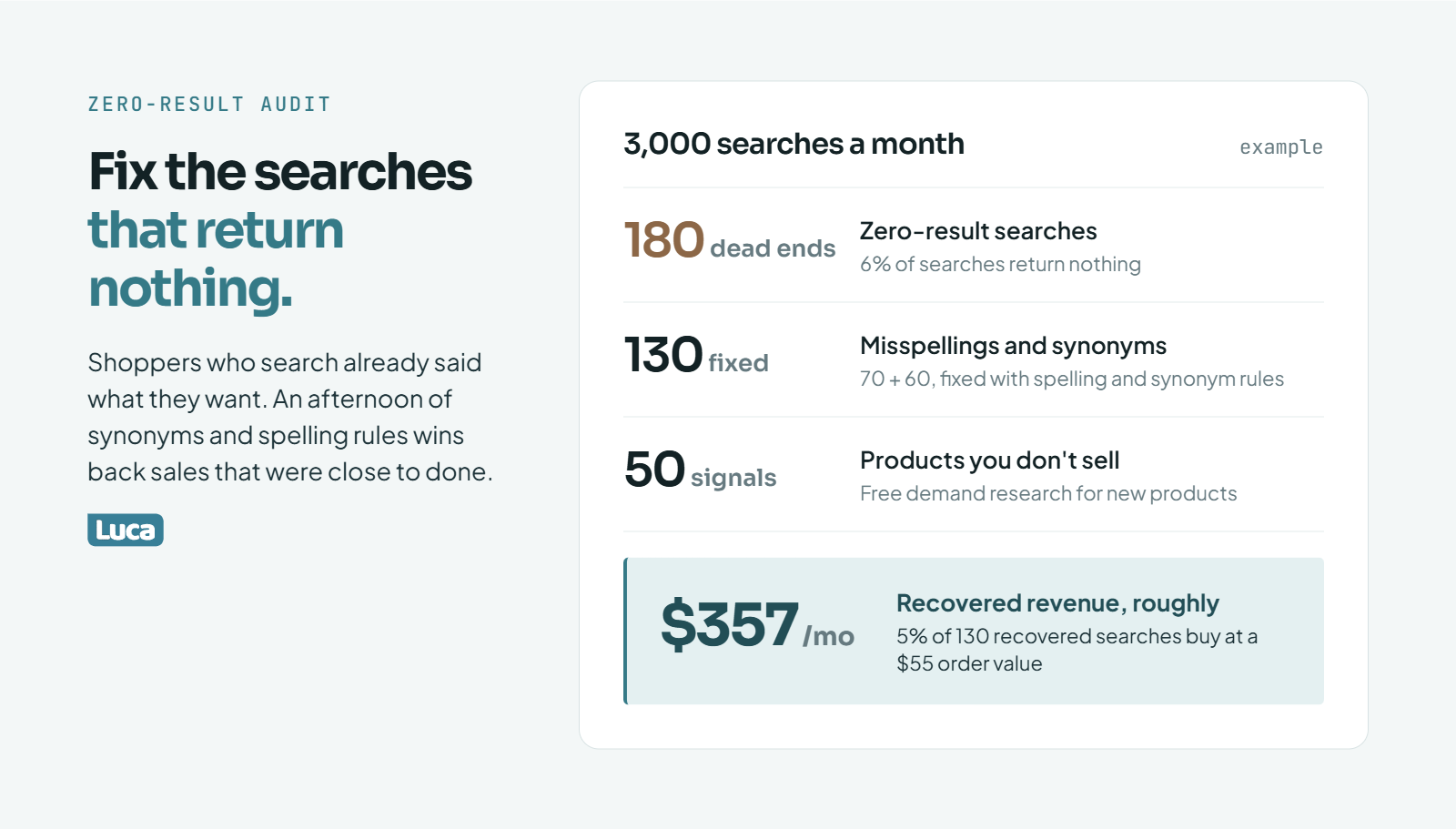
Fixing zero-result searches takes an afternoon, costs nothing and wins back sales that were close to done.
Predictive search suggests queries, products, and categories while the shopper is still typing. Baymard Institute's benchmark finds search autocomplete on about 80% of e-commerce sites, yet only 19% get it fully right [12]. Shoppers who search have already said what they want. So every misspelling, missing synonym, or empty results page costs a sale that was close to done.
🔎 How predictive search works
When a shopper types "vit", the search box guesses the rest. It draws on three things: your catalog (product names, tags, and types), past searches on your store, and rules you set. Good systems show query suggestions, a few product thumbnails, and a category link in one dropdown.
Baymard's testing found users tend to trust and follow the suggestions they see [12]. That cuts both ways. A good suggestion steers the shopper to the right product. A bad one steers them to a dead end, and they blame your store.
❌ The zero-result audit
The fastest win is the list of searches that return nothing. Shopify reports these in its analytics, and most search apps export them. Here is an example with made-up numbers for Maya's store:
3,000 searches a month, and 6% return zero results. That is 180 dead ends.
Group them. Say 70 are misspellings ("moisturiser", "niacinimide"), 60 are synonyms ("face wash" for cleanser), and 50 are products you don't sell.
Fix the first two groups with synonyms and spelling rules. That recovers about 130 searches.
If 5% of those buy at a $55 order value, that is roughly $357 a month.
That's not a fortune. But it takes an afternoon, it costs nothing, and it compounds every month.
💡 Search logs are free demand research
The third group is the real prize. Fifty searches a month for "SPF moisturizer" when you don't sell one is a product signal you didn't pay for. Shein is the extreme case, using on-site search behavior to steer what its designers make next, as Kunle Campbell describes [4].
Small stores can do a simple version. Review the top 20 zero-result queries each month with whoever plans new products. Luca AI can surface those query trends next to sales data, so the demand signal sits beside the revenue it might bring.
🧭 Synonyms, rules, and merchandising
After the audit, set three kinds of rules:
Synonyms: map "face wash" to cleanser, and "SPF" to sunscreen.
Pinned results: put your best-margin product first for high-volume terms.
Hidden results: drop out-of-stock items from the top rows.
Sam Cowwell and Vince Gunn describe a further step, where an AI agent reshapes the menu and filters once a shopper states a preference [18]. That's where search is heading. For most small stores, though, synonyms and pinned results capture the bulk of the value today.
Luca AI does not run your search box. Luca AI reads your search and sales data together and flags when search-driven revenue drops or dead-end queries spike. You decide the fix, and Luca AI shows whether it worked the following week.
How does predictive email marketing personalize what each subscriber gets?
Predictive email marketing uses each customer's history to forecast when they will buy, what they will buy, and whether they're slipping away. It then changes the email's timing, products, and offer. Klaviyo's predictive analytics estimate expected date of next order, churn risk, and predicted customer lifetime value (CLV) once a store meets its data thresholds [13]. Product blocks then fill with each subscriber's likely next item.
📈 The three predictions, in plain terms
Klaviyo shows these on each customer profile [13]:
Expected date of next order: when this person is likely to buy again, based on their own order behavior.
Each one answers a different email question. Expected date sets timing. Churn risk sets the offer. CLV sets how much effort a customer deserves.
⚠️ Check the data thresholds first
Klaviyo only turns these on when a store has at least 500 customers who have placed an order. The store also needs 180 days of order history, recent orders within 30 days, and some customers with 3 or more orders [13].
For one-time buyers, Klaviyo estimates the next order date "using data across all of your customers." [13] So for a store with mostly first-time buyers, the prediction is really a store average. Luca AI can compute repurchase intervals per product instead, which is often sharper for a narrow catalog.
🧱 Build in this order
Kunle Campbell cites email marketer Chase Dimond's advice: build abandoned cart and browse abandonment flows before polishing transactional emails [4]. I'd add a step before prediction:
Abandoned cart and browse abandonment.
Post-purchase cross-category flow (see Q4).
Predictive timing and churn-risk branches.
Prediction fine-tunes flows that already work. It won't rescue a flow that sends the wrong product.
👣 Watch visit speed, not just visit count
Peter Fader and Wendy Moe found that changes in how often someone visits predict conversion. A shopper who visits less and less is cooling off, even with a high baseline. A shopper who visits more and more is warming up [4]. That's a sharper trigger than a fixed "30 days since order" rule.
Operators feel the pain of fixed timers:
"My customers reorder anytime between 15 and 70 days so sending out a generic 30 day reminder is losing me potential sales." Eamonn, March 2024, Klaviyo Community Thread
"How do I make a replenishment flow based on Klaviyo predictive data ?" Nico01, February 2023, Klaviyo Community Thread
The question keeps coming up because the setup is not obvious, even when the idea is.
🔍 Where Luca AI fits
Luca AI reads Klaviyo and Shopify data together, so it can show whether a predictive flow created new orders or pulled forward orders that were coming anyway. Ask Luca AI for repeat rate and time to second order for recipients versus a holdout group. Q9 covers that test.
How do you time replenishment emails so they land before the customer runs out?
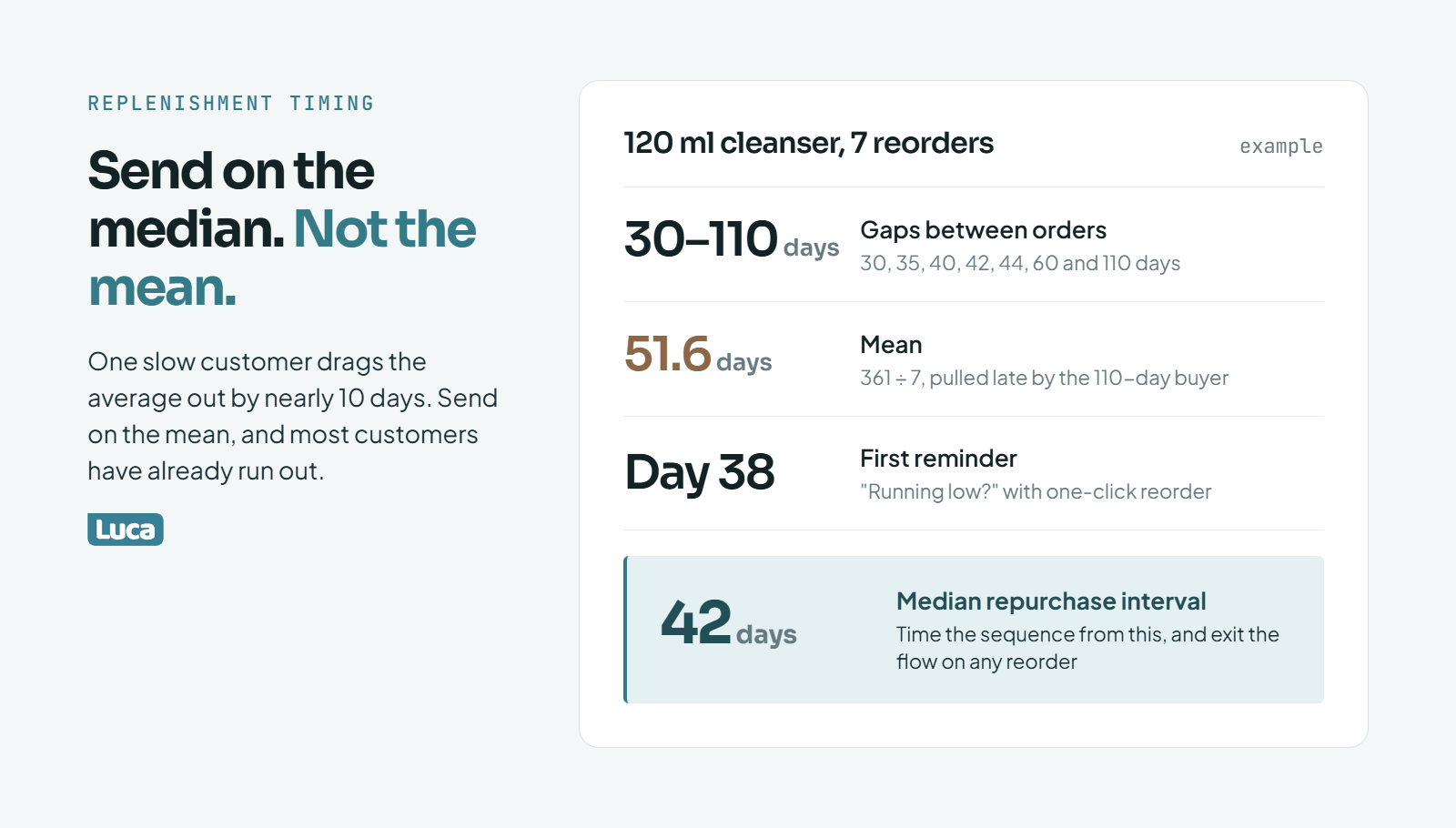
Time replenishment emails from the median, because one slow buyer drags the mean out by nearly 10 days.
Time replenishment emails from each product's real repurchase interval. Take the median days between a customer's first and second order of that product. Send the first reminder a few days before that median, then stop the sequence the moment they reorder. Klaviyo warns that counting down to the expected order date for repeat customers can lead to unsubscribes [13]. Vary the message and cap the sends.
🧮 Work out the interval
Here is an example with made-up numbers for Maya's 120 ml cleanser. Seven customers reordered after these gaps, in days: 30, 35, 40, 42, 44, 60, and 110.
Median: 42 days (the middle value).
Mean: about 51.6 days (361 divided by 7).
Use the median. One slow customer at 110 days drags the mean out by nearly 10 days. Send on the mean, and most customers have already run out, or bought elsewhere.
In practice, use every reorder from the last 12 months, not seven. Luca AI can compute this median per SKU from Shopify orders when you ask for time to repurchase by product.
⏰ The sequence
For a 42-day median, a simple sequence looks like this:
Replenishment sequence for a 42-day median (example)
Day after order
Email
Purpose
38
"Running low?" with one-click reorder
Catch the early half before they run out
45
Reminder plus one cross-category pick
Add a second category (see Q4)
55
Subscribe-and-save offer
Turn a habit into a subscription
Any reorder
Exit the flow
Stop the countdown
Klaviyo's own guidance backs the exit rule. Repeat buyers who get the same countdown before every order start to unsubscribe [13].
📱 SMS can carry the reminder
Kunle Campbell cites a Postscript case where 310 Nutrition used reply-to-buy SMS reminders [4]. The brand reported $400,000 in extra monthly revenue, a 59x ROI, and $2.65 earned per message. That's a vendor-reported case, so treat it as a ceiling, not a forecast.
The lesson that transfers is friction. A reply-to-buy text removes the login, the cart, and the checkout. For a consumable with a steady interval, that matters more than clever copy.
One caution on channels. If the email and the text both go out on day 38, each platform will claim the reorder. Pick one channel per step, or split the sends, so you can tell which one did the work.
💡 Prove the product still works
Ari Tulla, CEO of ELO Health, ties replenishment to usage data, such as a customer's sleep scores, so the reminder carries proof the product is working [19]. Most stores don't have a wearable. You can still include a short "what to expect by week six" note in the day 38 email.
🔍 Where Luca AI fits
Luca AI computes repurchase intervals per SKU from your Shopify orders and can push a weekly report when a product's interval shifts. A shifting interval often means a formula change, a pack-size change, or a competitor. You get the alert, then decide whether to adjust the flow.
What on-site personalization is worth doing beyond recommendation widgets?
Beyond widgets, the on-site personalization that pays is the kind where shoppers tell you what they want. That means quizzes, saved preferences, and shortcuts for returning visitors. This is called zero-party data: information a customer gives you on purpose. Doe Lashes used a beginner quiz to change both recommendations and post-purchase emails [4]. Discount-led personalization is riskier, because it trains buyers to wait for codes.
✅ Quizzes: ask instead of guess
Doe Lashes noticed many customers were new to false lashes, as Ben Parr of Octane AI describes in Kunle Campbell's book [4]. So the brand added a quiz that asked whether the shopper was a beginner. Beginners then got different product picks and more how-to content in their emails.
That's the model. A guess from clicks needs many sessions to be right. A quiz answer is right on the first visit. Luca AI can compare repeat rates for quiz takers against non-takers, so you know whether the quiz earns its place.
Merchant reviews of quiz apps are mixed, mostly on setup:
"Great revenue generating tool! We love the new AI quiz maker, takes the difficulty of making complex if/then decisions" WishGarden Herbs, October 2026, Octane AI Shopify App Store Review
"It's not the most intuitive at first, but the support team really makes a difference." Neuro, April 2026, Octane AI Shopify App Store Review
Show "pick up where you left off" with their last viewed products.
Show a reorder button for past buyers on the homepage.
Then match offers to customer tiers. Kunle Campbell suggests perks and early access for top spenders instead of discounts [4]. Luca AI can split customers into recency, frequency, and spend tiers from Shopify data, without a separate segmentation tool.
⚠️ Where personalization hurts
Personalizing around discounts can attract the wrong buyers. The Digital Darts team describes Day 1 churners as people "who would marry you for the honeymoon suite and file for divorce the next morning." [20] Show a discount to everyone who hesitates, and you teach your best customers to hesitate.
Data can also flatten a brand. Ken Price, CEO of Blake Mill, said his team "fell into the trap of getting too data driven and losing touch with the emotional side of our business." [17] In fashion and beauty, people buy how a product makes them feel. Let data pick the slot, and let your taste pick the story.
🔮 Where it's heading
Sam Cowwell and Vince Gunn describe a site where, once an AI agent learns your preferences, "the menu system completely transforms." [18] I think that's real, but 18 months out for most small stores. The quiz is the version you can run this quarter.
🔍 Where Luca AI fits
Luca AI doesn't build quizzes or change your storefront. Luca AI measures what they're worth: repeat rate, order value, and refund rate for quiz takers versus everyone else. That turns "the quiz feels good" into a number you can act on.
How do you measure whether personalization adds revenue or just takes credit for it?
Only the gap against a random holdout is money the widget made, here about 28% of the app's claim.
Measure personalization with a holdout, not with the app's revenue report. Recommendation and email apps count any purchase that follows a click or an open, including sales that would have happened anyway. Keep a random 10 to 20% of visitors or subscribers on the old experience. Compare revenue per visitor or per recipient, and count only the difference. Luca AI connects Shopify, Klaviyo, and ad data in one place, so that comparison doesn't need a spreadsheet rebuild.
❌ Why the app's number is too high
Every app grades its own homework. A widget gets credit if a shopper clicked it, then bought. An email gets credit if it was opened within a set window before the order. Neither asks whether the order would have happened without them.
The overlap is real. A Triple Whale user on G2 described the same order being claimed by two channels:
"Triple Whale will attribute more revenue to the email that was sent out, but the platform will attribute more revenue to the SMS that was sent out." G2 Verified User, April 2023, Triple Whale G2 Verified Review
Luca AI is not an attribution tool and doesn't try to settle which channel "won." Luca AI compares groups that did and didn't get the experience, which is the question that matters for cash.
🧪 How to run a holdout
Here is an example with made-up numbers. Maya's product pages get 20,000 visitors a month. She shows the recommendation widget to 85% and hides it from a random 15%.
Widget holdout test (example)
Group
Visitors
Revenue per visitor
Sees the widget
17,000
$3.30
Holdout (no widget)
3,000
$3.10
The gap is $0.20 per visitor. Across 17,000 visitors, that's $3,400 a month of real, incremental revenue. Now say the app's dashboard claims it "drove" $12,000. The true lift is about 28% of what the app reports. Still positive, but a very different decision about the next upgrade.
Email works the same way. Most email platforms let you split a flow so a random share of recipients skip a step. Compare repeat-order rate and revenue per recipient over 60 days.
⏰ How big and how long
Ivan Mazour warns that a few hundred visitors a day isn't enough for useful A/B tests, as Kunle Campbell reports [4]. Small differences need large samples. A practical rule:
Run for at least four full weeks, so paydays and weekends even out.
Don't stop early because the first week looks good.
If the gap is smaller than week-to-week noise, call it "no proven lift."
For context, McKinsey's 2021 work found personalization most often lifts revenue 10 to 15% [5]. A BCG study cited by Kunle Campbell put it at 6 to 10% [4]. If your holdout shows 40%, check the setup before you celebrate.
"Even on higher plans, Shopify doesn't really offer automated scheduled exports by itself." Reddit user, r/shopify, Reddit Thread
🔍 Where Luca AI fits
Luca AI normalizes Shopify, Klaviyo, and ad data on ingestion and answers lift questions in plain English. Ask Luca AI for revenue per visitor for the test group versus the holdout over the last 28 days. It can then send that comparison in a weekly report until the test ends.
Which AI product recommendation tools fit which stage of store?
Pick tools by stage and job. Under roughly 10,000 customers, Shopify's free Search & Discovery app plus Klaviyo flows cover most needs. Growing stores add a cart and upsell app such as Rebuy or LimeSpot, a quiz tool, and a search app. Enterprise suites such as Bloomreach or Nosto fit large catalogs with heavy traffic. Luca AI sits beside all of them as the analysis layer that shows which picks add money.
⭐ The tools, by job
Personalization tools by job and stage
Tool
Job
Fits best
Watch out for
Luca AI
Analysis layer: connects Shopify, Klaviyo, Meta, and Google data; answers lift and pairing questions in plain English
Stores that want proof before buying more tools
Not a widget; it doesn't change your storefront or send emails
Shopify Search & Discovery
Related products (automatic), complementary products (manual, up to 10), search synonyms [8]
Every Shopify store, as the baseline
Complementary picks need your time
Klaviyo
Email and SMS flows with predicted next order date, churn risk, and CLV [13]
Luca AI is listed first because it answers the question every other row raises: is this tool adding money? Luca AI does not replace any of them.
⚠️ Don't migrate for features you haven't proven
Luke Bean, CEO of Valente, moved his team from Klaviyo to Bloomreach for a single view of the customer. He called it "really significantly both expensive and difficult." [26] That can be the right call at his scale. At $150,000 a month, it's usually a year of distraction.
Ari Tulla, CEO of ELO Health, made a bigger version of the same bet. His company spent about $10 million building a system to turn data into meaning. Then large language models arrived and did it far better [19]. The lesson: rent capability before you build it.
"Sometimes the data takes time to update, and some ratios are more difficult to understand." Juliette P., CEO, January 2026, Polar Analytics G2 Verified Review
"the price is extremely high for a software like this, we decided to move forward with it anyways as it solved our needs." Maja, Polar Analytics Trustpilot Review
"I run a fashion brand on Shopify and built an analytics app after getting frustrated with how hard it is to understand product-level performance, especially once returns and stock risk come into play." Reddit user, r/ShopifyAppDev, Reddit Thread
✅ Who should not buy more tools yet
If you have fewer than 500 customers with orders, Klaviyo's predictions won't switch on [13]. Paid recommendation engines will also guess from thin data. Spend that budget on acquisition and on hand-picked complementary products instead. Luca AI is also not the right fit at that stage, because there isn't enough data to reason against.
🔍 Where Luca AI fits
Luca AI is the analysis layer next to your engines, not another engine. Luca AI reads every tool's output against your Shopify orders and margin, then tells you which tool is adding money and which is taking credit. You keep the tools that pass.
What should a store do in the next 90 days to get personalization paying?
In the first 30 days, find your best second-category pair and build a cross-category post-purchase flow. In days 31 to 60, fix zero-result searches and set complementary products for your top sellers. In days 61 to 90, add replenishment timing and run a holdout on the widget you already pay for. Spend on a bigger engine only if the holdout shows real lift.
🗓️ Days 1 to 30: the cross-category flow
Start where the money is largest and the data is richest: your buyers.
Run the cohort question from Q4. Which second category lifts repeat value the most?
Pick the top pair with at least 30 shared orders.
Build a post-purchase email that introduces that category, sent around the time most second orders happen.
Hold out 15% of buyers from the new step.
Luca AI can answer step 1 in plain English from connected Shopify data. That's the analysis Anthony Mink did by hand before rebuilding Live Bearded's back end around category moves [10].
🔧 Days 31 to 60: search and complementary products
Next, fix the free surfaces.
Export zero-result searches and add synonyms and spelling fixes (see Q5).
Send the "products we don't sell" list to whoever plans new products.
Set complementary products for your top 10 sellers in Search & Discovery, using lift, not raw counts [8].
Move similar-item blocks off the cart page.
None of this costs money. Luca AI can flag if the zero-result rate climbs again after a catalog change.
⏰ Days 61 to 90: timing and proof
Now add timing and measure what you already pay for.
Compute the median repurchase interval for your top five consumables (see Q7).
Build the replenishment sequence with an exit on reorder.
Run a four-week holdout on your existing recommendation app (see Q9).
At day 90, apply one rule. If the holdout shows lift worth more than the app's fee, keep it and consider the upgrade. If it doesn't, cancel it and put the money into the flows that did.
🚤 Why small stores can move faster
Kunle Campbell compares a billion-dollar company to a cargo ship and a small brand to a jet ski [4]. A big retailer needs a quarter to change one widget. You can test a flow this week. That speed is the real advantage, as long as each test ends with a number.
Anthony Mink described the risk of skipping that step. After generating "like 20 executive summaries that are 25 pages long," his next question was how to actually use any of it [10]. The plan above is the answer I'd give him.
🔍 Where Luca AI fits
Luca AI can track this whole plan in one weekly report: second-category conversion, zero-result rate, replenishment revenue, and holdout lift. You run the changes. Luca AI shows which ones paid. Tell us which of the three phases you're stuck on, and we'll tell you what we'd check first.
Kunle Campbell, E-commerce Growth Strategy (book), including material from Ivan Mazour (Ometria), Chase Dimond, Peter Fader and Wendy Moe, Ben Parr (Octane AI), Postscript, and a BCG study.
Luke Bean, CEO of Valente, Luca operator interview (recorded).
FAQ's
Do personalized product recommendations work for small Shopify stores?
Yes, but not in the form most vendors sell first. We see small stores win with personalization that runs on buyer data, not session data, because buyers carry real order history and sessions at a few hundred visits a day are thin.
Here is the order we suggest for a store under about 50,000 customers:
A post-purchase email that moves first-time buyers into a second product category.
Hand-picked complementary products for your top sellers in Shopify's free Search & Discovery app.
Fixes for zero-result searches, misspellings, and missing synonyms.
Only then, a paid on-site recommendation engine.
The reason is data volume. Collaborative filtering needs many shared orders per product pair to rank reliably, and a 60-SKU catalog has 1,770 possible pairs. A few hundred orders a month cannot fill that grid. Hand-picked pairs, chosen from your own order data, usually beat an algorithm guessing from noise.
Luca AI helps at the step before any of this. Luca AI reads Shopify and Klaviyo data together and answers which first purchase leads to the highest repeat value, so you know which cross-sell to build first. You can read more about that kind of question in our guide to e-commerce customer lifetime value. If your store has fewer than 500 customers with orders, we would spend on acquisition before any personalization tool.
What is the difference between related and complementary product recommendations?
Related products are alternatives. Complementary products are add-ons. The difference decides where each one belongs on your store.
Related (similar) products help a shopper who is still choosing. They belong on the product page, where a second option keeps a hesitant shopper browsing.
Complementary products help a shopper who has already chosen. They belong in the cart, at checkout, and in post-purchase email, where they raise order value.
On Shopify, the Product Recommendations API supports both intents. Shopify generates related products automatically. Complementary products must be chosen by hand in the free Search & Discovery app, up to 10 per product. Most small stores never set them, so the cart shows nothing useful or, worse, more versions of the item already in the cart.
We recommend choosing complementary pairs by lift, not raw count. Lift compares how often two products are bought together against how often the add-on sells anyway. A pair with a lower count but a higher lift is usually the better cross-sell.
Luca AI can produce co-purchase lift by product pair from your connected Shopify orders, so you can set complementary products from evidence rather than instinct. Our Shopify analytics guide covers where those order reports live.
How much revenue should product recommendations drive?
Less than your app dashboard says, and that is normal. Recommendation and email apps credit themselves for any purchase that follows a click or an open, including orders that would have happened anyway.
Outside research gives a rough range. McKinsey's 2021 work found personalization most often lifts revenue 10 to 15%, and a BCG study cited by Kunle Campbell put it at 6 to 10%. Neither is a forecast for your store.
The only number we trust is from a holdout test:
Hide the widget or flow step from a random 10 to 20% of visitors or subscribers.
Run it for at least four full weeks.
Compare revenue per visitor or per recipient between the two groups.
Count only the difference as the real gain.
In our worked example, an app claimed $12,000 a month while the holdout showed about $3,400 of real lift, roughly 28% of the claim. The tool was still worth keeping, but the upgrade decision changed.
Luca AI is not an attribution tool. Luca AI compares the test group against the holdout using Shopify, Klaviyo, and ad data in one place, and can send that comparison in a weekly report. For more on separating platform-reported numbers from profit, see our piece on platform ROAS versus true profitability.
Do I need machine learning for AI product recommendations?
Not at first. Machine learning helps when you have a large catalog, heavy traffic, and long order history. Below that, simple rules often perform as well, and they are easier to check.
Here is how we think about it:
Rules and hand-picked pairs suit catalogs under about 100 SKUs and stores with a few hundred orders a month.
Content-based matching (similar attributes such as category, ingredient, or price band) handles new products with no sales history, the so-called cold start problem.
Collaborative filtering and hybrid engines earn their cost when thousands of shared orders make pair rankings stable.
Built-in AI also needs checking. One operator we spoke with ran an inventory system's built-in AI forecasting for about six months, found it unreliable, and shut it down. Engines optimize clicks unless you tell them about margin and stock, so filter both kinds of recommendation by what you can afford to sell.
Luca AI does not render widgets. Luca AI checks whether the products an engine pushes carry margin and stock behind them, using connected Shopify data and plain-English questions. Our overview of predictive analytics tools for e-commerce covers where machine learning starts to pay.
How often should replenishment emails be sent?
Send them on each product's real repurchase cycle, not on a fixed 30-day timer. Customers of the same store can reorder anywhere from two weeks to two months, so one timer misses most of them.
Our method:
Take the median days between first and second orders for each SKU, using the last 12 months of reorders.
Send the first reminder a few days before that median.
Follow up about a week later with one cross-category pick.
Offer subscribe-and-save around ten days after that.
Exit the flow the moment the customer reorders.
Use the median, not the mean. In our example, one customer at 110 days pulled the mean to about 51.6 days while the median was 42. Sending on the mean would land after most customers had already run out.
Klaviyo's guidance warns that counting down to the expected date of next order for repeat customers can lead to unsubscribes, so vary the message and cap the number of sends. Klaviyo's predictions also need at least 500 customers with orders before they switch on.
Luca AI computes repurchase intervals per SKU from Shopify orders and can alert you when an interval shifts. Our guide to customer retention strategies covers what to do with that signal.
Enjoyed the read? Join our team for a quick 15-minute chat — no pitch, just a real conversation on how we’re rethinking Ecommerce with AI - Luca
Loading Schedule...
Your AI Co-Founder is here.
Here’s why:
Shopify, Meta, Xero - one brain.
"Should I scale?" Answered with real data.
Growth capital. No applications. One click.
Thank you! Your submission has been received! Please book a time slot for the Meeting
Oops! Something went wrong while submitting the form.