Google Analytics for Ecommerce: From GA4 Setup to Revenue Attribution—And the Profitability Gap GA4 Can't Close (2026)
12
mins read
TL;DR
GA4 replaced session-based Universal Analytics with event-based tracking, creating a competency gap even for experienced founders.
Enhanced ecommerce setup takes 30-45 minutes via Shopify's Google & YouTube app but requires verification to prevent tracking errors.
Five essential GA4 reports drive 90% of revenue decisions: Ecommerce Purchases, Purchase Journey Funnel, Traffic Acquisition, Events, and custom Funnels.
Data-Driven Attribution reveals 15-25% more channel contribution than Last-Click for brands with 400+ monthly conversions and multi-session journeys.
GA4 and Shopify revenue discrepancies are normal (5-10% variance) because GA4 uses client-side tracking while Shopify tracks server-side.
GA4 stops at the purchase event and cannot connect marketing attribution to COGS, cash flow, inventory, or profitability.
Q1. What Is Google Analytics for Ecommerce and Why Does GA4 Matter in 2026? [toc=GA4 Ecommerce Fundamentals]
Google Analytics 4 (GA4) is Google's current analytics platform, and it serves as the default starting point for ecommerce tracking worldwide. Unlike its predecessor Universal Analytics (which Google officially deprecated in July 2023), GA4 is built on an event-based data model rather than a session-based one. This architectural shift means everything a user does on your site is captured as an "event": page views, button clicks, product views, cart additions, and purchases, each carrying customizable parameters that describe the interaction in detail.
⭐ Why the Event-Based Model Matters for Ecommerce
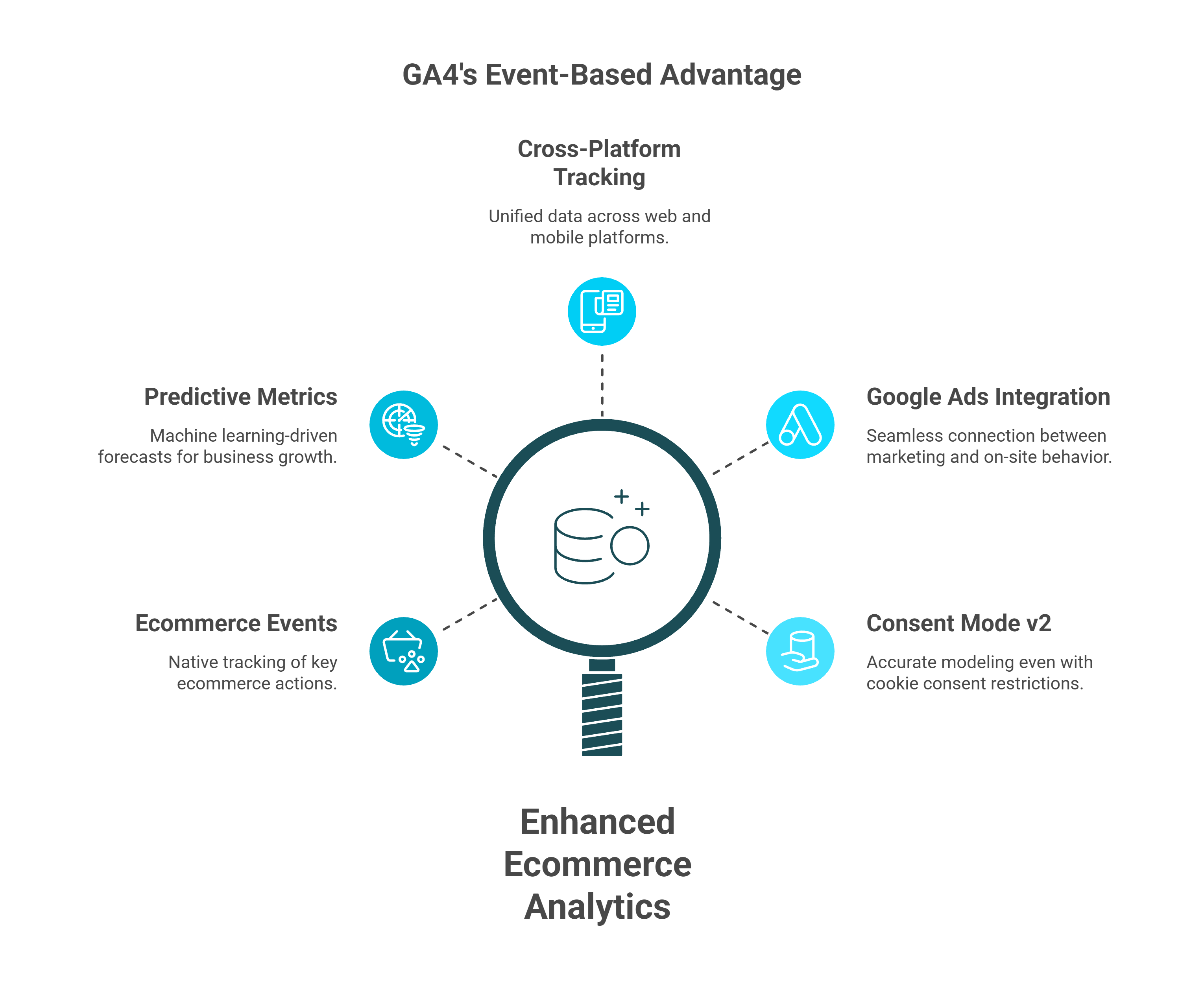
GA4 was designed for a privacy-first, cross-platform world. Instead of relying exclusively on cookies to stitch sessions together, it uses machine learning to model user behavior and fill gaps left by tracking restrictions. For ecommerce businesses, this translates into several key capabilities:
Ecommerce-specific events captured natively: view_item, add_to_cart, begin_checkout, purchase, and refund
Predictive metrics powered by machine learning: purchase probability, churn probability, and predicted revenue
Cross-platform tracking across web and mobile apps within one property
Deep Google Ads integration for connecting marketing spend to on-site behavior
Consent Mode v2 compatibility, which models conversions even when users decline cookies in EU markets
The core terminology every ecommerce operator needs: properties (the container for your data), data streams (web or app sources feeding that property), Measurement ID (G-XXXXXXX, your unique tracking identifier), events (every user action), parameters (details attached to each event), and conversions (events you've marked as business-critical, like purchases).
Total revenue, purchase revenue per user, item-level performance
Funnel Exploration
Step-by-step abandonment rates from product view to purchase
Retention Cohorts
Repurchase behavior over 7, 14, 30, and 90-day windows
Acquisition Attribution
Which channels and campaigns drive traffic and conversions
Predictive Audiences
ML-based segments of likely purchasers and likely churning users
This makes GA4 the essential behavioral tracking foundation for any online store. It's free, it's powerful for understanding what users do on your site, and every ecommerce business should have it configured properly.
But foundations have ceilings. GA4 captures behavioral and revenue data; it cannot see your cost of goods, shipping expenses, return rates, or cash flow implications. As one G2 reviewer put it:
"It has pretty substantial limitations for ecommerce tracking and often isn't close to accurate for conversion rate, number of orders, or revenue." — Verified User in Information Technology and Services, G2 Verified Review
Luca AI ingests your GA4 data alongside Shopify, Meta, Xero, and Stripe, synthesizing the behavioral data GA4 captures with the financial and operational context it structurally cannot provide.
Q2. How Do You Set Up GA4 Ecommerce Tracking on Shopify and Other Platforms? [toc=GA4 Setup Guide]
Setting up GA4 for ecommerce tracking involves four phases: property creation, implementation method selection, event configuration, and verification. Getting this right is critical. A misconfigured GA4 property means every report and attribution insight downstream is unreliable.
Step 1: Create Your GA4 Property and Data Stream
Navigate to Google Analytics Admin → Create Property
Enter your property name, time zone, and currency (currency must match your store's default or revenue reporting breaks)
Under your new property, go to Data Streams → Add Stream → Web
Enter your store URL and name the stream
Copy your Measurement ID (format: G-XXXXXXX)
Enable Enhanced Measurement. This auto-tracks page views, scrolls, outbound clicks, site search, video engagement, and file downloads
⚠️ Critical note: Enhanced Measurement does not auto-track ecommerce events. Product views, cart additions, checkouts, and purchases require additional configuration through one of the methods below.
Step 2: Choose Your Implementation Method
GTM vs. Shopify Native App Comparison
Criteria
Google Tag Manager (GTM)
Shopify Google & YouTube App
Ease of Setup
Medium, requires GTM knowledge
Easy, no-code installation
Data Accuracy
✅ High, full control over event firing
⚠️ Known duplicate event issues
Customization
✅ Custom dimensions, server-side tagging
❌ Limited parameter control
Consent Management
✅ Full Consent Mode v2 integration
⚠️ Basic consent handling
Best For
Scaling brands (€1M+ revenue)
Early-stage stores needing quick setup
For WooCommerce, the GTM4WP plugin or a manual data layer implementation through GTM are the standard approaches. For BigCommerce, use the native Google Analytics app or Script Manager with custom GA4 code.
Step 3: Configure the Complete Ecommerce Events List
The items array is the backbone of GA4 ecommerce reporting. Every event below should include it with item_id, item_name, price, and quantity at minimum:
Use GA4 DebugView (Admin → DebugView), the Realtime report, and the Google Tag Assistant Chrome extension to validate that every event fires with the correct parameters.
⚠️ Top 5 Implementation Pitfalls
Duplicate purchase events on Shopify the thank-you page reloads or the user refreshes, firing purchase twice
Missing currency parameter without it, GA4 cannot aggregate revenue data correctly
Consent Mode silently blocking events in EU markets, events never fire if consent defaults aren't configured, and GA4 shows no error
As one Reddit user discovered the hard way:
"My web team updated consent mode definitions in Q1 and depending on traffic geo there is 30-70% discrepancy between ad clicks vs. GA traffic attributed to those sources." — u/commenter, r/googleads Reddit Thread
Whether you use GTM or a native app, GA4 setup is just the first step. Luca AI connects to your Shopify store and GA4 property in under 10 minutes, pulling behavioral, order, product, and financial data into one reasoning layer, so you spend time on decisions, not data plumbing.
Q3. Which GA4 Ecommerce Reports Matter Most and How Do Predictive Audiences Work? [toc=GA4 Reports & Audiences]
GA4 offers dozens of reports, but ecommerce operators should focus on five core areas that directly inform revenue and conversion optimization. Knowing which reports to use, and more importantly, what questions they can and cannot answer, prevents the "data everywhere, understanding nowhere" trap.
The Monetization Reports: Revenue and Product Performance
The Monetization Overview is your top-level ecommerce dashboard. It displays total revenue, purchase revenue, average purchase revenue per user, ecommerce purchases, and first-time purchaser counts. The Ecommerce Purchases report drills into item-level performance: items viewed, items added to cart, items purchased, and item revenue.
GA4 Ecommerce Reports Quick Reference
Report
Primary Metric
Ecommerce Question It Answers
Monetization Overview
Total purchase revenue
How much revenue did we generate this period?
Ecommerce Purchases
Item revenue, cart-to-purchase rate
Which products drive the most revenue and conversion?
Purchase Journey
Funnel step completion rates
Where are users dropping off before buying?
User Retention
Cohort return rates
Are customers coming back and repurchasing?
Traffic Acquisition
Session source/medium
Which channels bring converting traffic?
Use the Items tab within Ecommerce Purchases to identify revenue concentration risk: if 80% of your revenue comes from three SKUs, that's a vulnerability GA4 can surface but can't help you solve.
Funnel Exploration and Retention Cohorts
The Funnel Exploration report (found under Explore → Funnel Exploration) lets you build a custom ecommerce funnel: view_item → add_to_cart → begin_checkout → purchase. You can visualize step-by-step abandonment rates and segment by traffic source, device, or geography to pinpoint conversion bottlenecks.
The Retention report shows cohort analysis: how user groups acquired in a given week return and repurchase over 7, 14, 30, and 90-day windows. For DTC brands with repeat-purchase models, this is one of the most valuable GA4 reports, though it only shows behavioral retention, not the revenue or margin value of those returning customers.
Acquisition Reports and the Advertising Workspace
Two acquisition reports serve different purposes:
Traffic Acquisition → Session-level analysis: which channels drive sessions right now
User Acquisition → First-touch analysis: which channels originally brought each user
The Advertising Workspace (available when Google Ads is linked) adds conversion path visualization, showing the multi-touchpoint journeys users take before purchasing. The Model Comparison tool lets you compare how data-driven, last-click, and Google Ads-preferred attribution models distribute credit differently across channels.
⭐ Predictive Audiences and the Custom Audience Builder
GA4's machine-learning engine generates three predictive metrics for users with sufficient data:
Purchase probability: likelihood a user will purchase within the next 7 days
Churn probability: likelihood an active user won't return within the next 7 days
Predicted revenue: expected revenue from a user over the next 28 days
You can use these predictions to build Predictive Audiences, segments like "Likely 7-day purchasers" or "Likely 7-day churning users", and export them directly to Google Ads for remarketing campaigns. The Custom Audience Builder goes further, combining event-based conditions (users who added to cart but didn't purchase), demographic filters, and predictive conditions into a single high-intent segment.
However, predictive audiences require minimum thresholds (typically 1,000+ purchasers and 1,000+ non-purchasers in the training window), which means many small-to-mid-sized ecommerce stores won't qualify. As one reviewer noted:
"The downside of GA is its learning curve, especially with GA4. The interface and reporting structure are not very intuitive at first, and finding specific metrics or building custom reports can take time." — Aman S., Performance Marketing Head, G2 Verified Review
GA4 reports reveal what happened on your site. Predictive audiences estimate what might happen next. But neither answers the question that drives profitability: what does this mean for your cash flow and margins? That's the layer Luca AI adds, connecting GA4 behavioral intelligence to financial reality in one conversational query.
Q4. How Does Revenue Attribution Work in GA4 and Why Does It Break in 2026? [toc=GA4 Attribution Failures]
Attribution is the mechanism that decides which marketing channel "gets credit" for a sale. In GA4, the default model is Data-Driven Attribution (DDA), which uses machine learning to analyze all touchpoints in a user's conversion path and distribute credit proportionally based on historical patterns. GA4 also offers last-click attribution and Google Ads-preferred attribution as alternatives, plus a Conversion Paths report that visualizes the multi-touch journeys users take before purchasing.
This sounds sophisticated. In practice, it's breaking down for ecommerce brands at scale, and in 2026, the problems are structural, not fixable.
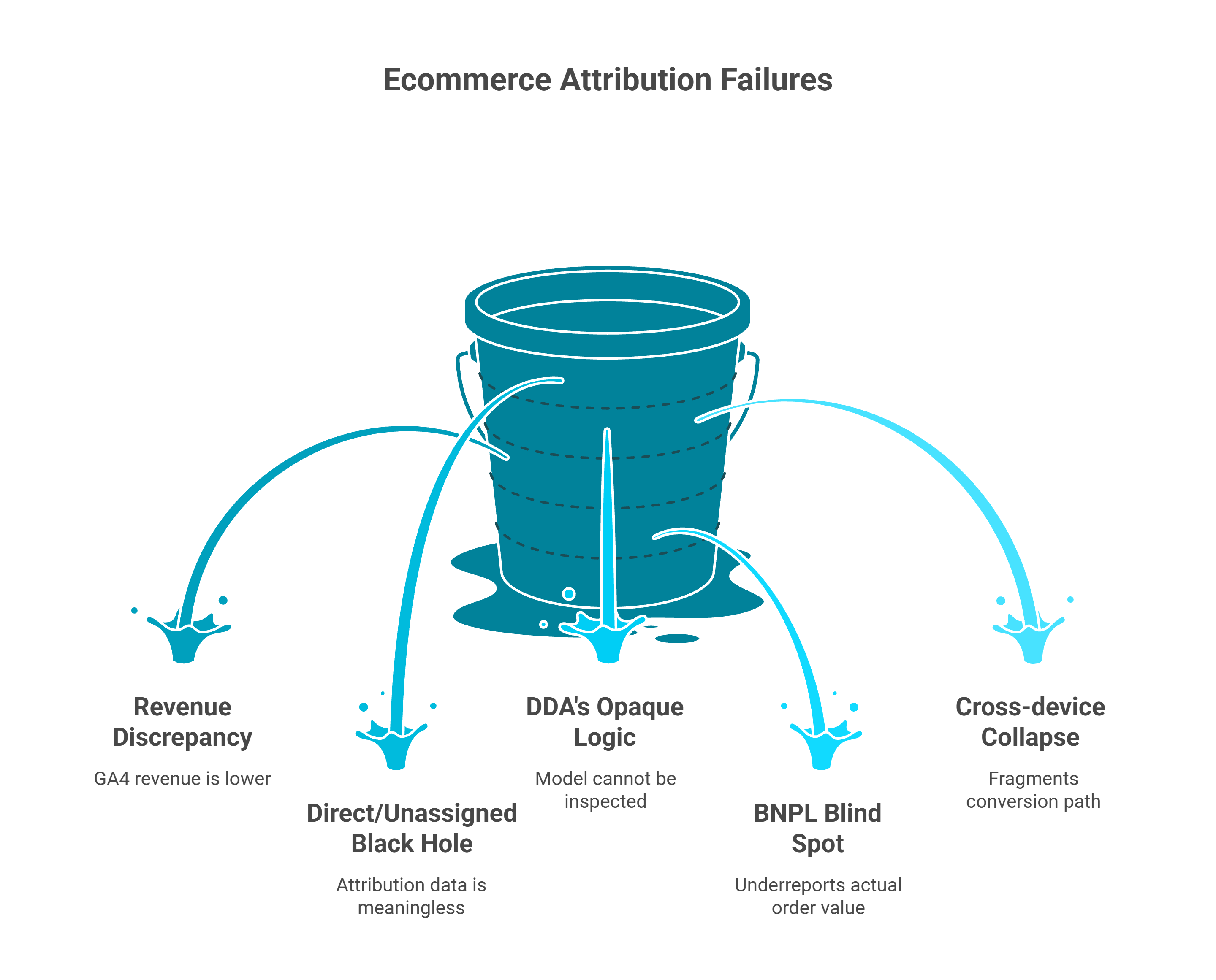
❌ The Five Attribution Failures Every Ecommerce Brand Hits
Leaky bucket diagram depicting five GA4 ecommerce attribution failures: revenue discrepancy, direct/unassigned black hole, opaque DDA logic, BNPL blind spots, and cross-device conversion collapse.
1. The Revenue Discrepancy Gap. GA4 revenue figures are typically 20-30% lower than what Shopify or Stripe shows in your backend. This isn't a configuration error. It's the result of browser-side tracking failing to capture every transaction due to ad blockers, page load failures, redirect chains, and users completing purchases on devices where GA4 has no session continuity.
One Reddit user running a $503K/month store described the problem:
"I suspect this discrepancy is due to the iOS 14.5 update, which likely affects tracking from devices or browsers that prevent us from tracing traffic back to the original ad source. This issue is critical for our executive team, as we cannot make informed decisions about scaling our campaigns." — u/commenter, r/marketing Reddit Thread
2. The "Direct/Unassigned" Black Hole. When GA4 can't determine where a user came from, it defaults to "direct" or "unassigned." Industry data suggests that 30-40% of conversion data falls into these catch-all buckets in many GA4 implementations, effectively making a third of your attribution data meaningless.
3. DDA's Opaque Logic. Data-driven attribution operates as a black box. You can see the result (which channels received credit) but not the logic (how the model weighted each touchpoint). You're making six-figure budget decisions on a model you can't inspect or verify.
4. The BNPL Blind Spot. GA4 captures purchase events at the moment of transaction. For Buy Now, Pay Later services like Klarna or Afterpay, it only records the first installment amount, grossly underreporting the actual order value from one of ecommerce's fastest-growing payment methods.
5. Cross-device collapse. Without Google Sign-In, GA4 treats the same person on their phone and laptop as two separate users, fragmenting the conversion path and misattributing credit.
⚠️ The 2026 Privacy Landscape: Why It's Getting Worse
These failures aren't bugs waiting for a GA4 update. They're the result of structural forces that are widening the attribution gap every year:
Consent Mode v2 (mandatory in EU/EEA): when users decline tracking, GA4 uses behavioral modeling to estimate conversions, adding another layer of approximation on top of already-incomplete data
iOS ATT: Apple's App Tracking Transparency continues to cause 30-50% signal loss on Safari and iOS devices
Ad blocker prevalence: over 40% of EU web users now run ad blockers that prevent GA4 tags from firing entirely
The Digital Markets Act (DMA): further restricts data sharing between Google services, reducing the signals DDA relies on
The result: ecommerce founders making six- and seven-figure marketing decisions on attribution data that's structurally 20-40% incomplete. As another Reddit user found when investigating revenue discrepancies:
"Sometimes GA4 is showing less than 1/5 of the Google Ads amount... My web team updated consent mode definitions in Q1 and depending on traffic geo there is 30-70% discrepancy between ad clicks vs. GA traffic." — u/commenter, r/googleads Reddit Thread
✅ How Luca AI Reconciles the Attribution Truth Gap
Luca AI doesn't replace GA4 attribution. It validates and completes it. By cross-referencing GA4's behavioral attribution data with actual Shopify orders, Stripe transaction records, and ad platform spend data simultaneously, Luca reconciles the numbers that never match when viewed in isolation.
More importantly, Luca answers the question GA4's attribution model cannot: "Which campaigns are actually profitable after COGS, shipping, and returns?" GA4 knows which channel sent the visitor. It has no idea what that visitor's order actually cost you to fulfill.
The ICP1 pain point captured perfectly: Facebook says €100K revenue, GA4 says €72K, Shopify says €95K. Which number is real? Founders spend hours reconciling three different truths. Luca AI synthesizes all three sources and gives you one answer: actual profit by channel.
"To make decisions based on grounded data, it is really difficult to trust it 100% and it complicates decision-making." — Verified User in Retail, G2 Verified Review
Q5. What Is the Profitability Gap That GA4 Can't Close and What Do You Actually Need? [toc=The Profitability Gap]
GA4 is a web analytics tool. It was built to track what users do on your site: page views, clicks, purchases. It was never designed to tell you whether those purchases are actually profitable. For a DTC brand doing €5M in annual revenue, the difference between "revenue" and "profit" can represent 60 to 80% of the top line once you subtract COGS, shipping, returns, ad spend, payment processing, and fulfillment costs.
This is the profitability gap, and it is the single most expensive blind spot in ecommerce analytics today.
💸 Revenue ≠ Profit: The Fundamental Disconnect
Founders who optimize for GA4 revenue metrics may unknowingly scale unprofitable campaigns, products, or channels. GA4 shows you that Campaign X generated €50K in revenue last month. It cannot show you that after COGS (€18K), shipping (€6K), returns (€4K), ad spend (€15K), and payment processing fees (€1.5K), that campaign delivered just €5,500 in actual profit. Meanwhile, Campaign Y, which GA4 ranked lower at €30K revenue, may have delivered €11,800 in profit because of lower return rates and higher margins.
Without cost data, revenue metrics become a mirage. And GA4 has zero access to cost data.
⚠️ What GA4 Tracks vs. What You Actually Need
What GA4 Tracks vs. What Scaling Brands Need
What GA4 Tracks
What Scaling Brands Need
Page views, sessions, users
True contribution margin by channel
Revenue (purchase event value)
COGS per product and per order
Ecommerce conversion rate
Shipping cost per order
Acquisition source/medium
Return and refund cost per channel
Funnel abandonment rates
LTV:CAC ratio with financial data
Predictive purchase probability
Cash flow impact of marketing decisions
Event counts and parameters
Payment processor fees (Stripe, Klarna)
Bounce rate, engagement time
3PL fulfillment costs
Tools like Triple Whale improve marketing attribution, but they still do not connect to Xero or QuickBooks to calculate true contribution margin. As one Trustpilot reviewer described their experience:
"Overall it has been unable to deliver on the promise to provide any insights or accurate data to our business, and we end up reverting back to direct data sources like Meta, Shopify, Recharge, etc." — Matt Huttner, Trustpilot Verified Review
Why the Gap Is Architectural, Not Fixable
The profitability gap exists because analytics, financial, and marketing tools were built as isolated systems. GA4 cannot add COGS tracking through a feature update; it is a structural boundary of a behavioral analytics tool. Shopify tracks orders but does not model campaign-level profitability. Xero tracks expenses but has no concept of which marketing campaign drove the sale. The result is that the founder becomes the manual integration layer, spending 10 to 15 hours per week reconciling data across disconnected platforms.
Intelligence without financial context is advice. Capital without intelligence is risk. The brands that win in 2026 unify behavioral, financial, and operational data into one reasoning layer, not the ones with the most dashboards.
✅ How Luca AI Closes the Profitability Gap
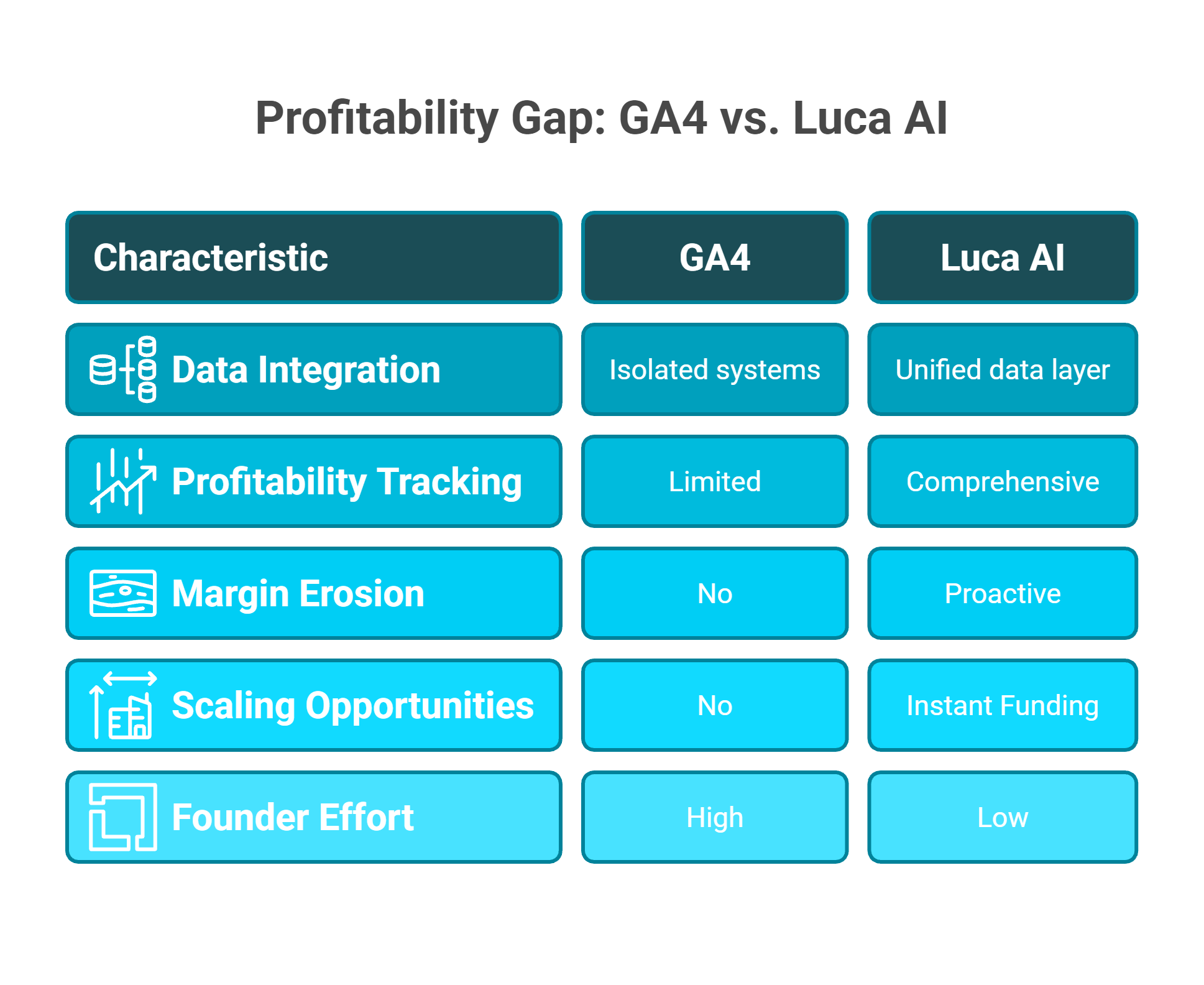
Visual comparison table contrasting Google Analytics GA4 limitations with Luca AI strengths across data integration, profitability tracking, margin erosion detection, scaling opportunities, and founder effort.
Luca AI unifies GA4 behavioral data with Shopify orders, Xero/QuickBooks financials, Stripe payment data, and ad platform spend into one reasoning layer. Founders ask: "What's my true contribution margin by product and channel this quarter?" and get an answer in seconds, not after a Sunday evening spreadsheet session.
Luca scans for margin erosion 24/7 and alerts proactively before unprofitable campaigns eat into cash. And when Luca identifies a profitable scaling opportunity, it can fund it instantly, because the system that sees the opportunity can also provide the capital.
"Once we hit a certain size, relying on Google Analytics became a liability rather than a benefit." — Gitai B., Marketing, Web Analytics, and Testing Lead, G2 Verified Review
Q6. How Do Cross-Domain Tracking, UTM Parameters, and Consent Mode Work in GA4? [toc=Cross-Domain, UTMs & Consent]
Three advanced GA4 configurations separate functional ecommerce tracking from broken attribution: cross-domain tracking, UTM parameters, and Consent Mode v2. Getting these right improves your data quality. Getting them wrong, or ignoring them, amplifies every accuracy problem discussed in this article.
When and How to Set Up Cross-Domain Tracking
Ecommerce brands need cross-domain tracking when their customer journey spans multiple domains: headless Shopify with a custom frontend, separate checkout domains, multi-brand stores sharing one GA4 property, or landing pages hosted on different subdomains.
Without it, GA4 treats each domain transition as a new session, inflating user counts, breaking attribution, and fragmenting conversion paths. Configuration steps:
In GA4: Admin → Data Streams → Configure Tag Settings → Configure Your Domains
Add all domains involved in the customer journey
GA4 will automatically decorate URLs with the _gl parameter to maintain session continuity across domains
In GTM: expand Cross Domain Tracking in your GA4 configuration tag and list the same domains
⚠️ Common pitfall: Self-referral exclusions must be configured correctly, or you will see inflated "new user" counts every time a customer moves from your main site to checkout. Mismatches between the GA4 domain list and the GTM configuration are the most common reason cross-domain tracking fails.
UTM Parameters: The Only Way to Attribute Non-Google Traffic
The five standard UTM parameters, utm_source, utm_medium, utm_campaign, utm_term, and utm_content, are the backbone of GA4 acquisition reporting for any traffic that is not auto-tagged by Google Ads.
UTM Parameter Examples by Channel
Channel
utm_source
utm_medium
utm_campaign
Meta Ads
facebook
paid_social
spring_sale_2026
Klaviyo Email
klaviyo
email
welcome_series
Influencer
instagram
influencer
creator_name_feb
Google Ads
google (auto-tagged)
cpc (auto-tagged)
manual override optional
TikTok Ads
tiktok
paid_social
q1_awareness
⚠️ UTM Hygiene Best Practices
Use lowercase only for all parameter values (GA4 is case-sensitive; "Facebook" and "facebook" create separate channels)
Use consistent separators (underscores preferred over hyphens)
Document naming conventions in a shared team spreadsheet
Never use UTMs on internal links; they will overwrite the original traffic source and break attribution
Messy UTMs are one of the top reasons GA4 shows large volumes of "unassigned" traffic. Without disciplined tagging, a third or more of your marketing performance data becomes unreadable.
Consent Mode v2: The Regulatory Requirement That Reduces Your Data
Consent Mode v2 is now mandatory for any business serving EU/EEA users under the Digital Markets Act and GDPR. GA4 operates with two consent states: "granted" and "denied." When consent is denied, GA4 uses behavioral modeling to estimate conversions, but this creates another data accuracy gap on top of already incomplete attribution.
Implementation steps:
Integrate a Consent Management Platform (CMP) such as Cookiebot, OneTrust, or Usercentrics
Configure default consent states in your GTM container (set analytics_storage and ad_storage to "denied" by default for EU visitors)
Deploy consent-aware GA4 tags that adjust behavior based on user choice
Verify consent signals in GA4 under Admin → Data Streams → Consent Settings
In EU-heavy markets, Consent Mode can reduce reported conversions by 30 to 50%, making GA4's already incomplete attribution even less reliable for data-driven budget decisions.
How Luca AI Handles the Complexity Downstream
Cross-domain tracking, UTMs, and Consent Mode are essential configurations, but they add complexity that increases the gap between GA4 data and business reality. Luca AI ingests GA4's behavioral signals alongside your actual order and financial data, so the accuracy limitations of browser-based tracking do not cascade into your business decisions. Instead of relying on modeled estimates, Luca validates against your Shopify backend and Stripe transaction records to surface the ground truth.
Q7. What Are the Non-Attribution Limitations Every Ecommerce Brand Should Know About GA4? [toc=GA4 Structural Limitations]
Beyond the attribution and profitability gaps covered above, GA4 has six additional structural limitations that affect ecommerce brands at scale. These are not bugs waiting for fixes; they are architectural trade-offs of a free, general-purpose analytics tool.
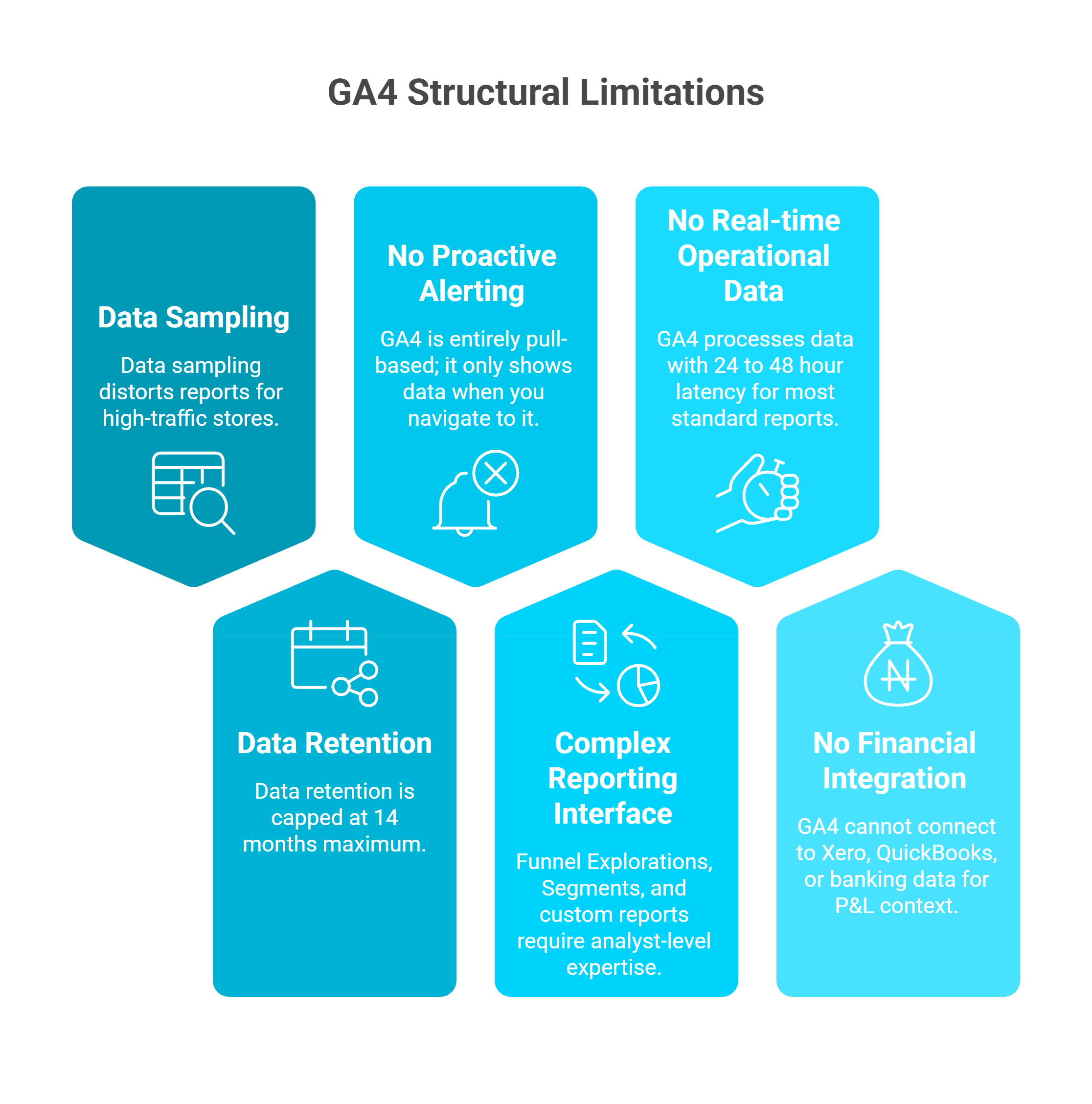
❌ Six Limitations That Compound at Scale
Card-based infographic highlighting six structural GA4 limitations for ecommerce: data sampling, no alerting, no real-time data, 14-month retention cap, complex reporting, and no financial integration.
1. Data sampling kicks in above 500K events in explorations, distorting reports for high-traffic stores. When GA4 samples your data, the numbers you see are estimates, not actuals. For a store processing 50,000+ daily sessions, this means Funnel Explorations and custom reports can vary by 15 to 25% depending on the sample drawn
2. Data retention is capped at 14 months maximum. There is no native long-term historical analysis. If you need to compare Q4 2024 performance against Q4 2025 using exploration reports, GA4 has already purged the older data. The only workaround is exporting to BigQuery, which requires technical setup and ongoing costs
3. No proactive alerting. GA4 is entirely pull-based; it only shows data when you navigate to it. Custom alerts via Google Sheets or Looker Studio require separate setup and maintenance. If a campaign goes unprofitable overnight, GA4 will not notify you
4. Complex reporting interface. Funnel Explorations, Segments, and custom reports require analyst-level expertise that most DTC founders lack. As one G2 reviewer titled their review: "GA4 should be called Make All of Your Own Reports, We Got Rid of All The Useful Default Ones"
5. No real-time operational data. GA4 processes data with 24 to 48 hour latency for most standard reports. The Realtime report shows the last 30 minutes but cannot be segmented, exported, or used for operational decisions
6. No financial integration. GA4 cannot connect to Xero, QuickBooks, or banking data for P&L context. It structurally cannot answer "What is my contribution margin by channel?" because it has zero visibility into costs
⚠️ The Compounding Effect
Each limitation on its own is manageable. Together, they create a compounding accuracy problem: sampled data, with modeled consent gaps, displayed in a complex interface, with no cost context, and no proactive alerts. The founder is left stitching together partial truths from multiple dashboards while the window for action closes.
"It is becoming very opaque, it doesn't have real-time, the sampling is increasingly wild, and now it applies a threshold. If you don't pay for BigQuery, you're really tied hand and foot." — Verified User in Retail, G2 Verified Review
"Almost all of the super popular, easy-to-use, out-of-the-box reports now have to be manually created. The rows aren't even clickable any more so the default views don't dive in to other views, and that is so sad." — Verified User in Computer Software, G2 Verified Review
✅ How Luca AI Addresses Each Limitation
Luca AI layers proactive intelligence, natural-language querying, and unlimited data retention on top of your GA4 data, while adding the financial, operational, and capital dimensions GA4 was never designed to provide. No sampling thresholds. No 14-month data caps. No analyst dependency. Ask any cross-functional question in plain English and get an answer in seconds, with the financial context built in.
Q8. How Do Scaling DTC Brands Move from GA4-Only Analytics to Unified Profitability Intelligence? [toc=From GA4 to Unified Intelligence]
It's Sunday evening. You've spent 2 hours exporting GA4 reports, cross-referencing with Shopify orders, checking Meta Ads Manager for spend data, and updating your margin spreadsheet in Google Sheets. GA4 says your top campaign drove €40K in revenue this week. But after COGS, shipping, and returns? You're not sure if it was €8K profit or €800. Your spreadsheet has 23 tabs and conflicting numbers. This is the reality for most DTC founders running €1M to €10M in annual revenue.
❌ Why the Problem Exists (and What It Costs)
GA4 was built for behavioral analytics. Shopify was built for order management. Xero was built for accounting. Meta was built for ad reporting. None were designed to reason across all four. The founder becomes the manual integration layer, and the costs are steep:
10 to 15 hours per week on data reconciliation across disconnected platforms
Delayed scaling decisions that miss 2 to 3 day windows of opportunity
15 to 20% reporting variance from manual processes and data source discrepancies
"It requires a lot of setup and manual work to get what you really need. The UI is hideous, and we run into problems often with GA not tracking things correctly." — Verified User in Information Technology and Services, G2 Verified Review
⭐ How It Should Work
The right system connects all your data sources, understands the relationships between them, and answers cross-functional questions instantly. You would ask: "What's my true contribution margin by channel and product this month?" and get an answer in seconds, not hours. You would ask: "If I scale Meta spend 30%, what happens to my cash position in 90 days?" and see a scenario model, not a blank stare from GA4.
This is not about replacing GA4. GA4 remains the behavioral tracking foundation. It is about adding the intelligence, financial context, and action layer that GA4 was never architected to provide.
✅ Luca AI's Approach to Unified Intelligence
Luca AI unifies your GA4 behavioral data, Shopify orders, Meta/Google ad spend, Xero financials, and Stripe payments into one reasoning layer. Ask any cross-functional question in natural language and get an answer in seconds. No exports. No spreadsheets. No Sunday evenings lost to data reconciliation. And when Luca identifies a profitable scaling opportunity, it can fund it instantly, because the system that sees the opportunity can also provide the capital.
💰 The Shift in Practice
From 2-hour Sunday sessions across 6 tools to a 30-second conversational query. That is the shift from fragmented analytics to unified intelligence. The brands making this transition are not choosing between tools; they are choosing between operating as the manual integration layer of their own business, or deploying an AI Co-Founder that reasons across every data source and acts on what it finds.
"The downside of GA is its learning curve, especially with GA4. The interface and reporting structure are not very intuitive at first, and finding specific metrics or building custom reports can take time. Some standard reports that were easily accessible in Universal Analytics now require extra configuration." — Aman S., Performance Marketing Head, G2 Verified Review
Q9. Is Your Ecommerce Analytics Stack Ready for 2026? (Self-Assessment Checklist) [toc=Analytics Stack Audit]
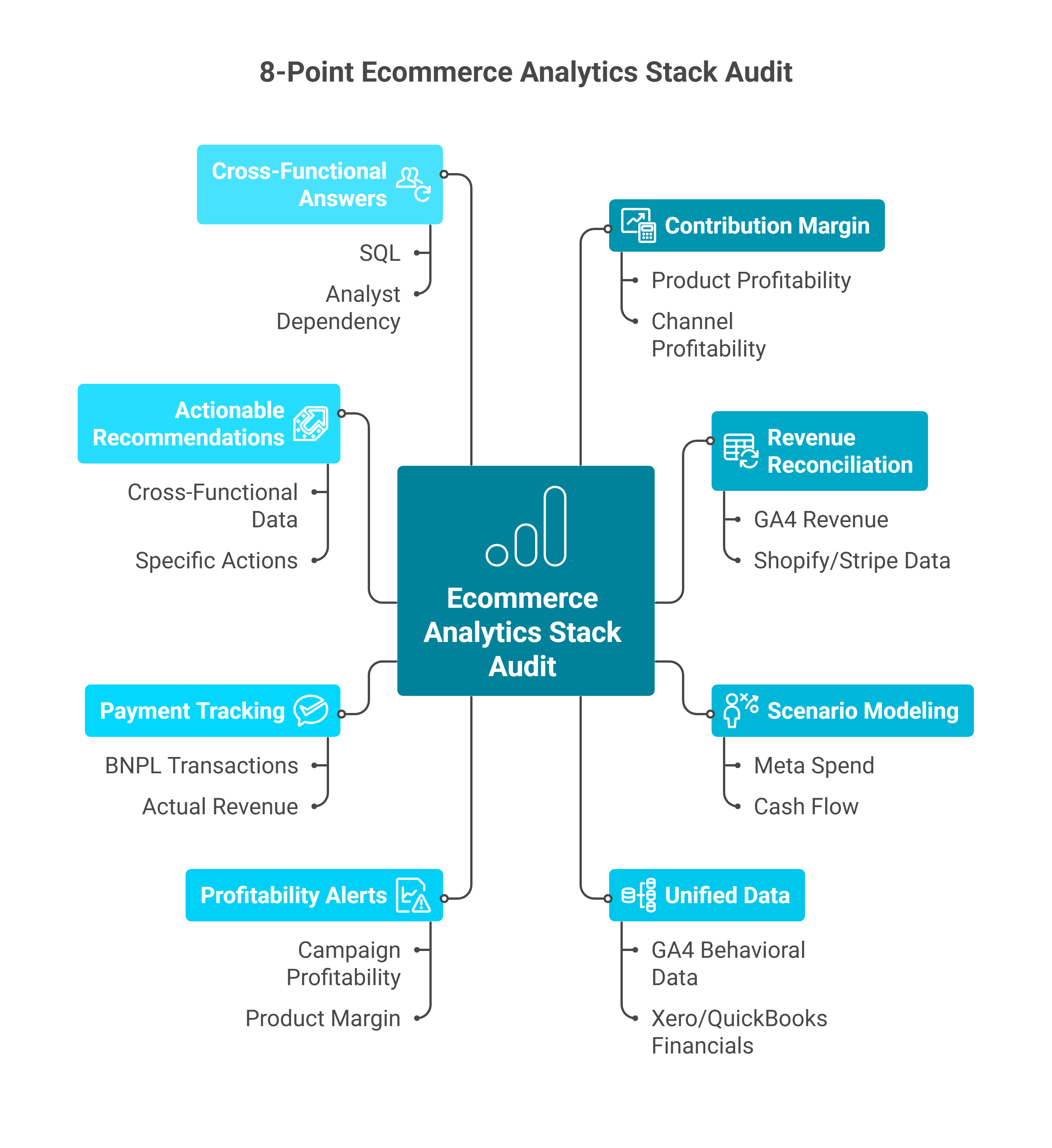
Every limitation, gap, and workaround discussed in this article points to one question: is your current analytics stack actually equipped for the decisions you need to make in 2026? This 8-point self-assessment distills the critical capabilities covered across all previous sections into a single diagnostic tool. Score your stack honestly; each unchecked box represents a concrete gap between the data you have and the intelligence you need.
⭐ The 8-Point Ecommerce Analytics Stack Audit
Mind map showing the eight-point ecommerce analytics stack audit checklist including contribution margin, revenue reconciliation, scenario modeling, profitability alerts, and cross-functional answers.
Rate your current stack against these criteria. Each maps directly to a capability gap this article has documented:
☐ 1. Contribution margin in under 60 seconds. Can you calculate true contribution margin by product and by channel, including COGS, shipping, returns, and ad spend, in under a minute? Or does it require a spreadsheet session?
☐ 2. Automatic revenue reconciliation. Does your system automatically reconcile GA4 revenue figures with Shopify/Stripe backend data? Or do you manually export and compare, discovering the 20 to 30% discrepancy each time?
☐ 3. Scenario modeling for spend decisions. Can you model "If I scale Meta spend 30%, what happens to my cash flow in 90 days?" Or are marketing and finance decisions made in separate silos with no shared view?
☐ 4. Unified behavioral + financial data. Are your GA4 behavioral data, Xero/QuickBooks financials, ad platform spend, and Shopify orders unified in one view? Or do you toggle between 5 to 8 disconnected dashboards?
☐ 5. Proactive profitability alerts. Does your system alert you when a campaign becomes unprofitable, a product's margin erodes, or a channel's CAC spikes above threshold? Or do you only discover problems when you manually check reports?
☐ 6. Full payment method tracking. Can you accurately track BNPL transaction revenue (Klarna, Afterpay) across all payment methods? Or does GA4's single-installment capture distort your actual revenue figures?
☐ 7. Actionable recommendations, not just reports. Does your analytics tool recommend specific actions based on cross-functional data? Or does it display charts and leave interpretation to you?
☐ 8. Cross-functional answers without analyst dependency. Can your team get answers to questions spanning marketing, finance, and operations without SQL, a dedicated analyst, or 5 open dashboards?
💰 Score Interpretation
Analytics Stack Readiness Scoring
Your Score
What It Means
Recommended Action
✅ 7 to 8 checks
Your stack is mature
Optimize and fine-tune; do not overhaul
⚠️ 4 to 6 checks
Critical gaps exist
You are likely making decisions on incomplete data
❌ 0 to 3 checks
Fragmentation is costing you
Revenue and profit visibility are severely compromised
Most founders relying on GA4 alone, even with Triple Whale or a similar attribution tool added, score between 1 and 3. The recurring theme across industry feedback confirms this reality.
As one DTC founder on Reddit described the fragmentation challenge:
"Centralizing all your data sources and setting up alerts for key metrics is honestly a game changer for catching issues before they get costly." — u/Wide_Brief3025, r/dropshipping Reddit Thread
✅ How Luca AI Turns Every Unchecked Box into a ✓
Luca AI is designed to address every capability gap in this checklist. Unified data synthesis across GA4, Shopify, Xero, Stripe, and ad platforms. Proactive profit alerts that scan 24/7 without manual monitoring. Scenario modeling that connects marketing spend to cash flow impact. Natural-language queries that replace SQL, analyst dependency, and multi-dashboard juggling. And embedded capital that funds the opportunities Luca's intelligence identifies, without a separate application process.
Most founders go from 2 to 3 checks to 8/8 within the first week of onboarding.
Scored below 6? Start with Luca AI's free assessment to see exactly where your GA4 data gains the financial intelligence layer it has been missing, and stop making profit decisions on revenue-only data
FAQ's
How do I connect GA4 to Shopify for accurate ecommerce tracking in 2026?
We recommend using Shopify's native Google & YouTube app for automatic GA4 integration, which implements server-side tracking and bypasses browser-based limitations from iOS 14.5 privacy changes. Navigate to Shopify Admin > Apps > Install "Google & YouTube" > Connect your GA4 Measurement ID. This automatically tracks purchase events, add-to-cart actions, and product impressions without custom code.
However, even with perfect GA4 setup, you'll still face the profitability blind spot: GA4 shows marketing attribution but can't connect to COGS, inventory levels, or cash flow. We synthesize Shopify orders, GA4 attribution, Meta/Google ad spend, and Xero financials into one reasoning layer, answering questions like "Which campaigns are profitable after all costs?" At Luca AI, we eliminate the gap between marketing performance and business health that GA4 architecturally cannot bridge.
The setup takes 30-45 minutes, but the real question is: once tracking is live, can you answer cross-functional questions that determine whether scaling is sustainable?
Why do my GA4 and Shopify revenue numbers never match, and which should I trust?
We see this confusion daily: GA4 uses client-side JavaScript tracking and misses 15-25% of conversions due to ad blockers, Safari's Intelligent Tracking Prevention, and users who close browsers before the purchase event fires. Shopify tracks server-side and captures every completed order regardless of browser behavior.
The decision framework is simple: Use Shopify revenue for financial reporting, P&L statements, tax purposes, and cash flow analysis. Use GA4 for marketing attribution decisions, campaign ROAS calculation, and customer journey insights. They measure different things by design, and 5-10% variance is normal.
We use Shopify as the revenue source of truth while layering GA4, Meta, and Google Ads attribution data on top, eliminating manual reconciliation. Our financial management capabilities synthesize realized revenue from Shopify with marketing attribution from GA4 and COGS from Xero in one unified answer. No more 5-hour reconciliation meetings defending data discrepancies.
Can GA4 track product profitability and inventory levels for ecommerce?
No. GA4 tracks gross revenue per product but cannot access COGS, shipping costs, return rates, payment processing fees, inventory levels, or supplier payment terms. You see "Product A generated €10,000 revenue" but not "Product A generated €2,000 profit after €5,000 COGS, €1,500 shipping, €1,200 returns, and €300 payment fees."
This creates a dangerous illusion: founders optimize marketing spend toward high-revenue products that may be burning cash, while ignoring lower-revenue products with 3x better margins. When Product X sells out and you need to decide whether to reorder, GA4 tells you it generated €18,000 last quarter but can't answer: What's the profit margin? How fast is it selling? Do I have cash to reorder 500 units at €35/unit?
We connect GA4 product revenue to Xero COGS, Shopify return rates, and inventory levels, answering "Should I reorder Product X based on 60-day sell-through velocity and contribution margin?" through our product management intelligence. These are capital allocation decisions GA4 alone cannot inform.
What's the difference between Data-Driven Attribution and Last-Click in GA4 for DTC brands?
Last-Click attribution credits only the final touchpoint before purchase (typically Google Shopping or retargeting), systematically undervaluing awareness channels like Meta prospecting and email that build your funnel. Data-Driven Attribution (DDA) uses machine learning to distribute credit across all touchpoints in multi-session customer journeys.
Use DDA if you have 400+ monthly conversions, AOV above €100, and purchase decisions spanning 3+ sessions over multiple days. Use Last-Click if you're below 400 conversions or run primarily bottom-funnel channels. We've seen DTC brands nearly cut Meta budgets based on Last-Click showing 12% revenue contribution, only to discover DDA revealed 34% contribution because Meta builds awareness that Google Shopping later captures.
73% of brands using DDA discover at least one channel contributing 15-25% more than Last-Click revealed. Through our marketing analysis capabilities, we extend attribution beyond GA4's models to answer "Which cohorts are profitable after CAC payback within 60 days?" connecting attribution to financial outcomes.
When do I need unified business intelligence beyond GA4 for my ecommerce store?
You've outgrown GA4 when your CFO asks "Can we afford to scale this campaign without running out of cash?" and GA4 goes silent. GA4 is architected as a marketing attribution tool that stops at the purchase event. It cannot see your P&L, COGS, supplier payment terms, inventory carrying costs, or cash runway.
The questions that determine business survival require financial data GA4 doesn't touch: "Which campaigns are profitable after COGS, shipping, and returns?" "If I scale Meta spend €20K this week, what's my cash position in 60 days given Net 30 supplier terms?" "Should I reorder Product X based on contribution margin and sell-through velocity?"
We start where GA4 ends. By unifying Shopify, Meta, Google Ads, Xero, Stripe, and 20+ platforms into one reasoning layer, we answer cross-functional questions GA4 architecturally cannot. When we identify a scaling opportunity, we can fund it instantly with dynamically-priced capital based on real-time business health. Intelligence + Capital = Outcome ownership. Learn more at Luca AI.
Enjoyed the read? Join our team for a quick 15-minute chat — no pitch, just a real conversation on how we’re rethinking Ecommerce with AI - Luca
Loading Schedule...
Your AI Co-Founder is here.
Here’s why:
Shopify, Meta, Xero - one brain.
"Should I scale?" Answered with real data.
Growth capital. No applications. One click.
Thank you! Your submission has been received! Please book a time slot for the Meeting
Oops! Something went wrong while submitting the form.

.jpg)